Hiring a backend developer usually costs a senior engineer's time before it costs anything else. Recruiters can check a resume for "PostgreSQL" and "Kafka," but they can't tell whether a candidate actually understands indexing trade-offs, idempotent APIs, or what happens when a downstream service times out. So the first technical phone screen falls to the people who are hardest to spare: staff engineers, engineering managers, and sometimes the CTO.
An AI interview can take over that first technical screen without lowering the bar, but only if it is designed for backend work. A generic "tell me about yourself" bot won't do it. This guide shows where AI fits in a backend hiring process, which competencies to assess, sample questions with follow-up probes and scoring anchors, and how to keep the process fair and hard to game.
Quick answer: To screen backend developers with AI, replace the 30-minute engineer-led technical phone screen with a 15–20 minute conversational AI interview. Base it on 4–6 backend competencies from the role, such as data modeling, API design, reliability, and debugging. Ask for real past examples, let the AI probe with follow-up questions, and score every answer against an anchored rubric. Engineers then review the scorecards and spend live time only on system design and coding rounds with the strongest candidates.
Where an AI interview fits in backend hiring
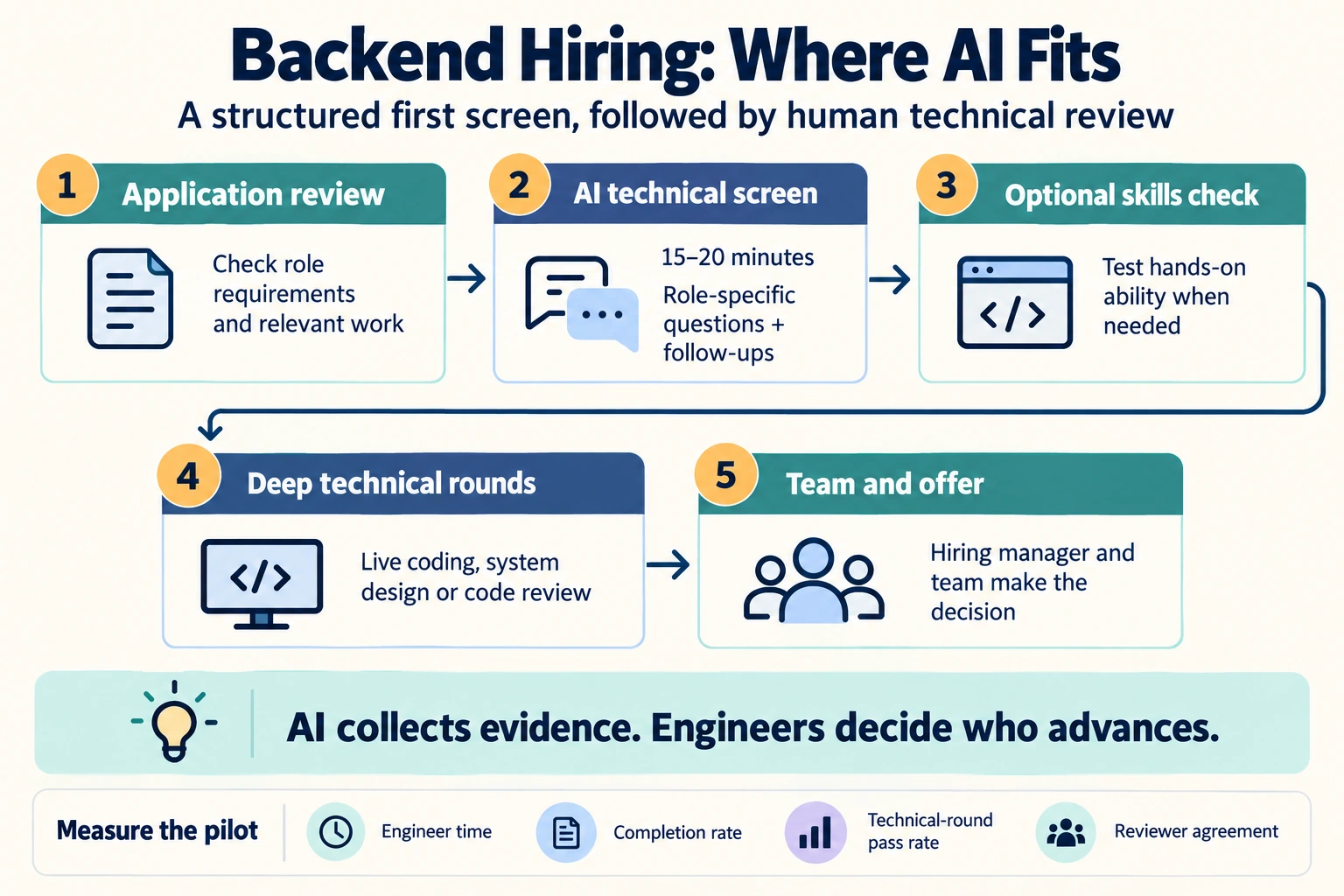
An AI interview should replace the most repetitive conversation in the process: the first technical screen. It should not replace your system design round, pair programming, or the team's final decision.
| Stage | Method | Who spends time |
|---|---|---|
| 1. Application review | Resume screening against must-have requirements, plus GitHub or code samples where relevant | Recruiter, assisted by AI |
| 2. Technical phone screen | Conversational AI interview (15–20 minutes) with backend-specific questions and follow-ups | Candidate only; engineers review the scorecards |
| 3. Optional skills check | Short role-specific assessment with a pass score | Candidate only |
| 4. Deep technical rounds | Live system design, pair programming, or a code review exercise | Senior engineers |
| 5. Team and offer | Collaboration, values, and compensation conversations | Hiring manager and team |
The payoff is that your engineers' first conversation with a candidate is already a deep technical round, held with someone who has shown real backend experience. For the broader engineering view across frontend, backend, and full-stack roles, see the recruiter's guide to AI interviews for software engineers.
What an AI technical screen can and can't assess
Be clear about the limits before you design anything. A spoken interview is good at testing reasoning and experience, and it is weak at testing hands-on coding.
| Good fit for an AI interview | Needs another method |
|---|---|
| Explaining past design decisions and their trade-offs | Writing and running production-quality code |
| Reasoning about databases, caching, queues, and failure modes | Whiteboard-depth system design with live diagramming |
| Debugging approach and incident handling | Code review of the candidate's own non-trivial work |
| Whether resume claims hold up under follow-up questions | Collaboration in a real team setting |
| Explaining technical ideas clearly to another person | Final hiring judgment and team fit |
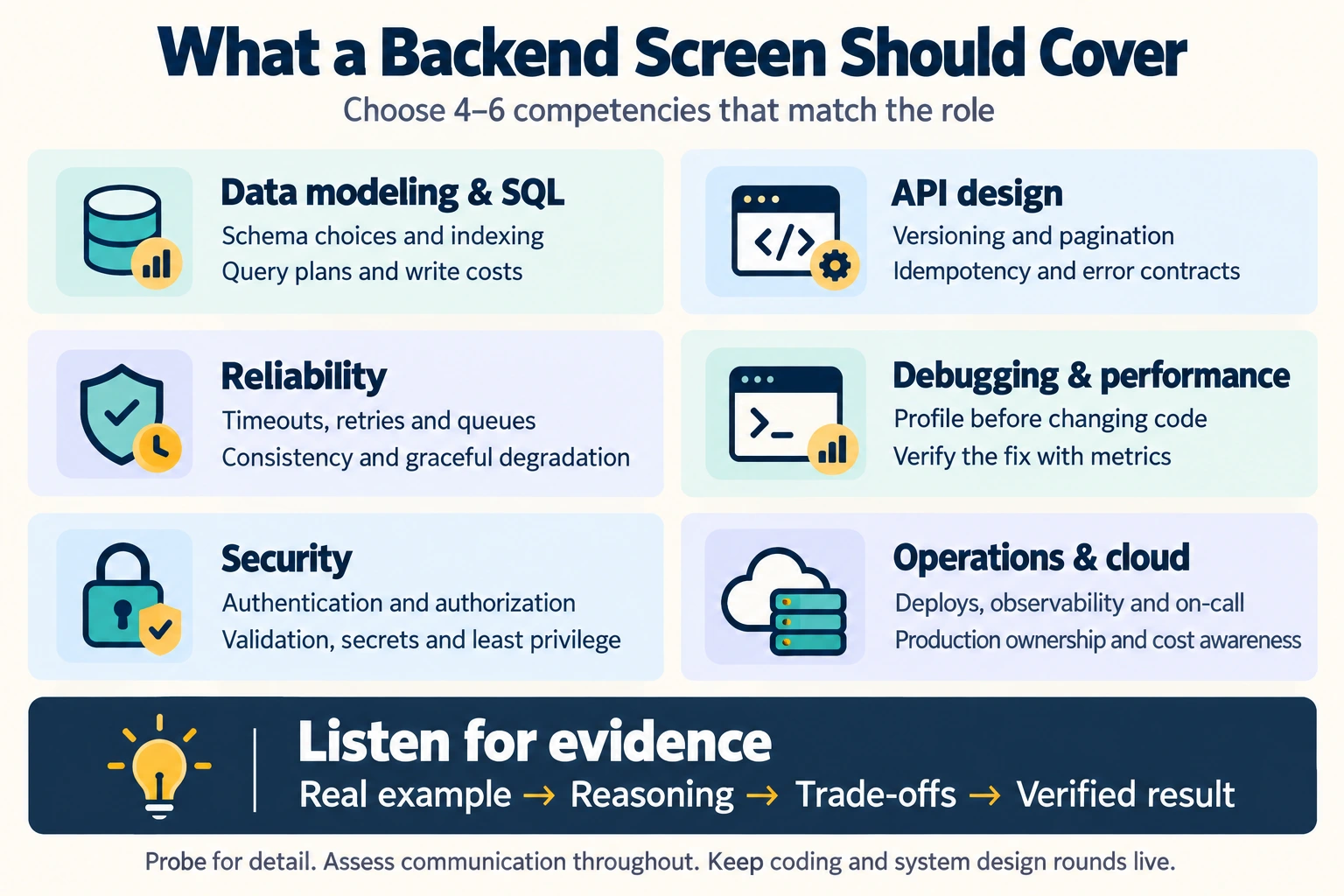
The backend competency map
Start from the job description, not from a question bank. Choose the 4–6 competencies that matter most for this role. A payments platform engineer and a data pipeline engineer should not get the same screen. If the job description is vague, tighten it first with the job description optimizer.
| Competency | Strong evidence sounds like | Red flag |
|---|---|---|
| Data modeling and SQL | Explains schema choices, indexing, query plans, and the write cost of an index | "I added an index and it got faster," with no reasoning |
| API design | Discusses versioning, pagination, idempotency, error contracts, and backward compatibility | Treats an API as a list of endpoints, with no thought for its consumers |
| Reliability and distributed systems | Talks about timeouts, retries with backoff, queues, consistency trade-offs, and graceful degradation | Assumes the network and downstream services always work |
| Performance and debugging | Measures first (profiling, metrics, traces), forms a hypothesis, and verifies the fix | Guesses at fixes without measuring |
| Security | Covers authentication versus authorization, input validation, secrets handling, and least privilege | Security is "handled by the framework" |
| Operations and cloud | Describes deploys, observability, on-call experience, and cost awareness on AWS, GCP, or Azure | Has never seen their code running in production |
| Technical communication | Explains a complex system simply and adjusts the level of detail when asked | Uses jargon in place of explanation |
Sample backend AI interview: questions, follow-ups, and what to listen for
Replace trivia ("What does ACID stand for?") with questions that require evidence from the candidate's own work. Trivia is easy to look up during a remote interview. A detailed account of a real incident is not. Here is a six-question screen that fits in about 15–20 minutes:
| Question | Follow-up probes | Competency |
|---|---|---|
| "Tell me about a slow query or endpoint you fixed in production." | How did you find the cause? What did the query plan show? How did the change affect writes? How did you confirm the fix? | Data modeling, performance |
| "Walk me through an API you designed that other teams consumed." | How did you handle a breaking change? What happens if a client retries a request? How do you paginate? | API design |
| "Describe an outage or incident you were involved in." | What was your role? What was the root cause? What did you change so it wouldn't happen again? | Reliability, operations |
| "A downstream payment service starts timing out 10% of the time. What do you do?" | How do you avoid charging a customer twice? Where would you add a queue? What would you show on a dashboard? | Distributed systems |
| "Your resume mentions moving to microservices. What was the hardest part?" | What would you keep as a monolith next time? How did services communicate? What got worse after the move? | Architecture, resume verification |
| "How would you explain your current system's architecture to a new teammate?" | What is its biggest weakness? What would you redesign first? | Communication, ownership |
Follow-up questions are where a conversational AI interview earns its place. A candidate who has done the work can go one level deeper each time. A candidate repeating memorized or generated answers usually can't. For a larger question bank, see the backend developer pre-screening interview questions, or generate a role-specific set with the interview script generator.
Anchor every question to a scoring rubric
A rubric with written anchors makes scores comparable across candidates and keeps the AI's scoring explainable. Here is an example for the slow-query question:
| Score | What the answer contains |
|---|---|
| 1 – Weak | A general statement ("I optimized queries") with no specific situation, method, or result. |
| 3 – Solid | A real example with the cause and the fix (for example, a missing composite index), but limited discussion of trade-offs or how the fix was verified. |
| 5 – Strong | Measured the problem, read the query plan, explained the trade-offs of the fix (write cost, locking, migration risk), verified the result with metrics, and named what they would do differently. |
How to run backend screening in InterviewFlowAI
- Define the criteria. Enter the role's competencies and what strong evidence looks like for each one. The AI scores answers against these criteria, not against generic notions of a "good answer."
- Write evidence-based questions and turn on follow-ups. The AI interviewer asks follow-up questions based on each answer, so a candidate who mentions "sharding" will be asked how they chose the shard key.
- Add work samples where they help. Portfolio screening reviews GitHub profiles, project write-ups, and code samples against the same structured criteria, so engineers aren't reviewing repositories ad hoc.
- Gate with a skills check if you need one. Skill assessments include 100+ built-in tests with weighted pass scores and can move qualified candidates straight into the AI interview.
- Review evidence, not just a number. Every interview produces a scorecard and full transcript with ratings, rationale, and evidence citations for each competency. Automated ranking orders candidates so engineers know whom to look at first.
- Engineers decide who advances. The AI collects and organizes the evidence. Your team makes the call and runs the deep technical rounds.
See how the role template works on the AI interviews for backend developers page.
Protecting integrity when candidates have AI assistants
Remote technical screens now have to account for tools that can listen to a question and display a generated answer within seconds. Three practices work better than surveillance alone:
- Set a clear AI policy and tell candidates before the interview. Decide whether AI tools are allowed in this screen. Some companies permit them in specific rounds, so state the rule instead of assuming candidates know it.
- Ask about real experience, then probe. Generated answers sound fluent on the first question and tend to fall apart on the third follow-up about a specific incident.
- Treat integrity signals as review prompts, not automatic rejections. InterviewFlowAI's Trust Score flags tab switches, copy-paste activity, unusual response timing, and inconsistencies across answers next to the competency scorecard. A flag tells a reviewer where to look. It isn't proof of cheating, and pauses or glances away have innocent explanations.
For a deeper look at detection without false accusations, read how companies detect AI interview cheating.
Does AI screening actually improve hiring signal?
The evidence supports structured AI interviews as a better first filter than resumes alone, with important caveats:
- Structure is the main driver. A 2022 meta-analysis by Sackett, Zhang, Berry, and Lievens in the Journal of Applied Psychology found that structured interviews had the highest mean validity (.42) of the selection methods studied. An AI interview built on consistent questions and anchored rubrics is a structured interview at scale.
- AI interview data improved shortlists in a field experiment. In "Better Together" (Aka et al., 2025, revised 2026), candidates shortlisted using AI interview reports passed final human interviews at rates 17.5 to 20 percentage points higher than candidates selected from resumes alone. The gain in predictive accuracy was larger for junior candidates.
- Completion is the risk. In the same study, 75% of invited candidates did not complete the AI interview. Candidate experience decides whether the method works for you (see the next section).
Keep the candidate experience strong
Backend developers usually have options, and they will skip a process that feels disrespectful. Greenhouse's 2026 candidate survey found that 38% of US candidates had withdrawn from a hiring process because of an AI interview, and 70% weren't clearly told beforehand that AI would evaluate them. To keep completion high:
- Disclose it upfront. Say that the first screen is an AI interview, how long it takes, what it evaluates, and that an engineer reviews every result.
- Keep it short and technical. Fifteen to twenty minutes of real backend questions respects a candidate's time more than a 45-minute generic screen. Completed InterviewFlowAI interviews average about 13 minutes across roles.
- Let candidates take it when it suits them. An AI screen can run around the clock, which helps employed candidates and those in other time zones.
- Offer accommodations and a human alternative on request, and check local rules on AI notice and audits (for example, NYC Local Law 144 and Illinois's AI Video Interview Act) before launch.
- Close the loop. Tell every candidate what happens next, including those who don't advance.
How to measure whether it's working
Pilot on one backend role before rolling out more broadly, and track:
- Engineer hours per hire spent on screening, before and after.
- AI-screen-to-onsite pass rate and onsite-to-offer rate. If more candidates who reach the deep rounds succeed there, the screen is adding signal.
- Completion rate among invited candidates.
- Time from application to first technical round.
- Reviewer agreement: how often engineers agree with the scorecard after reading the transcript.
Give your engineers their screening time back
Run backend technical screens as conversational AI interviews with follow-up questions, anchored scorecards, and full transcripts your team can review.
Frequently asked questions
Can AI interview backend developers?
Yes, for the first technical screen. A conversational AI interviewer can ask backend-specific questions about databases, APIs, reliability, and debugging, follow up on each answer, and score responses against your rubric. It should not replace live system design or coding rounds, and engineers should make the advancement decisions.
Can an AI interview assess coding ability?
Only partly. A spoken interview tests how a candidate reasons about code, design, and trade-offs, not whether they can write working code. Pair it with a skills assessment, a work-sample review, or a live coding round for hands-on evidence.
What questions should a backend technical screen ask?
Ask for evidence from real work: a slow query they fixed, an API other teams consumed, an incident they handled, or a hard part of a migration on their resume. Then probe with follow-ups about trade-offs and verification. Avoid trivia questions that can be looked up during the interview.
How long should an AI technical screen take?
About 15–20 minutes for five or six questions with follow-ups. That is long enough to collect evidence on the core competencies and short enough to keep completion rates high.
How do you stop candidates from using ChatGPT during the screen?
Set and communicate a clear AI policy, ask about specific past experience, and use follow-up questions that require details only the candidate would know. Integrity signals such as tab switches or copy-paste activity should prompt a human review, not an automatic rejection.
Is AI screening fair to backend candidates?
It can be fairer than unstructured phone screens because every candidate gets the same questions and rubric. Fairness still depends on job-related criteria, disclosure, accommodations, monitoring outcomes across groups, and keeping a human accountable for every decision.
Sources
- Sackett, P. R., Zhang, C., Berry, C. M., & Lievens, F. (2022). "Revisiting meta-analytic estimates of validity in personnel selection." Journal of Applied Psychology, 107, 2040–2068. Summary.
- Aka, A., Palikot, E., Ansari, A., & Yazdani, N. "Better Together: Quantifying the Benefits of AI-Assisted Recruitment", arXiv, 2025 (revised 2026).
- Greenhouse, "63% of Job Seekers Have Faced an AI Interview", May 2026.
- InterviewFlowAI, AI Recruitment Statistics 2026 (platform benchmark).