Automated Candidate Outreach — Multi-Step Sequences That Get Replies, explained.
Automated Candidate Outreach transforms how recruiting teams engage passive talent. Instead of recruiters manually drafting individual outreach messages, tracking responses, and remembering to follow up — a process that doesn't scale past a handful of candidates — teams can build multi-step outreach sequences that run on autopilot. Define the message sequence: initial outreach, first follow-up, second follow-up, final nudge. Personalize with candidate name, role, company, and skills. Set triggers for next steps based on candidate behavior (opened, replied, no response). The platform handles delivery, tracking, and follow-ups automatically. Recruiters step in only when a candidate replies — focusing their time on genuine conversations, not administrative chase work.
Create multi-step outreach sequences with automated follow-ups at configurable intervals
Automated Candidate Outreach transforms how recruiting teams engage passive talent. Instead of recruiters manually drafting individual outreach messages, tracking responses, and remembering to follow up — a process that doesn't scale past a handful of candidates — teams can build multi-step outreach sequences that run on autopilot. Define the message sequence: initial outreach, first follow-up, second follow-up, final nudge. Personalize with candidate name, role, company, and skills. Set triggers for next steps based on candidate behavior (opened, replied, no response). The platform handles delivery, tracking, and follow-ups automatically. Recruiters step in only when a candidate replies — focusing their time on genuine conversations, not administrative chase work.
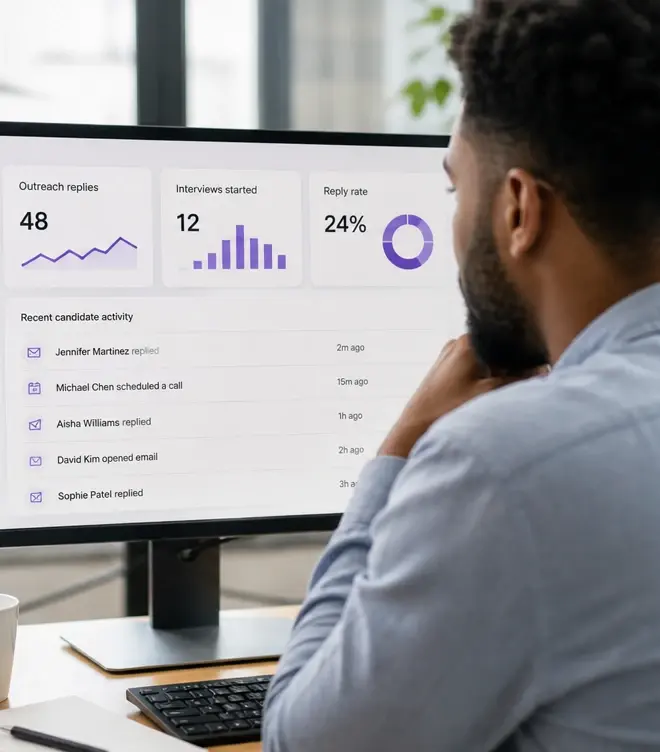
- Track opens, clicks, replies, and conversion from outreach to interview
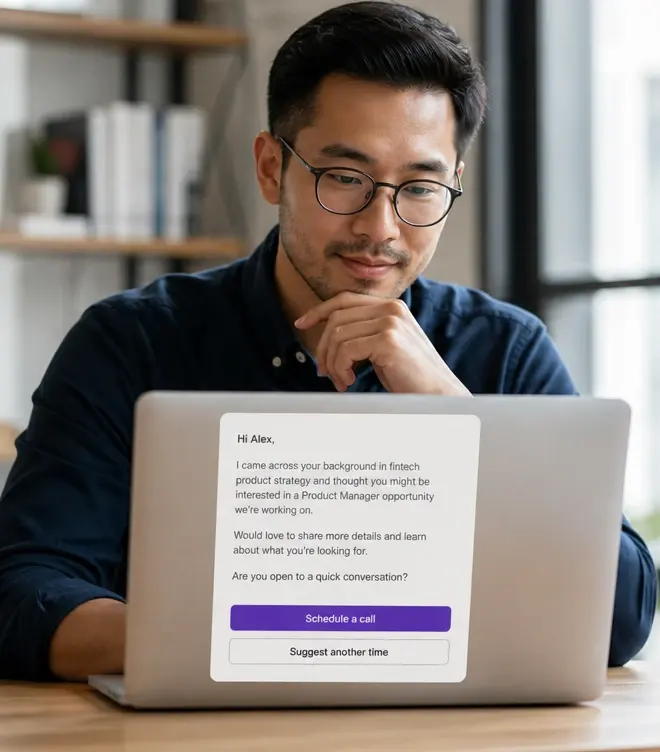
Personalize messages with candidate-specific fields — name, role, company, skills
Stop sending manual outreach emails that get ignored. Create multi-step sequences with personalized messaging and smart follow-ups that run automatically — engaging passive candidates, tracking replies, and surfacing interest while recruiters focus on conversations that matter.
- Free recruiters from manual follow-up to focus on real candidate conversations
Manual outreach doesn't scale — and candidates can tell when it's mass-produced
The math of candidate outreach is unforgiving. A sourcer might identify 100 promising candidates for a role. If each gets a personalized initial message (5-10 minutes to research and write), that's 8-16 hours just for first touches. Then 40-60% won't respond, requiring follow-ups. Then some will reply, requiring prompt responses to maintain engagement. At any scale beyond a handful of roles, the process breaks — and the fallback is generic, copy-paste outreach that candidates recognize and ignore.
Automated Candidate Outreach solves both problems simultaneously. Sequences handle the repetitive mechanics of multi-touch outreach automatically, while personalization fields keep messages feeling individual and relevant. Recruiters spend their time on the 10-20% of candidates who actually reply — having genuine conversations instead of managing an outreach assembly line.
How automated outreach sequences work
Multi-step sequence builder
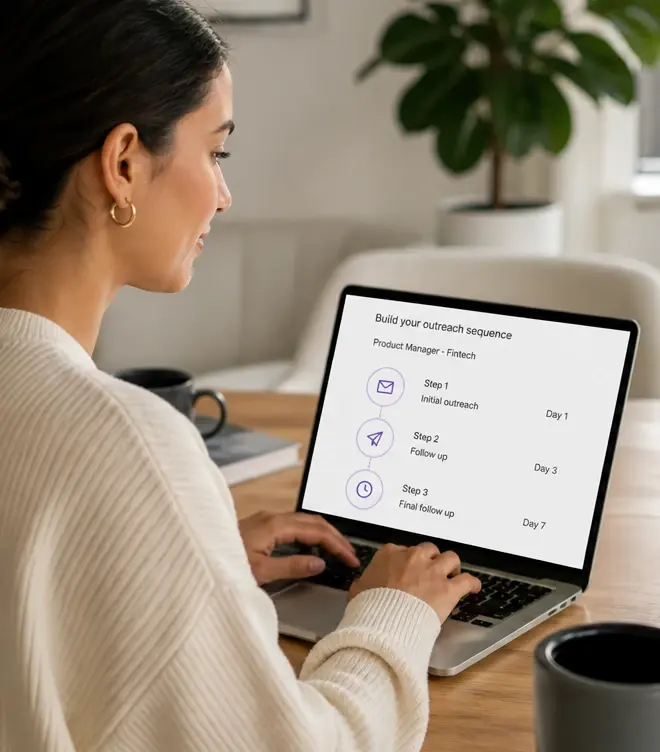
Design your outreach cadence: initial message, follow-up 1 (3 days later), follow-up 2 (5 days later), final nudge (7 days later). Set the timing, write the messages, and the sequence runs automatically.
Smart personalization
Use merge fields for candidate name, current role, company, key skills, and other attributes. Messages feel individually crafted even though the sequence structure is templated.
Behavior-based triggers
If a candidate replies, the sequence pauses so the recruiter can engage personally. If they open but don't reply, the next follow-up fires. If they never open, try a different subject line on the next touch.
End-to-end tracking
See open rates, click rates, reply rates, and conversion from outreach to interview completion. Know which sequences, messages, and subject lines perform best.
What effective candidate outreach looks like
The difference between outreach that gets replies and outreach that gets ignored isn't volume — it's relevance, timing, and persistence. Automated sequences handle timing and persistence; personalization handles relevance.
- Initial outreach: 'Noticed your work on [specific project] at [company]. We're building a [relevant team] and your background in [skill] stood out. Open to a conversation?'
- First follow-up (3 days): 'Following up on my note about the [role] opportunity. Happy to share more context if it's the right time — or let me know if I should check back later.'
- Second follow-up (7 days): 'Last note on this — we're moving to interviews next week and I wanted to make sure you had the chance to express interest if this is relevant for you.'
- Final nudge (14 days): 'Closing the loop on this search. If the timing isn't right now, I'd love to stay connected for future opportunities that might be a better fit.'
- Track which subject lines, messaging angles, and follow-up cadences drive replies. A/B test and optimize over time.
Automated outreach vs. manual candidate outreach
| Aspect | Manual outreach | Automated Candidate Outreach |
|---|---|---|
| Scalability | 15-25 personalized outreaches per day per recruiter. Follow-ups often forgotten. | 100+ outreaches launched in minutes. Follow-ups fire automatically on schedule. |
| Personalization quality | High when recruiter has time. Degrades as volume increases. | Consistently personalized via merge fields. Maintains quality regardless of volume. |
| Follow-up consistency | Poor. Recruiters forget, get busy, or deprioritize follow-ups. Most candidates receive 1 touch. | Perfect. Every candidate receives the full sequence. Follow-ups fire on schedule regardless of recruiter bandwidth. |
| Recruiter focus | Split between research, drafting, tracking, follow-ups, and actual conversations. | Focused on conversations. Platform handles research (Talent Search) and outreach mechanics. Recruiters engage when candidates reply. |
Recommended outreach workflow
Build your sourcing list with Talent Search
Identify target candidates by skills, company, experience, and location. Build a list of qualified prospects for your role.
Create a role-specific outreach sequence
Write an initial message and 2-3 follow-ups. Personalize with candidate-specific fields. Set timing and triggers.
Launch the sequence and let it run
Candidates receive messages on your defined schedule. Opens, clicks, and replies are tracked automatically.
Engage personally with candidates who reply
When a candidate responds, the sequence pauses. You step in for genuine conversation — screening, scheduling, relationship-building.
How this was verified
Feature capabilities described here were verified against the live InterviewFlowAI product pages and the published pricing page in August 2026. Plan availability can change; the pricing page is the source of truth.
Frequently asked questions
How do the sequences adapt to candidate behaviour?
They pause when someone replies, continue when a message is opened but not answered, and adjust when it is not opened at all, so nobody receives a follow-up that ignores what they already did.
What gets tracked?
Open rates, click rates, reply rates and conversion from outreach through to a completed interview, which is the only number that tells you whether the sequence works.
Can I test different messaging?
Yes, subject lines and messaging angles can be A/B tested across a campaign.
How many follow-ups is too many?
The page notes that 40 to 60% of candidates will not respond to a first message. That is an argument for a few well-spaced follow-ups, not an unlimited sequence — persistent unsolicited contact damages your employer brand.
What compliance obligations apply to outbound recruiting email?
Unsolicited recruiting email is regulated differently across jurisdictions, covering consent, identification and opt-out. Get your approach reviewed before running volume campaigns, especially in the EU and UK.
Make your next hiring flow faster.
See how InterviewFlowAI can streamline screening for your team.