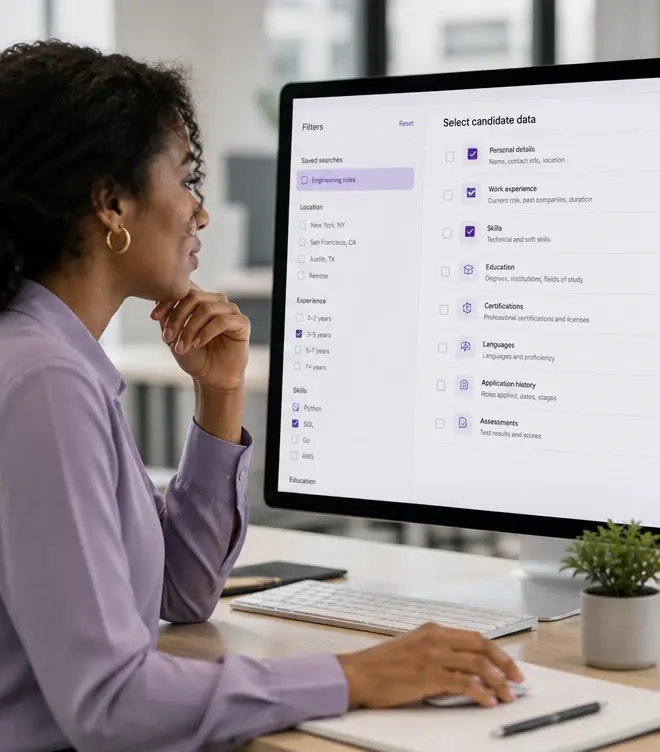
Bulk Interview Data Export — Move Hiring Outputs to Downstream Systems, explained.
Bulk Exports give recruiting operations teams the ability to move interview data out of InterviewFlowAI at scale. When you've screened hundreds of candidates and need to feed results into your ATS, build a recruiting dashboard, archive interview records for compliance, or share candidate packets with clients — Bulk Exports lets you select, filter, and export structured data in batches. Choose which data fields to include, filter by role, date range, status, or score threshold, and download a clean CSV or structured file that your downstream tools can consume immediately.

Export interview transcripts, scorecards, and rankings in bulk
Bulk Exports give recruiting operations teams the ability to move interview data out of InterviewFlowAI at scale. When you've screened hundreds of candidates and need to feed results into your ATS, build a recruiting dashboard, archive interview records for compliance, or share candidate packets with clients — Bulk Exports lets you select, filter, and export structured data in batches. Choose which data fields to include, filter by role, date range, status, or score threshold, and download a clean CSV or structured file that your downstream tools can consume immediately.
- Feed structured hiring data into ATS, BI, and compliance systems
Filter exports by role, date range, status, or score threshold
Export candidate outcomes, interview transcripts, scorecards, and rankings in batches — ready for your ATS, BI tools, compliance reporting, and stakeholder presentations. No more exporting one candidate at a time.
- Support audit and reporting workflows with batch data access

Interview data trapped in one tool isn't useful data
InterviewFlowAI generates rich candidate data: transcripts, competency scorecards, trust signals, rankings, completion metrics. That data is powerful inside the platform — but its value compounds when it flows into the rest of your hiring stack. Your ATS should show interview outcomes alongside pipeline stage. Your BI dashboards should include screening quality metrics. Your compliance archive should have complete interview records. When data export is limited to one candidate at a time, none of that happens efficiently.
Bulk Exports solve the data mobility problem for teams operating at scale. Filter to the candidates, roles, or time periods you need, select the data fields that matter for your downstream system, and export everything in one batch. Whether you're feeding an ATS, building a Tableau dashboard, archiving for SOC 2 compliance, or sharing candidate packets with a client — the data moves in minutes, not hours.
What you can export in bulk
Candidate outcomes and statuses
Export completion status, interview date/time, overall scores, ranking position, and advancement status for every candidate in a role or campaign.
Competency scorecards
Export detailed competency-by-competency scores with rating rationales and evidence citations — structured for comparison and analysis.
Full interview transcripts
Export complete, searchable transcripts for compliance archiving, stakeholder review, or deeper qualitative analysis.
Trust and integrity data
Export trust scores, flagged behaviors, and monitoring data for audit trails and integrity verification workflows.
When bulk exports create the most value
Bulk exports are essential for any workflow where interview data needs to live outside the InterviewFlowAI platform — whether for compliance, reporting, client delivery, or system integration.
- Feed interview scores and outcomes into Ashby, Greenhouse, Teamtailor, Workable, or Zapier-connected workflows for unified pipeline tracking.
- Build recruiting performance dashboards in BI tools with structured screening data exports.
- Archive complete interview records for SOC 2, ISO, or internal audit compliance requirements.
- Share structured candidate comparison data with hiring managers who don't have platform access.
- Deliver candidate packets to agency clients with transcripts, scores, and rankings in a consistent, professional format.
Bulk exports vs. individual data retrieval
| Scenario | One-at-a-time export | Bulk Exports |
|---|---|---|
| Exporting 100 interview results | Open each candidate. Copy or export individually. Hours of repetitive work. High error risk. | Filter by role. Select fields. Export all 100 in one download. Minutes. |
| Monthly compliance archive | Manually gather interview records. Hope nothing is missed. Inconsistent format. | Schedule recurring exports with consistent field selection. Complete, auditable, defensible. |
| Building a recruiting dashboard | Manually compile data from exports. Reconcile formats. Update manually each cycle. | Export structured data on a cadence. Feed directly into BI tools. Automate the refresh. |
| Sharing results with clients (agency) | Screenshot dashboards. Copy-paste scores. Unprofessional and time-consuming. | Export branded candidate packets. Professional, consistent, value-add for client relationships. |
Recommended bulk export workflow
Define what data your downstream system needs
Determine which fields (scores, transcripts, statuses, trust data) your ATS, BI tool, or compliance archive requires.
Filter to the relevant candidates
Filter by role, date range, completion status, or score threshold to export exactly the data you need.
Export and feed into downstream workflows
Download the structured file and import into your ATS, BI tool, compliance archive, or client deliverable.
Set a recurring cadence for regular reporting needs
For monthly reporting or compliance archiving, establish a repeatable export schedule with consistent field selection.
How this was verified
Feature capabilities described here were verified against the live InterviewFlowAI product pages and the published pricing page in August 2026. Plan availability can change; the pricing page is the source of truth.
Frequently asked questions
What can I filter an export by?
Role, date range, candidate status, or a score threshold, so you can pull just the shortlist or just one campaign rather than everything.
Which fields can be exported?
Candidate outcomes and statuses, competency scorecards, full transcripts and trust or integrity scores, with selectable columns.
What formats are supported?
CSV or structured files intended for downstream systems. Confirm the exact schema with your data team before building a pipeline on it.
Who typically uses bulk export?
Compliance teams keeping records, recruiting operations building pipelines, agencies sharing results with clients, and analytics teams measuring funnel performance.
Should transcripts be exported routinely?
Only where you need them. Transcripts contain candidate personal data, so exporting them into broadly-accessible spreadsheets or channels creates avoidable privacy exposure.
Make your next hiring flow faster.
See how InterviewFlowAI can streamline screening for your team.