
Bulk Candidate Import — Launch Screening Campaigns at Scale, explained.
Bulk Imports is the candidate onboarding engine for high-volume screening. When you have 50, 200, or 500 candidates to screen — from a career fair, a job board export, an agency submission, or a sourcing campaign — Bulk Imports lets you upload them all at once and launch AI interviews immediately. Upload a CSV, map the fields, review the list, and send interview invitations to everyone in one workflow. Automated reminders keep completion rates high. Recruiters skip the individual data entry and go straight to reviewing completed interviews. Built for operations teams who move candidates in batches, not one at a time.
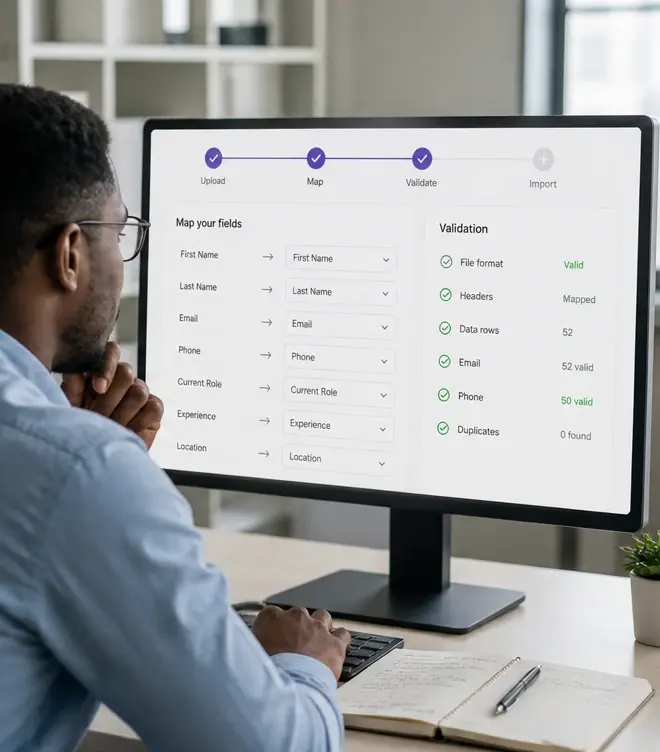
Upload hundreds of candidates in a single CSV import
Bulk Imports is the candidate onboarding engine for high-volume screening. When you have 50, 200, or 500 candidates to screen — from a career fair, a job board export, an agency submission, or a sourcing campaign — Bulk Imports lets you upload them all at once and launch AI interviews immediately. Upload a CSV, map the fields, review the list, and send interview invitations to everyone in one workflow. Automated reminders keep completion rates high. Recruiters skip the individual data entry and go straight to reviewing completed interviews. Built for operations teams who move candidates in batches, not one at a time.
- Automated reminders included to protect batch completion rates
Launch AI interview invitations for entire batches at once
Upload hundreds of candidates in one batch and launch AI screening campaigns immediately. Built for high-volume hiring teams, recruitment agencies, seasonal spikes, and any workflow where entering candidates one at a time isn't an option.
- Review all completed interviews in one ranked dashboard view
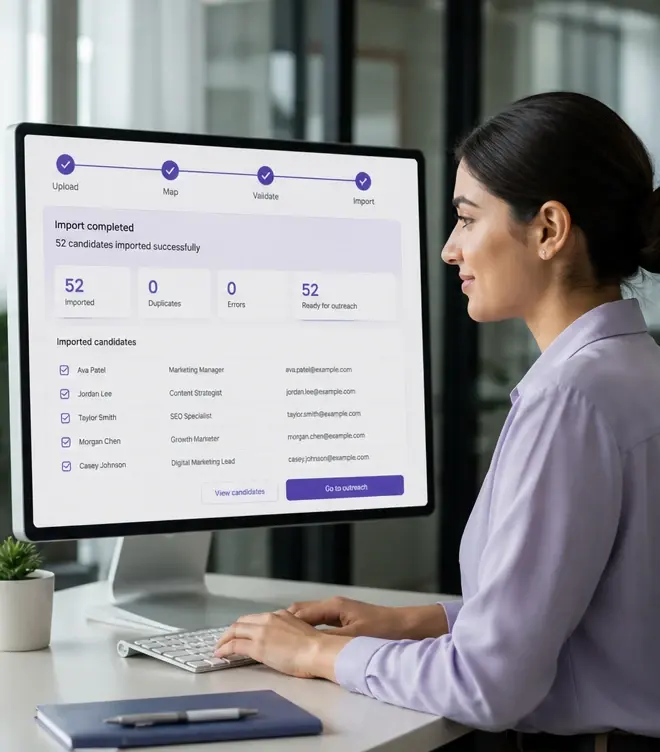
When hiring volume spikes, candidate onboarding shouldn't be the bottleneck
Most recruiting tools are designed for one-at-a-time candidate management. That works fine when you're hiring for a handful of roles with modest applicant volume. It breaks completely when a seasonal hiring campaign opens, a career fair produces 300 leads, a sourcing campaign delivers 150 interested candidates, or an agency submits 80 profiles for a mandate. Suddenly, the tool that was 'fine' becomes the thing slowing you down.
Bulk Imports is purpose-built for batch candidate workflows. Upload a list. Map the fields once. Send interview invitations to everyone. The AI screens candidates in parallel — 24/7, without scheduling — while your recruiters focus on reviewing results, not entering data. When the next batch arrives, your field mapping is saved. The workflow takes minutes instead of days.
What bulk import workflows look like in practice
One upload, one campaign launch
Upload your candidate CSV, review the list for accuracy, and send AI interview invitations to every candidate in one action. No individual setup required.
Smart field mapping with memory
Map CSV columns to InterviewFlowAI fields once. The platform remembers your mapping for the next batch — especially valuable for recurring roles and repeat campaigns.
Batch-aware analytics
Track completion rates, scores, and rankings by batch. Compare campaign performance. See which sources and cohorts produce the strongest candidates.
Automated batch reminders
Set reminder schedules that apply to the entire batch. Candidates who haven't completed their interview get nudged automatically — no individual follow-up needed.
When bulk imports are the right approach
Bulk import is the right workflow when you're processing candidates in groups rather than individually. If you find yourself entering the same type of candidate information over and over, it's time to batch.
- Seasonal hiring campaigns: upload all seasonal applicants at once and let AI screening run in parallel.
- Campus recruiting: import career fair leads, send interview invitations the same day, and review results by the end of the week.
- Agency submissions: upload candidate profiles from your agency partners and get structured, comparable screening results.
- Sourcing campaigns: import sourced candidates from LinkedIn, job boards, or talent databases and qualify them at scale.
- Recurring roles: save field mappings for roles you hire for repeatedly — SDRs, customer support, retail associates — and reuse every cycle.
Bulk imports vs. individual candidate entry
| Scenario | Individual entry | Bulk Imports |
|---|---|---|
| 50 candidates from a job fair | 50 individual entries. ~2-3 hours of data entry. Invitations sent one at a time. | One CSV upload. 5 minutes of field mapping. All invitations sent simultaneously. |
| 200 seasonal applicants | Impossible to process individually without days of data entry or dedicated admin support. | Upload, map, launch. Screening begins immediately. Recruiters review results the next day. |
| Recurring SDR hiring (monthly batch) | Same data entry process every month. Same fields. Same workflow. No learning curve improvement. | Field mapping saved from first use. Each subsequent batch takes under 5 minutes to launch. |
| Multiple candidate sources | Different formats, different fields, different entry requirements for each source. | Map each source once. Switch between saved mappings depending on which source you're importing. |
Recommended bulk import workflow
Prepare your candidate list
Export candidates from your ATS, CRM, sourcing tool, or event registration. Ensure emails and names are included at minimum.
Upload and map fields
Upload the CSV, map columns to InterviewFlowAI fields, and verify the parsed list looks correct.
Launch the screening campaign
Send AI interview invitations to all candidates in the batch. Set reminder schedules appropriate for your timeline.
Monitor completion and review results
Track batch completion rates. As interviews finish, the ranked shortlist populates automatically. Start reviewing from the top.
How this was verified
Feature capabilities described here were verified against the live InterviewFlowAI product pages and the published pricing page in August 2026. Plan availability can change; the pricing page is the source of truth.
Frequently asked questions
How many candidates can I import at once?
The page describes hundreds per upload but publishes no hard cap. Confirm the limit with support before a campus or seasonal campaign rather than finding it mid-upload.
Does importing send invitations automatically?
It can. The batch can be invited to interview as part of the same workflow, which is the point of the feature compared with plain data import.
Do I have to remap fields every time?
No. Mapping templates are saved, so recurring roles and repeat hiring cycles reuse the same schema.
How do I stop completion rates collapsing at volume?
Automated reminders are the main lever, and cohort-level analytics show which batches are dropping off so you can adjust timing or messaging.
Which hiring situations is this built for?
Seasonal and campus recruiting, agency submissions arriving in bulk, and recurring operational campaigns where the same role is filled repeatedly.
Make your next hiring flow faster.
See how InterviewFlowAI can streamline screening for your team.