InterviewFlowAI is campus recruitment software that runs your placement drive as one connected funnel: a skill assessment, an AI interview, and an AI role play. Your hiring team meets only the students who qualify, with scored evidence for each one.
200+ businesses trust InterviewFlowAI · 150,000+ AI interviews completed · 4.8/5 average candidate experience rating
The problem with traditional campus drives
A campus placement drive packs weeks of hiring into a day or two. The usual written test, quick interview, and HR round strain under that load.
- Too many students, too few interviewers. Hundreds of students apply at each college, and a small TA team has to see them all before the day ends.
- Panels are expensive and inconsistent. Flying interviewers to several campuses costs money. Two panelists at two colleges rarely score the same answer the same way.
- Fresher resumes look alike. Same degree, similar projects, the same certifications. Resume screening alone gives little to separate one student from the next.
- Online rounds are easy to game. Aptitude papers get shared between batches. Remote tests invite tab-switching and answers copied from AI tools.
- The skills that matter are hard to see. A multiple-choice test can't show how a student calms an upset customer or handles a firm "no."
How the campus recruitment funnel works
One connected funnel replaces the written test, the first interview round, and the situational round. Each stage is scored against your criteria, keeps the evidence, and records integrity signals.
- Apply. Students apply through one link, your branded careers page, or a QR code shown at your pre-placement talk. You can also send email invites or import a CSV. Application questions and AI resume screening check your must-haves.
- Assess. Students take a timed skill assessment inside your drive window. Those who clear your pass bar move to the AI interview automatically.
- AI interview. A conversational AI interviewer asks your questions, follows up on vague answers, and scores every response.
- AI role play. Shortlisted students join a live voice call with an AI character, such as a frustrated customer.
- Review and final round. Your team compares students, sends booking links, and meets only the strongest in the final panel.
Campus drives already running on InterviewFlowAI
Two recent drives show how teams combine the stages at scale.
Zycus: 3,000+ students and a 92% completion rate
Zycus ran a campus placement drive with more than 3,000 participants from VIT, Amity, and several other colleges. Round one was a 30-minute AI interview. Round two was a 15-minute AI role play. The drive had a 92% completion rate.
FOOM Lab Global: 10,000+ participants in Indonesia
FOOM Lab Global's campus placement drive in Indonesia was one of the largest on InterviewFlowAI, with more than 10,000 participants. Round one was resume screening and round two was a skill assessment. Shortlisted candidates then took an AI interview in the final round.
Stage 1: Skill Assessments as your online aptitude test
A skill assessment is a timed, mostly auto-scored test that students take before their AI interview. Use it as the online aptitude test for your campus placement, so only students with the basics reach the interview.
Set it up for your drive
- Build the paper quickly. Add one to five assessments from the template library, filtered by level, or write your own questions.
- Use the right question types. Single select, multiple select, true/false, numeric, and fill in the blank are auto-scored. Your team reads short and long answers. A typing test measures speed and accuracy, with pasting blocked.
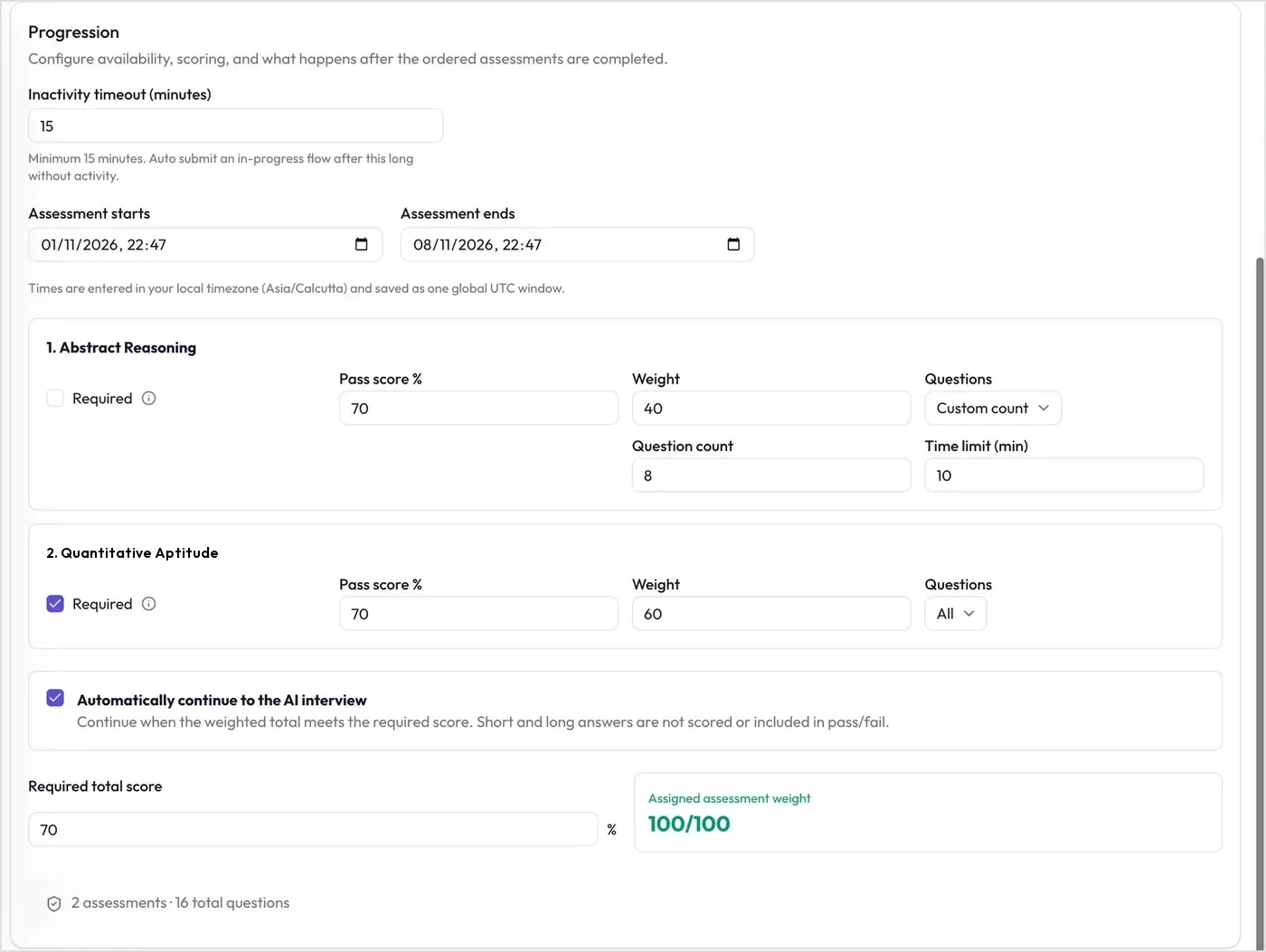
- Match your drive date. Set the assessment window's start and end times to drive day.
- Give every student a different paper. Randomize questions, shuffle options, and use Custom count to ask a set number of questions from a larger pool.
- Control timing and marks. Set marks and a time limit for each question. Add an on-screen calculator or voice-over where it helps.
- Set the bar once. Give each assessment a pass score and a weight, and mark the essential ones Required. With Automatically continue to the AI interview on, students who reach your required total score move straight on. The rest are declined automatically.
What you get back
Each report shows the weighted assessment score, how many assessments the student passed, and every response with its score. Typing tests add words per minute and accuracy. An Integrity tab lists proctoring events, such as leaving the tab or exiting fullscreen. Explore skill assessments.
Stage 2: AI Interviews for freshers
An AI interview is a two-way spoken conversation between a student and an AI interviewer, by video in the browser or by phone. Students take it any time before their link expires. The AI asks your questions, follows up, and scores each answer.
Set it up for freshers
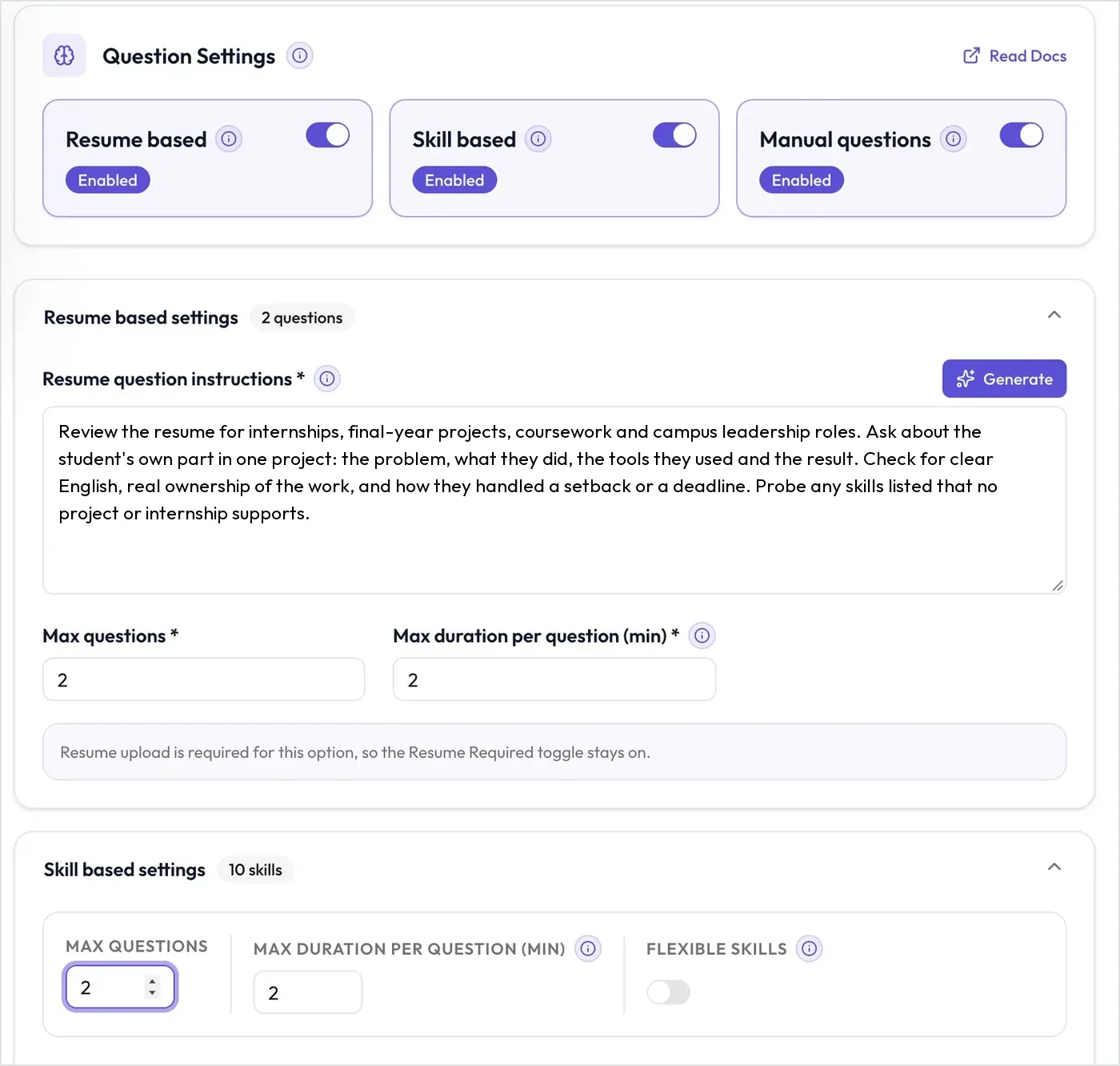
- Mix your question sources. Ask manual questions every student answers, such as "Why this role?" Resume-based questions probe each student's own project or internship. Skill-based questions cover skills you choose, such as SQL.
- Fit the format to the drive. Choose the language, a duration from 10 to 60 minutes, the link expiry, and up to three retakes. Require video, keep it desktop-only, and add an intro video from your campus team.
- Score communication your way. The AI rates Grammar & Syntax, Vocabulary & Expression, Communication Effectiveness, and Conversational Flow from 1 to 5, using a rubric you can edit.
- Turn on proctoring. Each interview gets a trust score out of 100, explained in the integrity section below.
- Tag students automatically. The AI fills in candidate tags from each interview, such as preferred work location, so you can filter by them later.
What you get back
You get the recording and a searchable transcript, with an English version for interviews in other languages. An AI summary lists strengths, risks, red flags, and follow-up recommendations. Each question shows its score and the AI's reasoning, next to communication scores and proctoring results. Assessment and role play results sit in tabs on the same report, which exports as a PDF. See the AI interviewer.
Stage 3: AI Role Plays
An AI role play is a live voice call between a student and an AI character, such as a skeptical prospect or a frustrated customer. The character stays in role, and the call is scored against your criteria.
Role plays suit customer-facing roles: sales and BDE, customer support and BPO, customer success, and management trainees. IT trainees can take a technical scenario, Production incident debugging.
Set it up for your roles
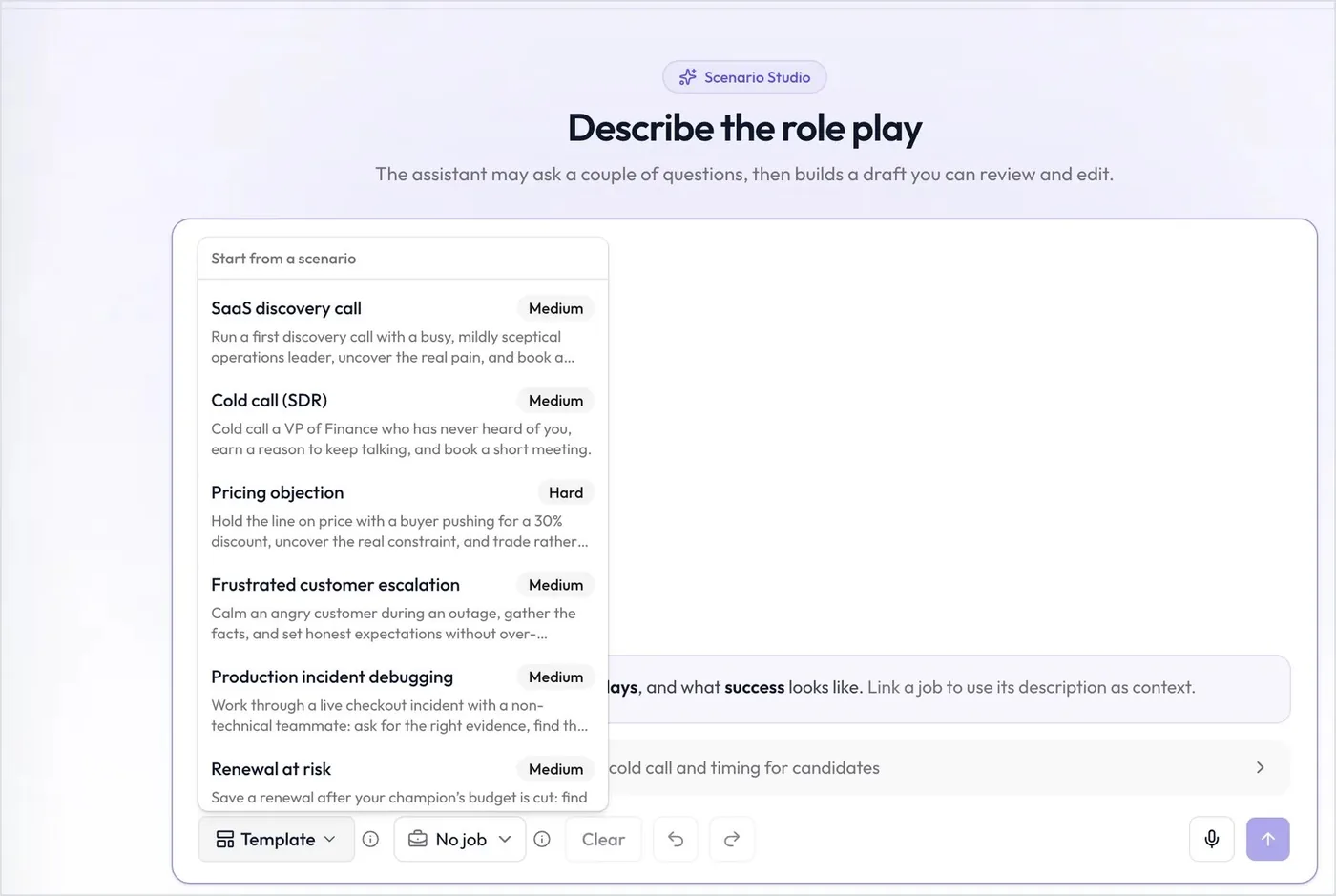
- Describe it or pick a template. Describe the scenario in plain words in the Scenario Studio, and the AI drafts it. Or start from a template: SaaS discovery call, Cold call (SDR), Pricing objection, Frustrated customer escalation, Production incident debugging, or Renewal at risk.
- Choose a difficulty. Pick Easy, Medium, or Hard. Harder levels mean a more guarded character, more pushback, and stricter grading. Easy or Medium suits most freshers.
- Define what good looks like. Add 3 to 12 weighted criteria, and mark any of them as Must pass.
- Reward good questions. Hidden facts come out only when the student asks the right questions. Objection and discovery triggers test pushback handling and follow-up.
- Set the session. Show up to five reference items, such as a price sheet. Choose 3 to 15 minutes, webcam on or off, and desktop-only if you want. Every student gets one attempt.
- Invite in bulk. Add students from an Interviewer's candidate list, or invite people directly with a CSV.
What you get back
Each call gets a score from 0 to 100 and an AI recommendation, from Strong yes to No. A red flag, or a low score on a Must pass criterion, makes it No. Students don't advance automatically. Your team reviews the result and decides.
The report covers strengths, gaps, red flags, and notes for the human interviewer, with clickable times that jump into the recording. It also shows each criterion's score with evidence, the hidden facts uncovered, the transcript, and a PDF export. Explore AI role plays, or read about role-play interviews.
Which stages to use for which fresher roles
| Fresher role | Assessment focus | AI interview focus | Role play scenario |
|---|---|---|---|
| Software / IT trainee | Aptitude, logical reasoning, programming concepts as auto-scored questions | Final-year project (resume-based), technical skills you choose | Optional: Production incident debugging |
| Analyst (data, finance, operations) | Numerical reasoning with the on-screen calculator, data interpretation | Projects and internships, skills such as SQL or Excel | Optional |
| Sales / BDE | Verbal reasoning, product or domain basics | Motivation for sales, internships and college roles | Cold call (SDR) or Pricing objection |
| Customer support / BPO | Typing test, English usage and comprehension | Communication rubric tuned for conversational flow, tags for shift preference | Frustrated customer escalation |
| Management trainee | Aptitude, business scenarios, a long-answer written sample | Leadership and ownership examples from college life | Renewal at risk, or a custom scenario such as giving difficult feedback |
Fair and cheat-resistant by design
Every student, at every campus, is scored against the same criteria. Each stage also has its own integrity controls.
- A different paper for each student. Randomized questions, shuffled options, and Custom count pools mean students don't all see the same paper.
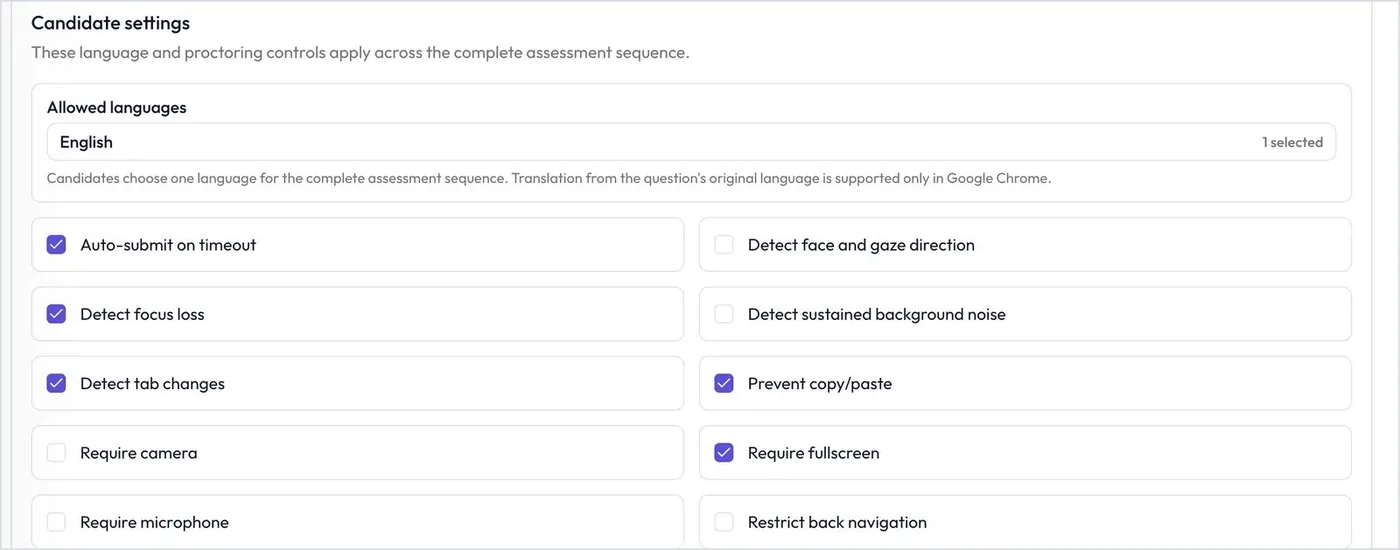
- Proctored assessments. Require camera, microphone, and fullscreen. Detect face and gaze direction, focus loss, tab changes, and background noise. Block copy and paste, restrict back navigation, and auto-submit on timeout or inactivity.
- Proctored AI interviews. A trust score combines tab switching, eye and face detection, and answer-authenticity checks for signs of reading AI-written answers. You can also block second screens.
- One attempt at the role play. Each student gets one live call with a character who reacts to what they say.
- Signals for review. Integrity events and trust scores show you where to look. They don't prove cheating, so read them alongside the answers and the recording.
Feature availability varies by plan. See pricing for details.
A simple experience for students
- Nothing to install. Students open their link and join in the browser. There's no app to download and no account to create.
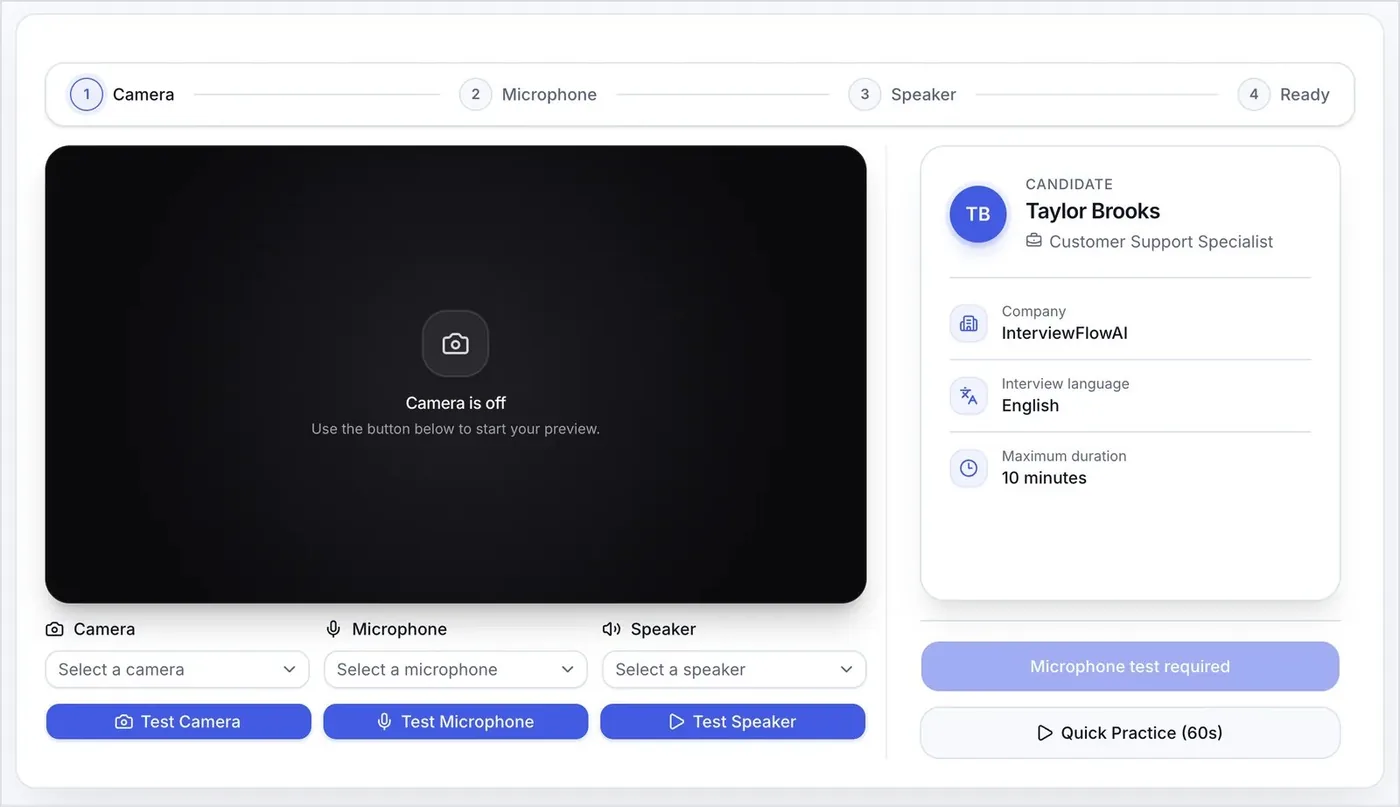
- A practice run first. An equipment check tests the camera, microphone, and speaker, and offers a 60-second practice.
- Recover from a dropped call. If the connection drops during the AI interview, students have 5 minutes to reconnect and resume.
- Their language. Run AI interviews in any of 16 languages, including Hindi. On assessments, students choose from the languages you allow. See supported languages.
- Reminders until they finish. Automated email reminders go to students who haven't completed their interview.
- Practice beforehand. Share the free AI interview practice tool so the format feels familiar on drive day.
Review, compare, and move students to the final round
When the drive closes, your team works from scored evidence for every student.
- Filter and sort. Narrow results by score, stars, completion date, tags, or a minimum score on a key question.
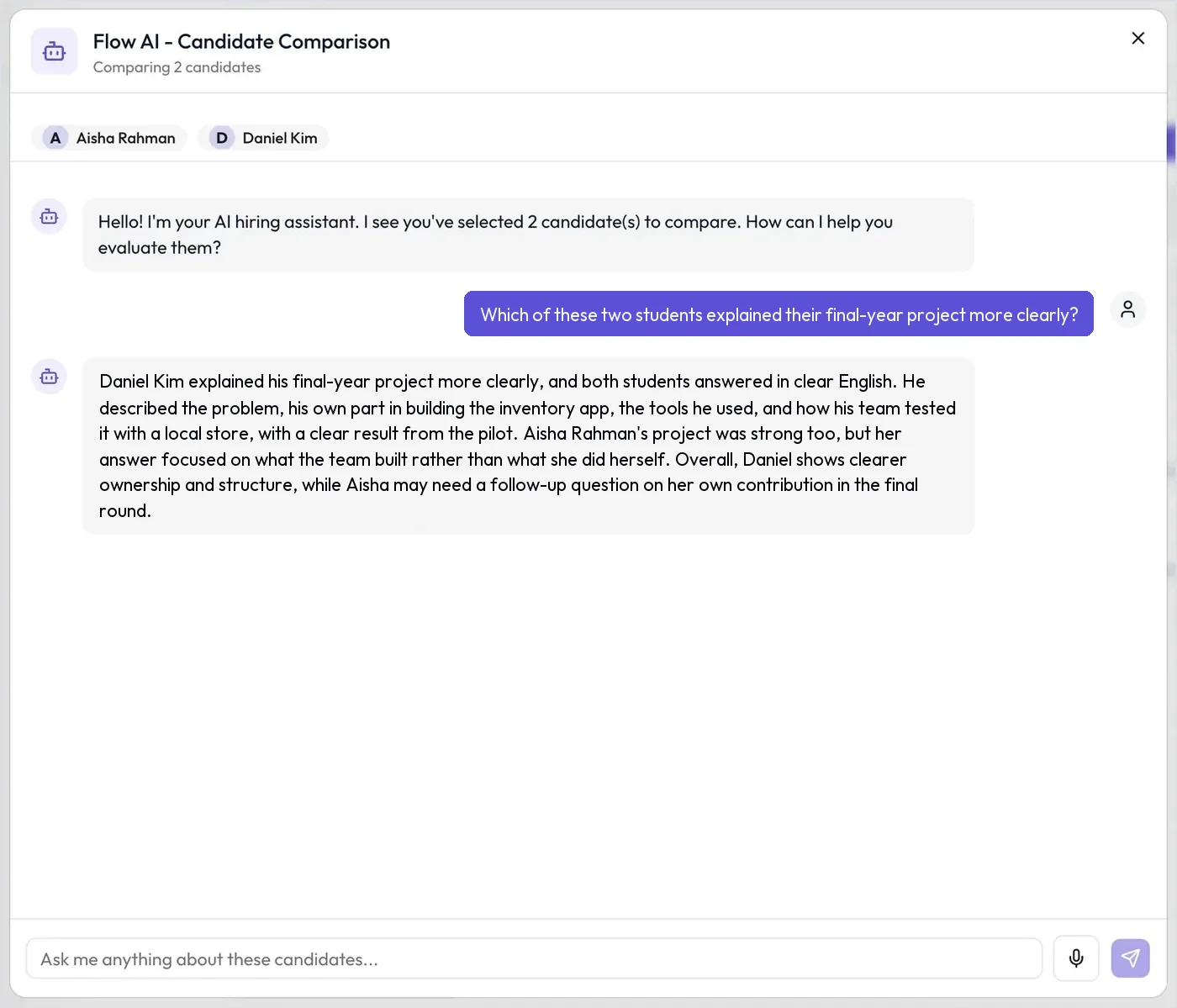
- Compare with Ask FlowAI. Select up to 10 students and ask, "Which of these explained their project most clearly?" Ask FlowAI compares students or summarizes one. It never shortlists or rejects anyone on its own.
- Track each campus. Analytics shows each Interviewer's applicants, completion rate, average score, and status mix.
- Send booking links automatically. Coordinator emails your scheduling link to students who reach your AI interview pass score. If a role play comes after the interview, move students to a custom stage such as "Final Panel" with an approved booking email instead.
- Record the final panel. Notetaker joins your Google Meet, Zoom, Microsoft Teams, or Webex call and attaches the transcript and notes to the student.
- Keep your systems in sync. Use branded emails from your own domain, CSV export, and webhooks. Connect Greenhouse, Ashby, Teamtailor, Workable, Recruit CRM, or Zapier.
Example drive plan: Business Development Trainees from four colleges
A company is hiring Business Development Trainees from four colleges in one placement season.
| Stage | Example settings |
|---|---|
| Setup | One Interviewer, cloned for each college. Each college gets its own link, QR code, assessment window, and analytics. |
| Apply | Resume required. Must-have application questions: graduation year (numeric, exact) and willingness to relocate (yes/no). |
| Assess | Aptitude (weight 60, Required, 20 questions from a larger pool in 25 minutes) and Business English (weight 40). Pass score 70% each, required total 65%, auto-continue on. Default proctoring plus face and gaze detection. Open 9:00 to 18:00 on drive day. |
| AI interview | English, 15 minutes, no retakes, video required, link expires in 3 days. Two manual questions, two resume-based questions on internships or projects, and skill-based questions on communication and negotiation. Proctoring on. |
| Role play | Cold call (SDR) template, Easy, 8 minutes. Five criteria, with objection handling as Must pass. One hidden fact and a price sheet. Invite students who scored 70 or above in the AI interview. |
| Review | Sort role play results by score, compare the top group with Ask FlowAI, and move chosen students to a "Final Panel" stage. Add Notetaker to each panel call. |
Frequently asked questions
Can students take the AI interview on a mobile phone?
Yes, if you allow it. AI interviews are desktop-only by default. Turn off Desktop only to let students join from a phone or tablet. Role plays have the same setting.
How do you stop cheating in an online campus drive?
Assessments randomize questions, draw from larger pools, and can require camera and fullscreen while blocking copy and paste. AI interviews add a trust score from tab switching, eye and face detection, and answer-authenticity checks. These signals guide your review. They don't prove cheating.
Can we run placement drives at several colleges at once?
Yes. Clone your Interviewer for each college, so every campus has its own link, QR code, assessment window, and analytics. With the same questions and criteria everywhere, every student is scored the same way.
Does the AI interview work in Hindi?
Yes. You can run the AI interview in Hindi or any of 16 supported languages. The report includes an English transcript for reviewers. You set the language for each Interviewer.
Do students get a second attempt?
Only if you allow it. AI interview retakes are off by default, and you can allow one to three. Each role play allows one attempt. If a student had a genuine problem, you can reset their assessment.
How do we decide who goes to the final round?
Your team decides. Assessments can move students forward automatically at your pass bar, but role play results never do. Filter by score, compare up to 10 students with Ask FlowAI, then move your shortlist on.
Does this campus recruitment software include coding tests or group discussions?
No. There's no code editor, compiler, or group discussion round. For IT trainees, test programming concepts with auto-scored questions and ask about projects in the AI interview.
Does it work for university recruiting in the US and UK?
Yes. The same funnel works for campus recruiting and graduate recruitment anywhere. Share the link or QR code at career fairs, interview in English or another supported language, and connect your ATS.
Related use cases
Run your next placement drive as one funnel
Set up the assessment, the AI interview, and the role play once, then clone the setup for each campus. Your panel meets only the students who qualify. See every plan on the pricing page. Hiring at volume beyond campus? Read about high-volume hiring.