InterviewFlowAI helps data annotation companies hire quality annotators at scale. Applicants take an auto-scored guideline test built from your own labeling rules, then a short spoken AI interview on language, judgment and reliability. Only those who pass both reach your paid trial.
200+ businesses trust InterviewFlowAI · 150,000+ AI interviews completed · 4.8/5 average candidate experience rating
Why hiring data annotators is hard
Annotation projects need large teams fast, and label quality decides whether the client stays. Hiring for that is harder than it looks.
- Applicant pools are huge. One remote annotation posting can bring in thousands of applicants in a few days.
- Resumes say little. Most applicants have never done this work, and a resume can't show how accurate someone is.
- Following guidelines is the real skill. Speed is easy to see. Applying a long guideline the same way on item 500 as on item 5 is not.
- Tests get gamed. Answers to well-known annotation tests are shared online, and a chatbot can answer a text test.
- Projects are multilingual. Each language queue needs people who read and write that language well.
- Ramp-ups are sudden. A new client project can need a full team within days.
How to hire data annotators at scale, step by step
The same steps work for annotation companies, BPOs with data teams and in-house labeling teams.
- Post one link. Share your public application link in job ads, on your careers page, or as a QR code at a hiring drive.
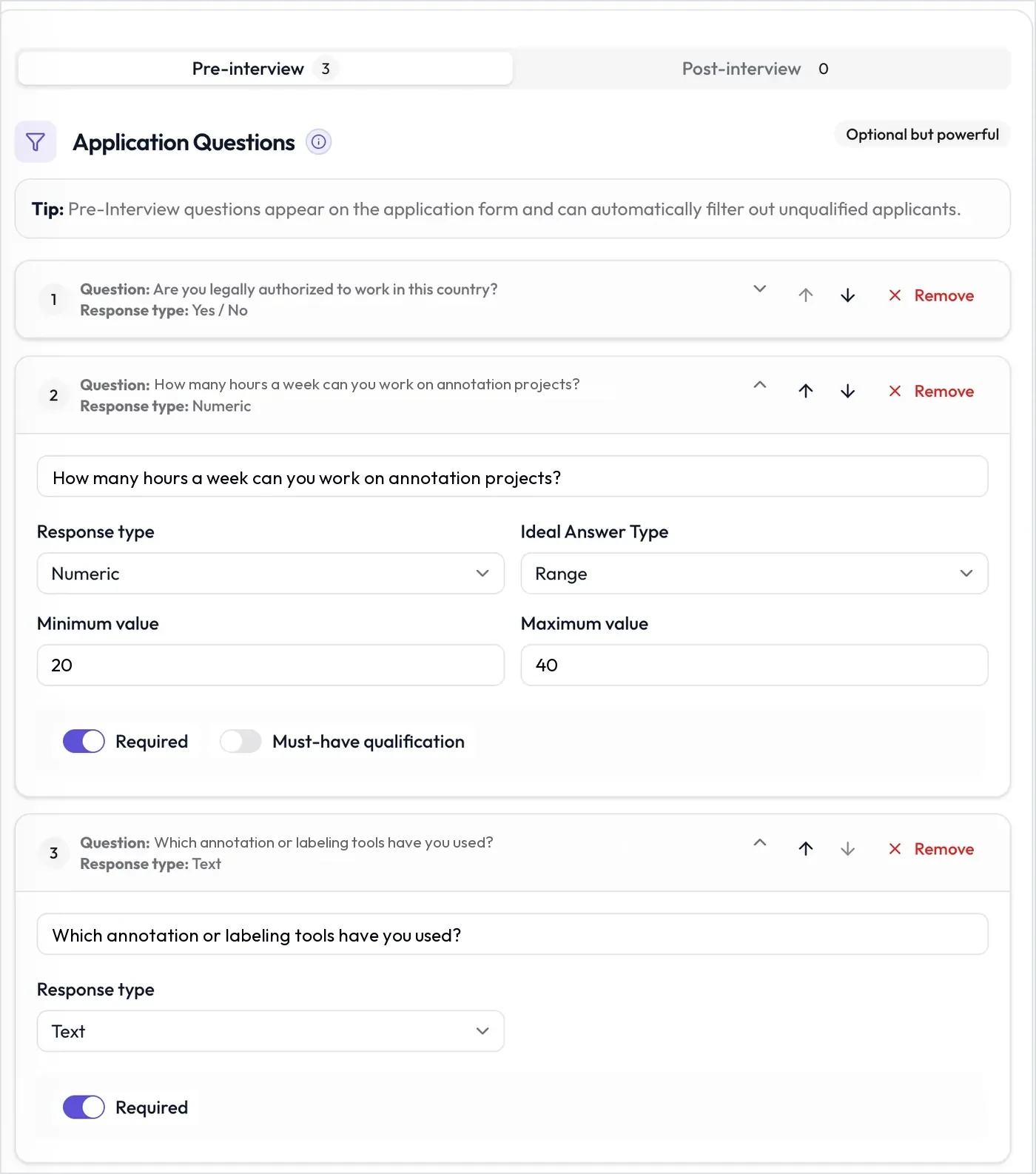
- Screen the basics. Ask must-have questions on the application form, such as whether they have a computer, stable internet and enough hours each week. Anyone who misses a must-have is declined automatically.
- Test the guideline. A skill assessment built from your labeling rules is scored automatically. Applicants who reach your pass score move on to the AI interview.
- Run a short AI interview. A 10-minute spoken interview checks their language, how they handle unclear items, and whether they're reliable.
- Trial the best. Move finalists to a paid trial in your own annotation tool, then onboard them in batches.
What to put in the guideline test
A data annotation test checks whether an applicant can follow your labeling rules correctly, every time. Write the questions from your own guideline, so answers shared online don't help.
| Question type | What it tests | Example item |
|---|---|---|
| Single select | Text classification | Which label fits this product review: Positive, Negative, Mixed or Not a review? |
| Multiple select | Entity and attribute tagging | Select every word in this sentence that is a brand name. |
| Fill in the blank | Guideline recall | Under the guideline, which label code do you use for sarcasm? |
| Numeric | Quality review | How many of these five labeled items break the guideline? |
| Typing test | Transcription speed and accuracy | Type this passage. Pasting is blocked. |
| Short or long answer | Reasoning, read by your team | This item was labeled Negative. Explain why that's wrong and what it should be. |
- A different paper for each applicant. Randomize questions, shuffle options, and draw a set number of questions from a larger pool.
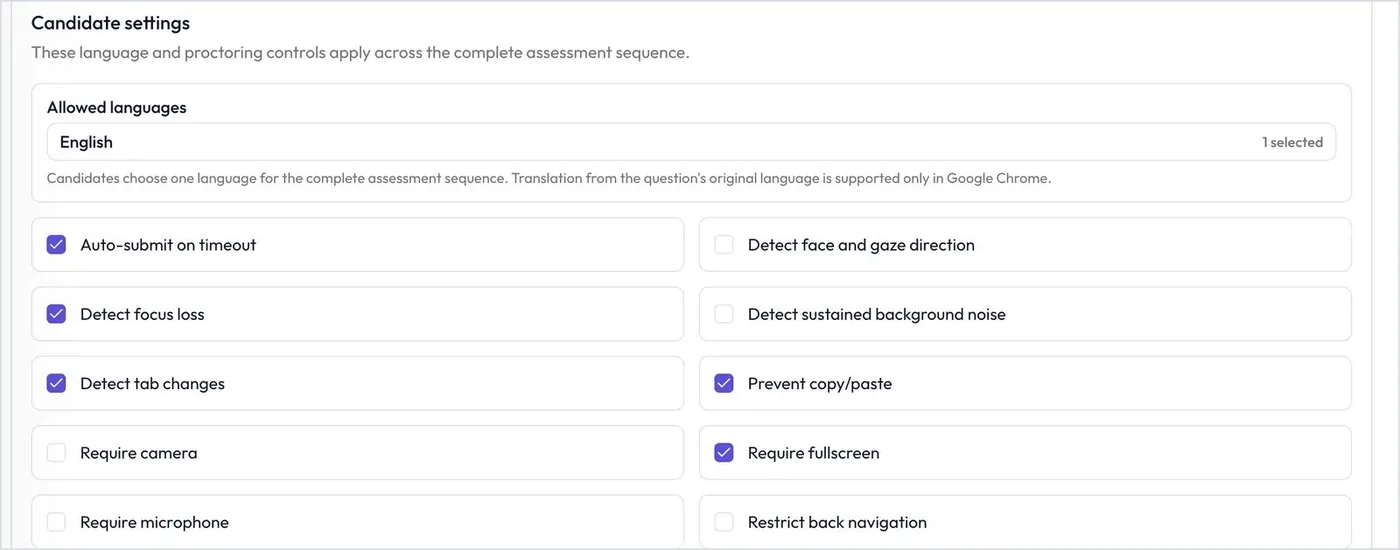
- Proctoring. Assessments can require a camera, microphone and full screen. They can also spot tab changes, block copy and paste, and submit when time runs out.
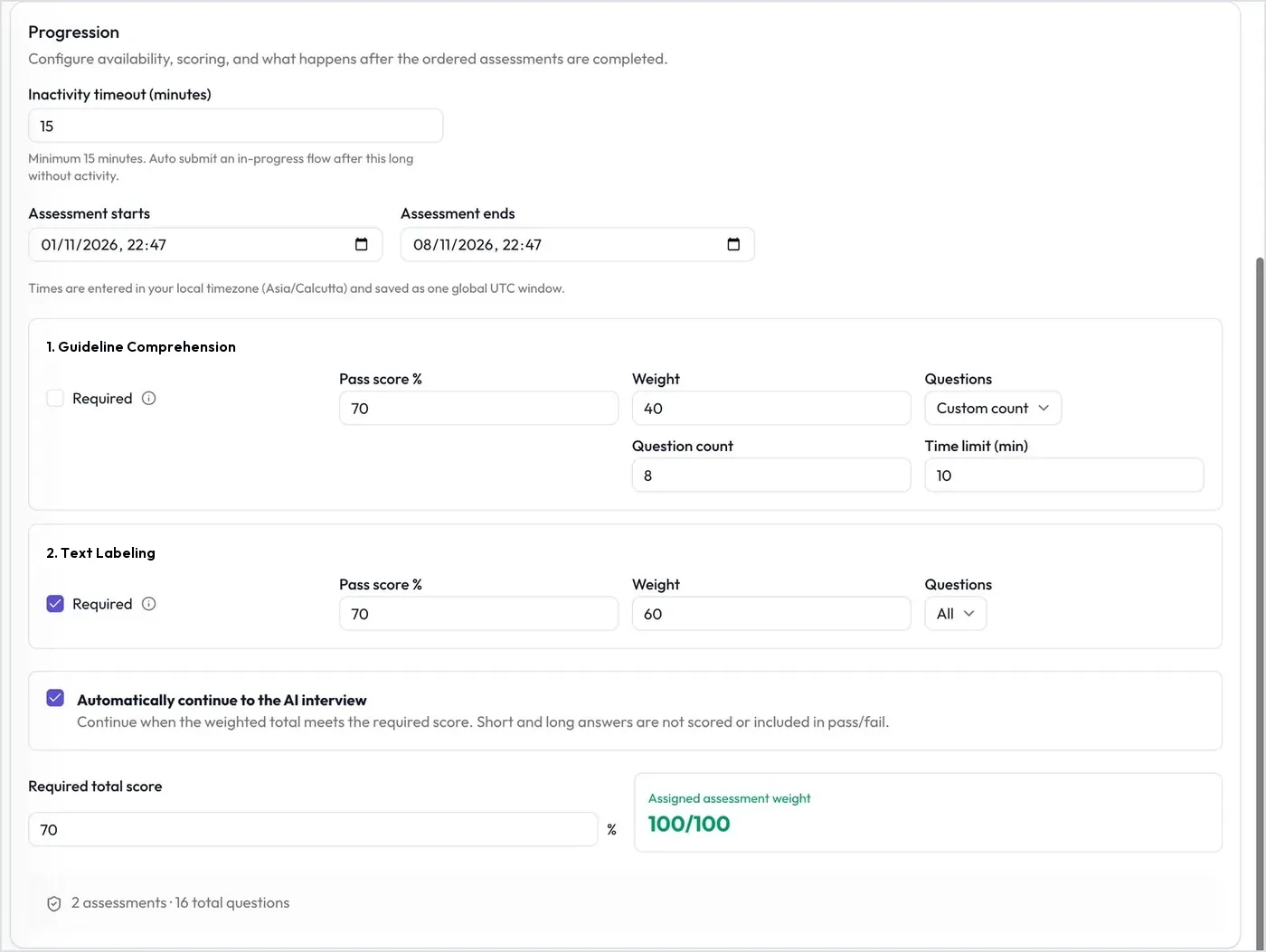
- Automatic progress. Set a pass score and weight for each assessment. Applicants who reach the required total score continue to the AI interview, and the others are declined.
- Image, video and audio work. There's no labeling canvas, so test bounding boxes, segmentation or audio in a short paid trial in your own annotation tool.
What the AI interview checks
An AI interview is a two-way spoken conversation between an applicant and an AI interviewer, by video in the browser or by phone. For annotators, keep it short and focused:
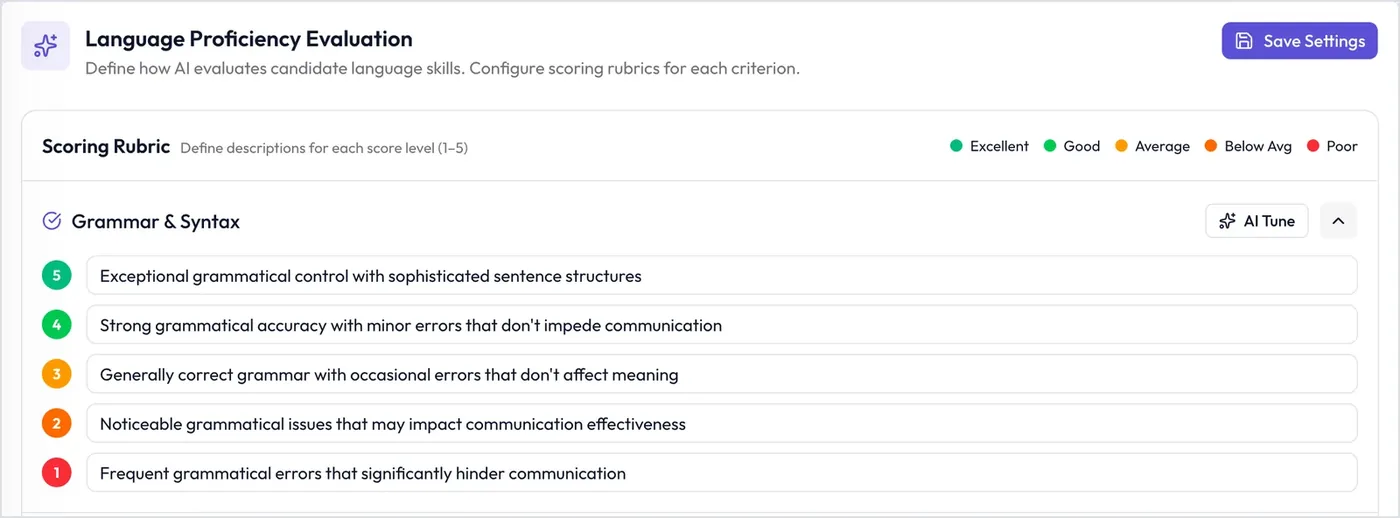
- Language. The AI scores language proficiency on grammar, vocabulary, communication effectiveness and conversational flow, from 1 to 5. Set the interview language for each Interviewer.
- Judgment. Scenario questions show whether someone flags an unclear item or guesses silently.
- Reliability. Ask about hours, equipment and internet, and you get clear answers on the record.
- Integrity. Turn on a trust score that combines answer-authenticity checks, tab switching, and eye and face detection. Integrity signals are for review, not proof.
Data annotator interview questions to ask
These questions ask for a real example or a realistic situation. Pick five for a 10-minute AI interview.
| Question to ask | What it tests | A strong answer includes |
|---|---|---|
| How would you learn a 30-page labeling guideline before your first task? | Guideline learning | Reads all of it, notes the edge cases, practices on examples, and asks questions early |
| You're unsure which label fits, and the guideline doesn't cover the case. What do you do? | Judgment | Flags the item with a reason and asks the lead, instead of guessing silently |
| A reviewer says 15% of your labels last week were wrong. How do you respond? | Taking feedback | Reviews the errors, finds the pattern, rereads that part of the guideline, and asks what's unclear |
| How do you stay accurate in the fourth hour of a repetitive task? | Consistency | Short breaks, a checklist, and spot checks of their own earlier work |
| Tell me about a time you found a mistake in your work after you'd submitted it. | Honesty and care | Reported it quickly, fixed it, and changed how they check their work |
| Which annotation tools have you used, and for what kind of data? | Tool experience | Specific tools and data types, and an honest line about what they haven't done |
| Describe your computer, your internet connection and where you'll work. | Setup and reliability | A computer of their own, stable internet with a backup, and a quiet place to work |
| This project uses confidential customer data. What does that change about how you work? | Confidentiality | No screenshots or sharing, and no pasting the data into personal devices or AI tools |
| Which hours can you work each week, and can you take night or weekend shifts? | Availability | Exact hours and days, with other jobs or classes stated openly |
Add each one as a manual question. Put "What it tests" into What you are looking for and the strong answer into Strong answer (5), then describe a weak answer.
Data annotator job description template
Copy this template and fill in the brackets. To write one for another role, try the free job description generator.
About the role
You'll label [text, images, audio or video] by following detailed project guidelines. Your work trains and tests machine learning models, so accuracy and consistency matter more than speed. This role is [remote or on-site in city], [full-time, part-time or contract].
Responsibilities
- Label and tag data exactly as the project guidelines describe.
- Flag unclear or unusual items, and ask questions in the project channel.
- Meet daily accuracy and output targets.
- Review other annotators' work when you're assigned to quality checks.
- Keep all client data confidential.
Requirements
- Strong reading and writing in [language].
- Careful attention to detail, and the patience to follow long written rules.
- A laptop or desktop computer and a stable internet connection.
- Availability for [hours] a week in [time zone].
Nice to have
- Experience with annotation tools such as [tool names].
- Knowledge of [domain, such as retail, medical or legal content].
- A second language.
How to apply
Apply through [your link]. You'll answer a few questions, take a short guideline test and a 10-minute AI interview on your own schedule.
Review applicants and onboard in batches
- Sort and filter. Filter by overall score, completion date, tags and a minimum score on any question. Filters also apply to CSV exports.
- Compare borderline applicants. Ask FlowAI compares up to 10 candidates side by side. It never shortlists or rejects anyone.
- Your pipeline. Add custom stages such as "Paid trial" or "Batch 3 onboarding", each with an approved email.
- One Interviewer per project or language. Clone an Interviewer so each client project or language queue has its own link, test and results.
- Your systems. Use the API and webhooks to bring results into your own platform, or connect Greenhouse, Ashby, Teamtailor, Workable, Recruit CRM or Zapier.
Example: staffing a 100-person text annotation project
An annotation company wins a text labeling project for an online store. It needs 100 English-language annotators within two weeks.
| Stage | Example settings |
|---|---|
| Application | Must-have questions: has a laptop or desktop computer (yes/no), has stable internet (yes/no) and can work 30 hours a week (yes/no). No resume required. |
| Guideline test | 25 questions drawn at random from a pool of 60, written from the client's guideline. Pass score 80%. Proctoring blocks copy and paste, requires fullscreen and detects tab changes. Applicants who pass continue to the AI interview automatically. |
| AI interview | English, 10 minutes, desktop only, no retakes, link expires in 3 days. Five manual questions from the list above, plus language proficiency scoring. |
| Review | Filter for an AI interview score of 75 or above. Compare borderline applicants with Ask FlowAI, and move the chosen ones to a "Paid trial" stage with an approved email. |
| Paid trial | A one-hour task in the client's annotation tool, scored against a gold set. Those who pass join the project in batches. |
Frequently asked questions
Can InterviewFlowAI test image, video or audio annotation?
Not as a labeling task. InterviewFlowAI has no annotation canvas. Its tests use question types such as single select, fill in the blank and typing tests. To test bounding boxes, segmentation or audio work, run a short paid trial in your own annotation tool after the AI interview.
Answers to popular annotation tests are shared online. How do we keep our test fair?
Write your own questions from your guideline and draw them at random from a larger pool, so applicants see different papers. Turn on proctoring to block copy and paste, require fullscreen and detect tab changes. The spoken AI interview then checks whether applicants understand the rules.
Do short and long answers count toward the pass score?
No. Your team reads short and long answers, and they don't affect pass or fail. Single select, multiple select, numeric, fill in the blank and typing questions are scored automatically.
Can applicants who pass the test move to the AI interview automatically?
Yes. Turn on automatic continue. Applicants who reach your required total score and pass every required assessment go straight to the AI interview. The others are declined.
Can we hire annotators for several languages?
Yes. Create one Interviewer per language queue and set its interview language. On assessments, applicants choose from the languages you allow, and a typing passage always appears as you wrote it. Reports include an English transcript for reviewers.
Can applicants take the AI interview on a phone?
Only if you allow it. AI interviews are desktop only by default. Keep that on for annotation roles, since the work itself needs a computer.
How quickly can we screen a new batch of applicants?
There is no scheduling. Applicants take the test and the AI interview right after they apply, at any hour, and you review scored results when you're ready.
How is this different from hiring AI trainers or domain experts?
Annotation roles are usually entry level and high volume, so the test does most of the filtering and the AI interview is short. Expert roles need a longer interview on their field. See AI trainer and domain expert hiring for that setup.
Who decides who gets hired?
Your team. Must-have questions and test pass scores can decline applicants automatically, using rules you set. Ask FlowAI only compares candidates and never shortlists or rejects anyone.
Related use cases
Staff your next annotation project with tested annotators
Build your guideline test and AI interview once, share one link, and review scored applicants. Feature availability varies by plan, so see the pricing page. Hiring experts to train AI models? See AI trainer and domain expert hiring.