Greenhouse and Ashby both released official MCP servers in 2026. MCP lets Claude, ChatGPT and other AI assistants read your ATS directly. You can ask "who's waiting on a scorecard for the Senior PM role?" and get an answer from live data, with no CSV export.
This guide covers what each server can read and change, who in your company has to turn it on, and how to connect it in Claude or ChatGPT. It also shows how to put an AI interviewer in the same chat, so the assistant can go from "who applied?" to "who did best in the first-round interview?" without you leaving the conversation.
Key takeaways
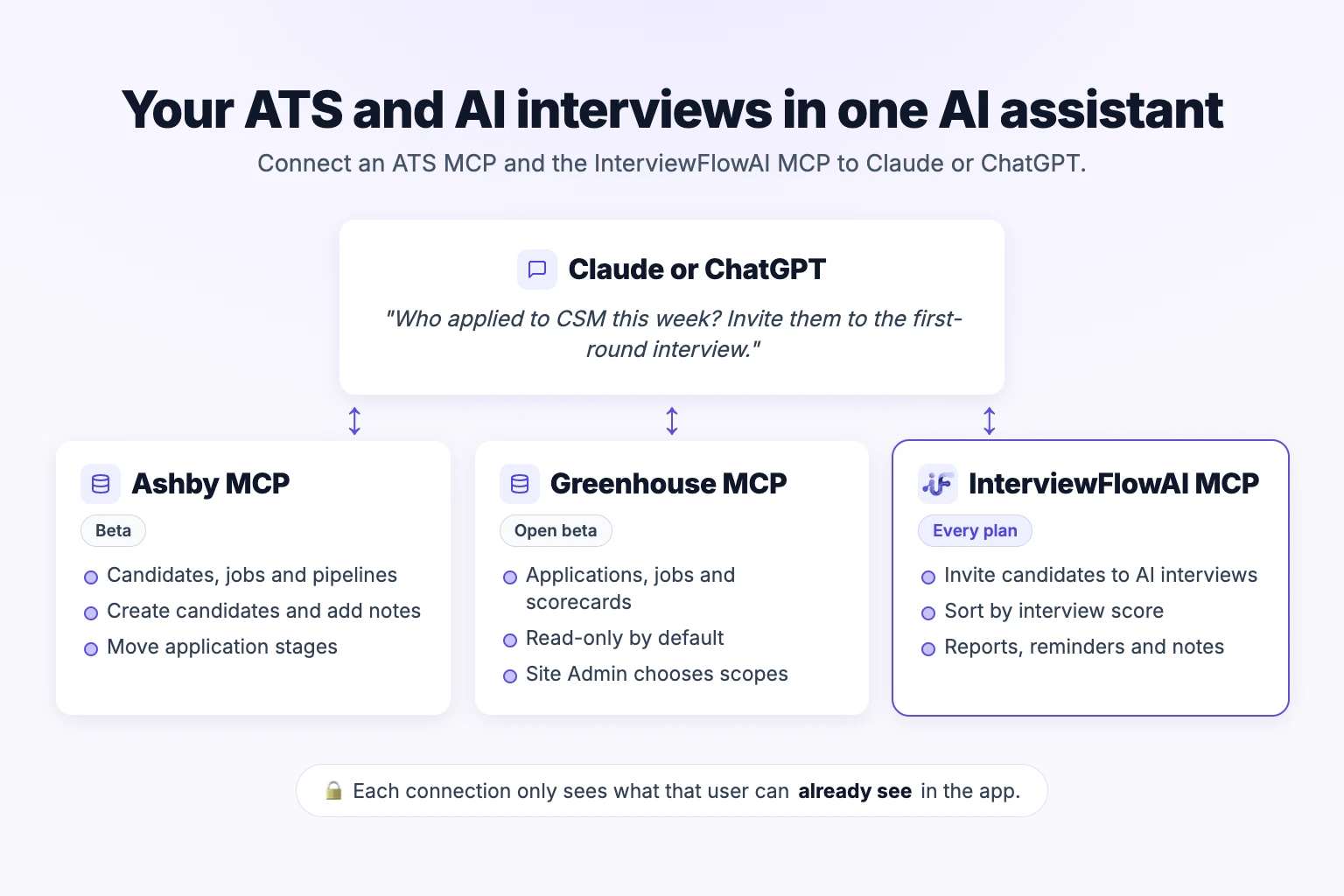
Ashby MCP is in beta on all Ashby plans except Analytics-only. An Org Admin turns it on, and it can create candidates, add notes, move stages and consider candidates for other jobs.
Greenhouse MCP is in open beta on the Core, Plus and Pro tiers. A Site Admin adds each AI tool and chooses its scopes. By default it's read-only.
Both servers only show each user what that user can already see in the ATS.
Neither one runs interviews. Connect an interview tool's MCP, such as InterviewFlowAI's, in the same assistant to invite, score and compare candidates.
Use the native ATS integration to run AI interviews inside your hiring process: recruiters send them from the candidate's profile in Greenhouse, and Ashby can start them automatically when a candidate enters a configured interview-plan stage. Use MCP for questions you ask on the spot and actions you take in bulk.
What is an MCP server, in recruiting terms?
An MCP (Model Context Protocol) server is a connector that gives an AI assistant a defined set of actions in another app. These include "list applications", "get candidate" and "move stage". When you ask a question, the assistant picks the right action, calls it with your login, and answers using the result.
For recruiters, this means you can ask your ATS questions in plain English. MCP doesn't add a new database, and it doesn't skip any permissions. Ashby and Greenhouse both limit each connection to the data that user can already see in the ATS.
Check your AI assistant's plan first
Your ATS plan is only half of the requirement. Your AI assistant's plan and workspace settings also decide what you can connect.
ChatGPT: full MCP access, including write actions, is available on ChatGPT Business and Enterprise/Edu, on ChatGPT web only. Pro users can connect custom MCP servers with read and fetch permissions only. In a Business workspace, only admins and owners can create custom MCP connections. In Enterprise/Edu, admins can give selected members that permission through role-based access control (OpenAI Help Center: Connecting custom MCP servers in ChatGPT, retrieved November 3, 2026).
ChatGPT custom servers are added from Plugins: go to Plugins, select the plus button, then Add custom MCP server. Enter a name and the server URL, set up authentication, tick I understand and want to continue on the risk warning, and select Create as a plugin. Developer Mode is no longer needed first.
Claude: on a team or company account, you may need your Claude account owner to let you add a custom connector. Greenhouse's setup article notes this.
Ashby MCP: what it does and how to turn it on
Ashby announced its MCP on June 30, 2026, and the documentation still labels it beta. The server URL is https://mcp.ashbyhq.com/mcp/v1 (Ashby MCP Server docs, retrieved November 3, 2026).
Who can use it
Plans: Foundations, Legacy Plus, Plus and Enterprise. It's not available to Analytics-only organizations.
Turning it on: an Org Admin goes to Admin > Organization Setup > Opt-In Features and switches on MCP Server. Nobody can connect until this is on.
Connecting: after that, users with Elevated Access sign in with their own Ashby account through OAuth.
What it can read
Ashby's documentation lists read tools for:
searching candidates, jobs, applications and email templates by name
filtering applications, jobs, openings, scheduled interviews and offers
full candidate profiles, including resume, feedback, emails, notes and transcripts
upcoming interviews, interview plans and prep briefings
candidate counts by stage for each job
your own pending tasks, such as scorecards you still owe
What it can change
There are four write actions:
| Action | What happens |
|---|---|
create_candidate | Creates a candidate with name and contact details |
add_note_to_candidate | Drafts a note and asks you to confirm before saving |
change_application_stage | Moves an application to another stage, including Archived |
consider_candidate_for_job | Adds the candidate to another job's first stage |
Check your archive automations first. Archiving needs an archive reason, and Ashby's automatic Archived-stage steps still run. If that stage sends a rejection email automatically, moving a candidate there through the assistant sends it too.
Limits worth knowing
Ashby allows 120 requests per minute per login and a separate tool budget of 120 units per minute. Most actions cost 1 unit; filtering costs 2. Ashby also warns that its tool inputs and outputs may change without notice while the server is in beta.
Ashby's launch post adds a practical caution: the AI assistant, not Ashby, decides which model answers. A weaker model can miss tools or give a "confident but incorrect" count on large datasets (Ashby blog, June 30, 2026). For hiring reports where accuracy matters, use Ashby's own reports and keep MCP for questions about individual candidates and jobs.
Connect Ashby MCP to Claude or ChatGPT
Claude: open Customize > Connectors, search for Ashby, click Connect, sign in, then click Approve.
ChatGPT: Ashby's docs say to open Settings > Apps, search for Ashby, click Connect, and follow the sign-in prompts. Whether you see it, and whether write actions work, depends on your ChatGPT plan and workspace settings (see above).
Cursor and other tools: add
https://mcp.ashbyhq.com/mcp/v1as a server in the tool's MCP settings and sign in the first time you use it.
Greenhouse MCP: what it does and how to turn it on
Greenhouse's help center describes its MCP as an open beta for the Core, Plus and Pro tiers (Greenhouse Support: Set up Greenhouse MCP, last updated October 29, 2026).
Who can use it
Setup: only a Site Admin can set it up. They add each AI tool as a client and choose its scopes (permissions) under Dev Center > MCP Access.
Connecting: after that, other users on eligible tiers connect with their own Greenhouse login.
AI tools listed: Claude, Claude Code, ChatGPT and Google Antigravity. Greenhouse also lists tools that support OAuth 2.0 with PKCE and Dynamic Client Registration, such as Copilot Studio, Glean and Amazon Q.
What it can read and change
If a Site Admin hasn't set any scopes, Greenhouse applies a read-only default:
list applications
list candidates
list job interview stages
list jobs
list rejection reasons
list scorecards
list users
The defaults can't create, edit or delete anything. Site Admins can turn on wider scope groups, such as "editing applications" and "managing jobs". Greenhouse doesn't publish a full list of write scopes, so open MCP Access in your own Dev Center to see what's available.
Don't save MCP Access with no scopes selected. If you do, the AI tool loses access to all Greenhouse data.
Connect Greenhouse MCP to Claude or ChatGPT
Greenhouse's article lists two server URLs. It uses https://mcp.greenhouse.io/mcp in the Claude steps and https://mcp.us.greenhouse.io/mcp in the ChatGPT and Claude Code steps. Use the URL shown for your AI tool.
Claude: go to Settings > Connectors > Add custom connector, enter a name, paste the server URL, then click Add and Connect. Approve access in Greenhouse.
ChatGPT: go to Plugins, select the plus button, then Add custom MCP server. Paste the server URL, set authentication to OAuth, accept the risk warning, select Create as a plugin, and approve access in Greenhouse. You need a ChatGPT plan and workspace role that allow custom MCP servers (see above). Greenhouse's own article still describes the older Developer Mode and Apps steps.
Claude Code: run
claude mcp add greenhouse --transport http https://mcp.us.greenhouse.io/mcp
Greenhouse MCP troubleshooting
| Problem | What to check |
|---|---|
| Connection or redirect URL error | A Site Admin must add your AI tool as a client in MCP Access, with its redirect URL on the allowlist. Greenhouse says this applies even to Claude and ChatGPT. |
| Some tools are missing | Tools for scopes that aren't enabled don't appear. Ask your Site Admin which scopes are on. |
| New scopes aren't working | After a Site Admin changes scopes, disconnect and reconnect your AI tool. |
| Connected to the wrong account or the sandbox | Disconnect, sign out of Greenhouse, then reconnect with the right account. |
| The sign-in window doesn't open | Allow popups and redirects in your browser settings. |
| Everyone lost access at once | Someone saved MCP Access with no scopes selected, or removed a redirect URL. Restore it, then reconnect. |
Source: Greenhouse Support, last updated October 29, 2026.
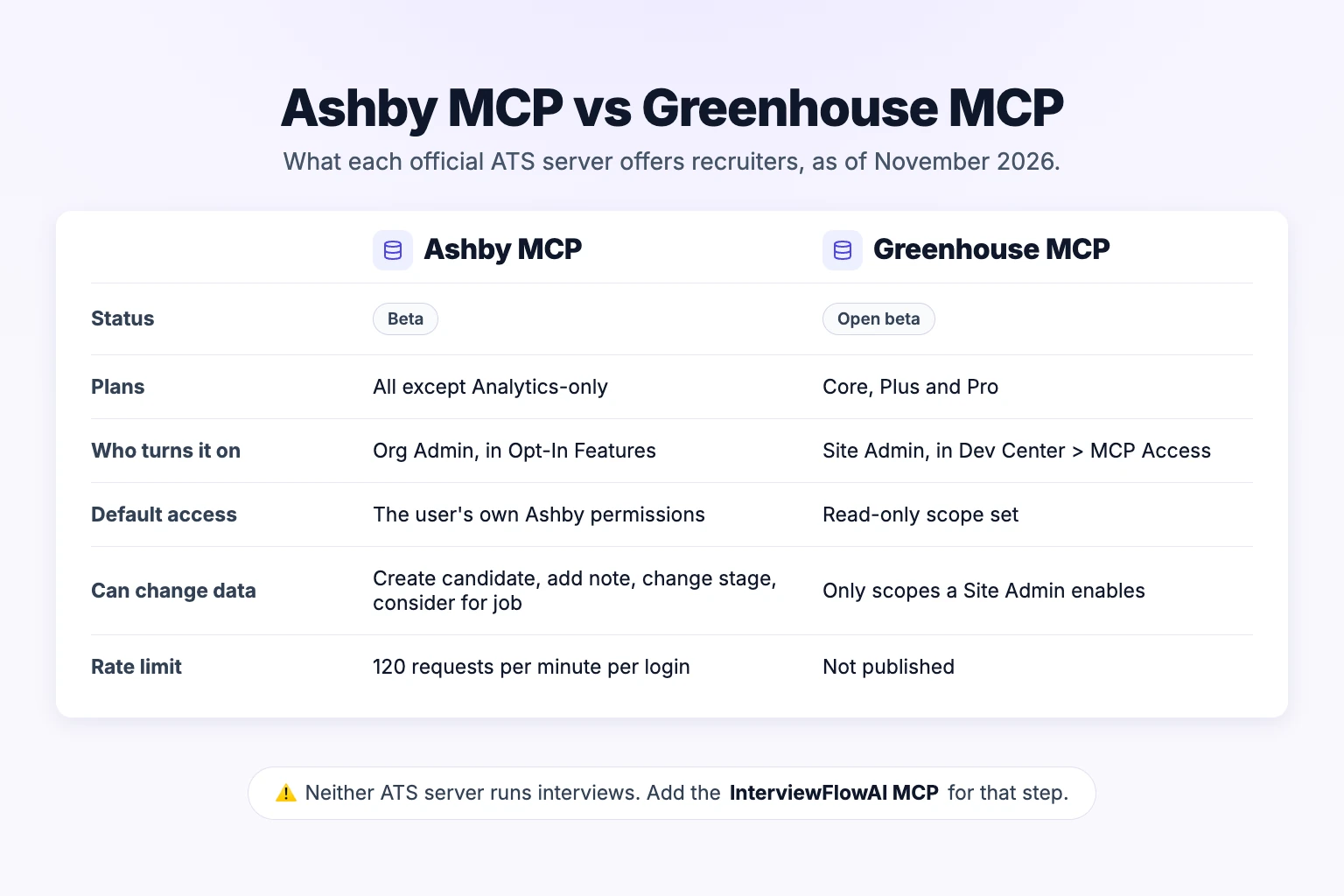
Ashby MCP vs Greenhouse MCP at a glance
| Ashby MCP | Greenhouse MCP | |
|---|---|---|
| Status (November 2026) | Beta | Open beta |
| Plans | All except Analytics-only | Core, Plus, Pro |
| Who turns it on | Org Admin (Opt-In Features) | Site Admin (Dev Center > MCP Access) |
| Default access | The user's own Ashby permissions | Read-only scope set |
| Changes it can make | Create candidate, add note, change stage, consider for job | Only what a Site Admin enables |
| Listed AI tools | ChatGPT, Claude, Cursor, Glean, Gemini CLI | Claude, Claude Code, ChatGPT, Antigravity and other OAuth tools |
| Published rate limit | 120 requests per minute per login | Not published |
What about Workday and LinkedIn?
Workday made its MCP server, SQL access and agent runtime generally available in October 2026, according to The New Stack. The coverage is about HR and finance agents. We found no primary source confirming that Workday Recruiting data is included, so check with your Workday admin before planning recruiting workflows around it.
LinkedIn has no official MCP server that we could find as of November 2026. The community-built servers usually work through your own logged-in browser session. That can conflict with LinkedIn's rules on automated access, so keep them away from your LinkedIn Recruiter seat. For finding candidates on LinkedIn, a search-string tool such as the free LinkedIn candidate search builder keeps you within normal search.
Adding AI interviews to the same chat
ATS MCP servers can read a lot about interviews your team has already held. Ashby's MCP returns candidate feedback, notes and transcripts, and Greenhouse's default scopes include scorecards. What neither one can do is run a new first-round interview for the candidates who just applied.
The InterviewFlowAI MCP adds that step: it invites candidates to two-way AI phone or video interviews, then lets you review the scores, transcripts and reports in the same chat. It connects to the same assistant at https://api.interviewflowai.com/mcp with your normal InterviewFlowAI login and no API key (InterviewFlowAI MCP docs). It's included on every plan, including the trial.
Owners and Viewers can read: find AI Interviewers; sort and filter candidates by interview, resume or assessment score; read interview results, resume feedback, timelines and role-play results; export candidates to CSV.
Only Owners can change things: invite candidates to an interview or role play, move them to a hiring stage, star them, update notes and custom fields, send reminders, give extra time, draft an Interviewer from a job description, clone or archive an Interviewer, and email candidates.
Safeguards: according to the InterviewFlowAI docs, every InterviewFlowAI change or email shows a preview and waits for your confirmation. Candidates who are shortlisted or mid-interview can't be moved from the assistant.
What you see when you connect
When you add the InterviewFlowAI MCP to Claude and sign in, InterviewFlowAI shows this consent screen. It lists what the assistant can read and change, and says changes happen only after you confirm each one. Click Allow access only if you started the connection yourself.
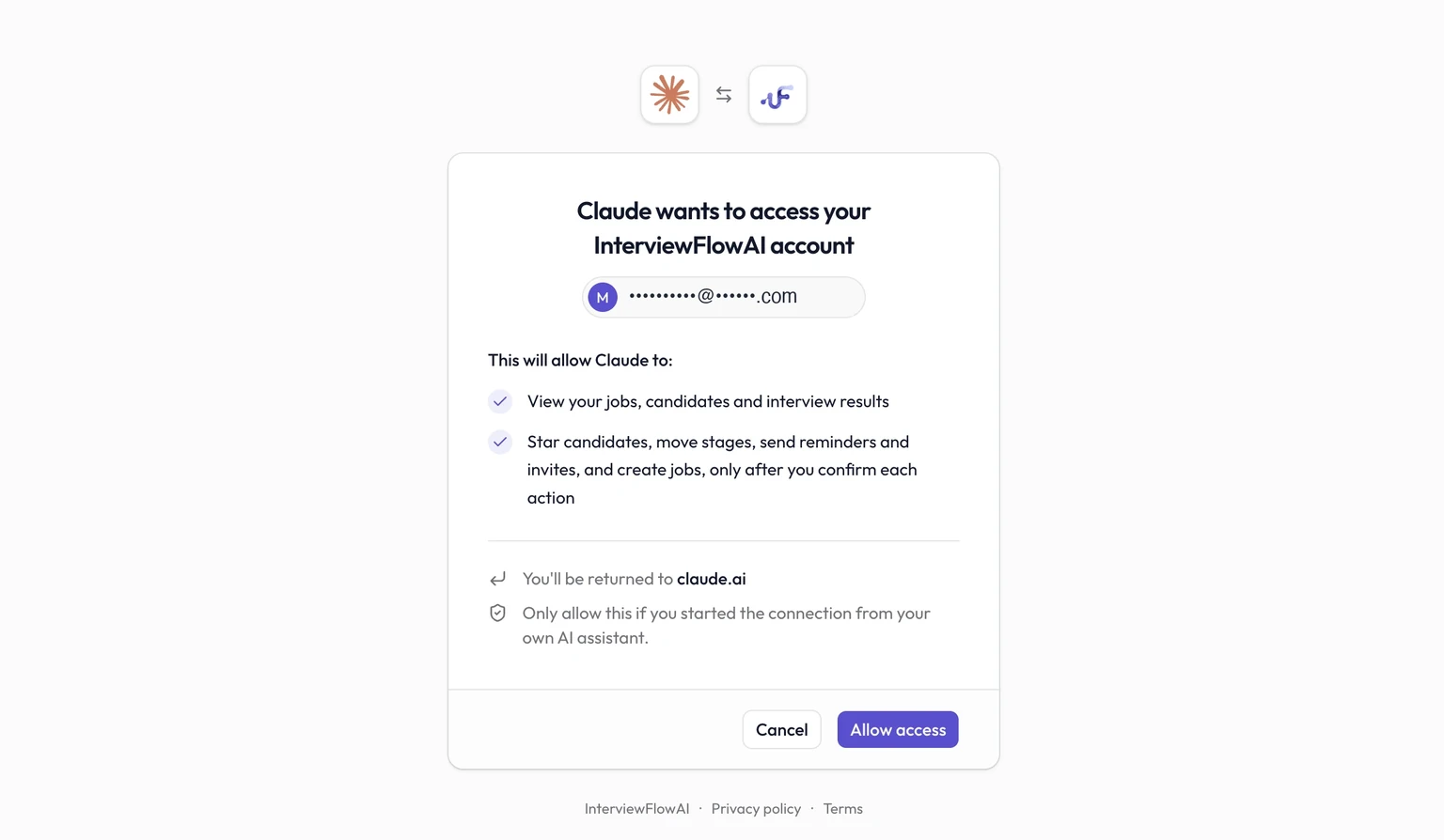
Captured on our own account on November 3, 2026. Email address masked.
Setup steps for each assistant are on the Claude setup page and the ChatGPT setup page. In ChatGPT, add it as a custom MCP server from Plugins, as described above. Cursor, VS Code, Codex, OpenCode and Claude Code are covered in the docs.
Three workflows that use both MCPs
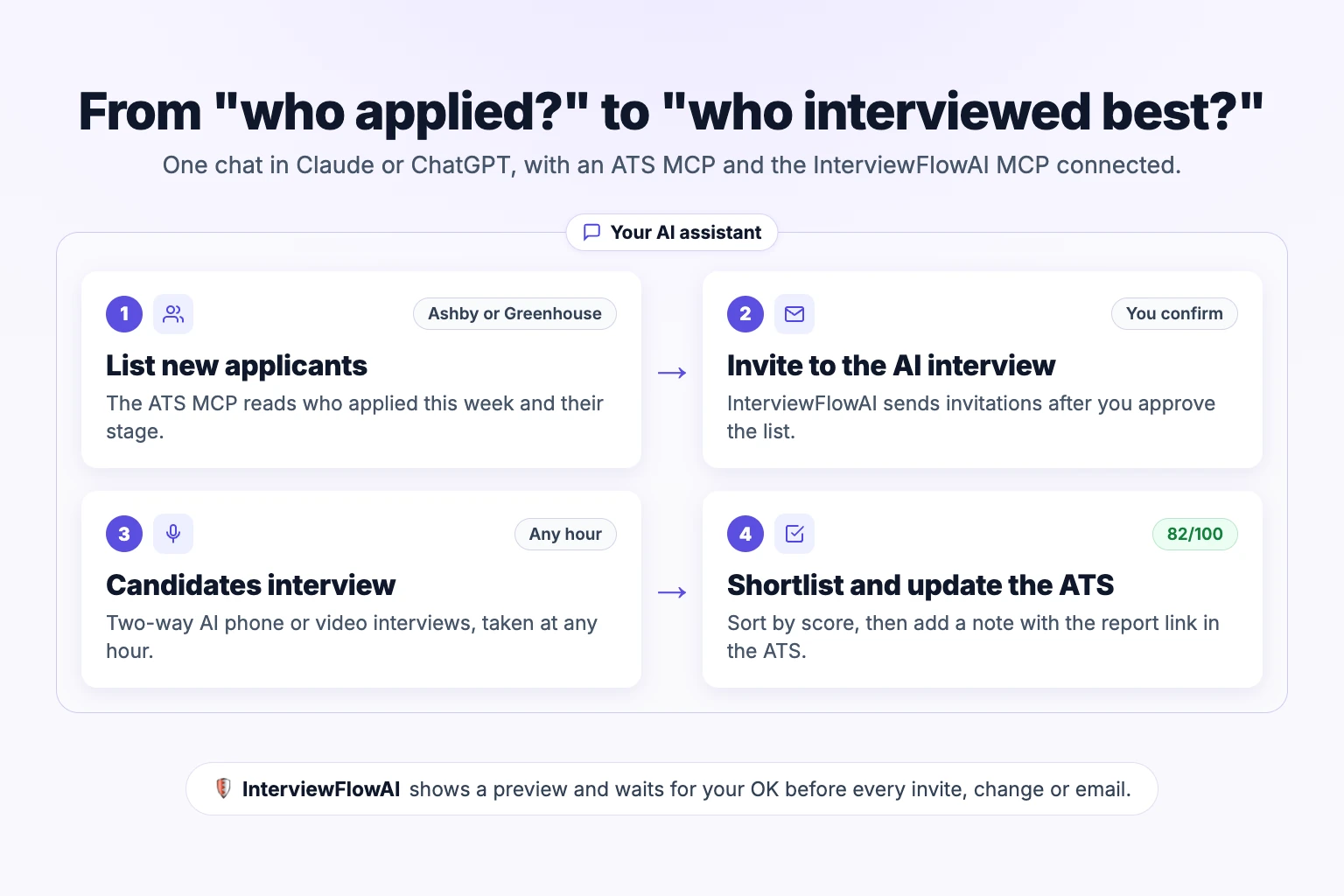
These examples assume an ATS MCP and the InterviewFlowAI MCP are both connected in the same Claude or ChatGPT chat.
Who asks you to confirm, and when
InterviewFlowAI: its docs say every change and email shows a preview and waits for your confirmation.
Ashby: its docs say
add_note_to_candidatedrafts the note for you to confirm. They don't describe a confirmation step for creating candidates, changing stages or considering candidates for a job.Greenhouse: its setup article doesn't describe a confirmation step for write actions.
ChatGPT: OpenAI says ChatGPT may ask for confirmation before write actions, depending on app permissions and the action's context.
So don't rely on every action pausing for you. Ask the assistant to show its plan first, check it, then tell it to go ahead.
Match candidates by email before acting
Ashby, Greenhouse and InterviewFlowAI each keep their own candidate records and IDs, so the assistant has to work out which person is which. Names alone aren't enough: two applicants can share a name, and one person can apply twice. Add these rules to your prompt:
Match people by email address, or by an ATS ID you store in an InterviewFlowAI custom field.
List every match, with name, email and the job in each system, before taking any action.
Stop and ask if a candidate has no email, more than one possible match, or a different email in each system.
Never act on a candidate you matched by name alone.
InterviewFlowAI's candidate additional fields can hold an ATS ID for each candidate, which makes matching exact.
1. Invite new applicants to a first-round interview
"In Ashby, list candidates who applied to Customer Success Manager this week and are still in Application Review, with their email addresses. Show me the list and skip anyone without an email. After I approve it, invite them to my 'CSM first round' Interviewer in InterviewFlowAI."
The assistant reads the applications from Ashby and shows you the list. After you approve, InterviewFlowAI shows a preview of the invitations and waits for your confirmation before sending.
2. Shortlist from interview results, then update the ATS
"Show my top 5 candidates for 'CSM first round' by interview score, with one line on each candidate's strongest answer. Match each one to their Ashby candidate by email and show me the matches. Stop if any match is unclear. Then add a note in Ashby for each with the score and the report link."
InterviewFlowAI provides the scores and results. Ashby's add_note_to_candidate drafts each note and waits for your confirmation. With Greenhouse, this step depends on which write scopes your Site Admin has turned on.
3. A Monday pipeline check
"For every open job in Greenhouse, show how many candidates are at each stage. For the jobs with an InterviewFlowAI Interviewer, list who was invited but hasn't finished, and send them a reminder."
This uses Greenhouse's default read scopes plus InterviewFlowAI's reminder action, which only Owners can use.
Test the connection read-only first
Before you let an assistant change anything, check that it sees the right data. Ask only read questions and compare the answers with what you see in each app.
Limit write access while you test. In Greenhouse, keep the default read-only scopes. In InterviewFlowAI, test with a Viewer account, which can only read. Ashby has no read-only switch for MCP, because it uses your normal Ashby permissions, so only ask read questions there.
Ask for something you can check. For example: "List the open jobs you can see in Greenhouse" or "How many candidates are at each stage for Customer Success Manager in Ashby?" Compare the answer with the ATS screen.
Check InterviewFlowAI. Ask "List my InterviewFlowAI Interviewers and how many candidates each one has." Compare it with your dashboard.
Check permissions. Ask about a job you can't open in the ATS. The assistant shouldn't be able to return it.
Test matching. Ask the assistant to match three candidates across systems by email, and check each match by hand.
Turn on write access, or switch to an Owner account, only after these checks pass.
Native ATS integration or MCP: which should you use?
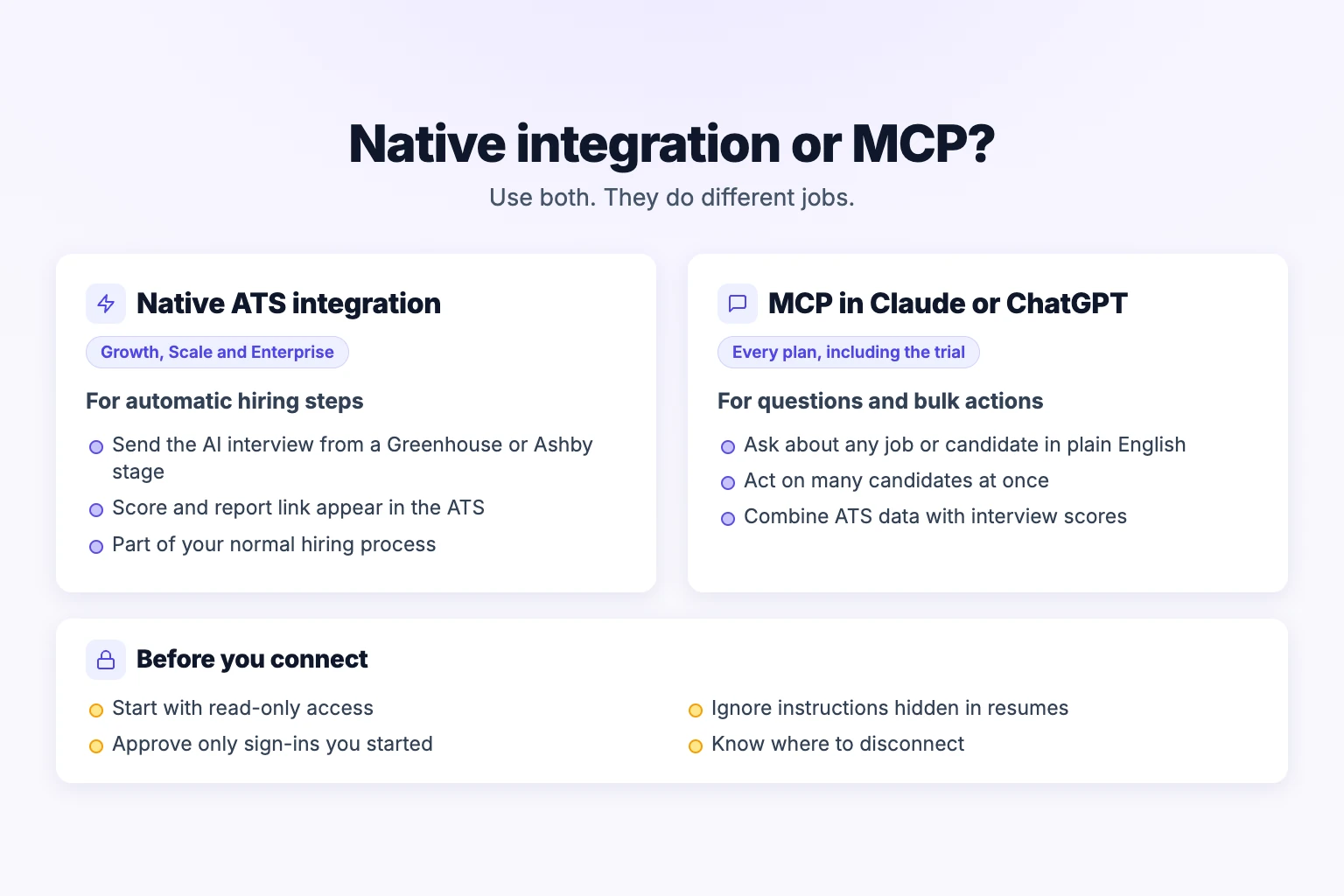
Use both, for different jobs:
Native integration for interviews that run inside your ATS hiring process. InterviewFlowAI's Greenhouse integration adds the AI interview as an assessment: a recruiter clicks Send Test on the candidate's InterviewFlowAI stage. The Ashby integration starts the interview automatically when a candidate enters the stage, once you add InterviewFlowAI to the job's interview plan. In both, scores and report links appear in the ATS. Native integrations are on the Growth, Scale and Enterprise plans.
MCP for questions you ask as they come up, actions across many candidates at once, and summaries that combine data from more than one system.
To see how the integrations work day to day, read the walkthroughs on AI screening inside Greenhouse and automating screening in Ashby.
Security checklist before you connect
Start read-only. In Greenhouse, keep the default scopes until your team trusts the workflow. In InterviewFlowAI, give teammates who only need answers the Viewer role.
Watch for hidden instructions. Resumes and interview answers can contain text written to trick AI assistants. Turn down any change or email you didn't ask for.
Approve only connections you started. If a sign-in window appears that you didn't trigger, click Cancel.
Know how to disconnect. In InterviewFlowAI, go to Settings > Connected apps > Disconnect and access ends immediately. In Greenhouse, disconnect the AI tool, or a Site Admin can remove its client or scopes in MCP Access. In Ashby, an Org Admin can turn off the MCP Server toggle.
Frequently asked questions
Does Ashby have an MCP server?
Yes. Ashby's official MCP server is in beta at https://mcp.ashbyhq.com/mcp/v1. It's available on all Ashby plans except Analytics-only, after an Org Admin turns it on under Opt-In Features.
Does Greenhouse have an MCP server?
Yes. Greenhouse MCP is in open beta for the Core, Plus and Pro tiers. A Site Admin adds each AI tool in Dev Center, then MCP Access. Without further setup, access is read-only.
Can an MCP server reject candidates for me?
Ashby's change_application_stage can move an application to Archived, and Ashby's automatic archive emails still run when it does. Greenhouse can only do this if a Site Admin enables the matching write scopes. Keep a human decision on every rejection.
Do I need both an ATS MCP and the InterviewFlowAI MCP?
Only if you want one assistant to work across both systems. The ATS MCP covers applicants and pipeline stages. The InterviewFlowAI MCP covers interview invitations, scores and results. Together, the assistant can go from who applied to who interviewed best in one conversation.
Is the InterviewFlowAI MCP included in my plan?
Yes. The InterviewFlowAI MCP is available on every plan, including the trial, while your subscription is active. The native Greenhouse and Ashby integrations are on the Growth, Scale and Enterprise plans.
Which ChatGPT plans can connect an ATS MCP?
According to OpenAI, full MCP access, including write actions, is available on ChatGPT Business and Enterprise/Edu, on ChatGPT web. Pro users can connect custom MCP servers with read and fetch permissions only. In Business workspaces, only admins and owners can create custom MCP connections.
Which AI assistants work with the InterviewFlowAI MCP?
Claude, ChatGPT, Claude Code, Codex, Cursor, VS Code and OpenCode have step-by-step setup in the docs. Other MCP-compatible assistants can use the Copy setup prompt button under Settings, then MCP and AI.
Start with one question
Connect one ATS MCP and the InterviewFlowAI MCP in the same assistant, then ask a question you usually answer with a spreadsheet: "Which candidates finished their first-round interview this week, and how did they score?" If the answer saves you an export, add the workflows above one at a time.
For more on AI agents in hiring, see our guide to using an AI agent for recruiting.
Sources
Ashby, Ashby MCP Server (Beta), retrieved November 3, 2026
Ashby, Ashby MCP is live, June 30, 2026
Greenhouse Support, Set up Greenhouse MCP with supported AI tools, last updated October 29, 2026
The New Stack, Workday MCP and agent runtime coverage, October 13, 2026
OpenAI Help Center, Connecting custom MCP servers in ChatGPT, retrieved November 3, 2026
InterviewFlowAI, MCP documentation, retrieved November 3, 2026