Greenhouse keeps your candidate pipeline organized. InterviewFlowAI adds structured AI phone and video interviews, detailed reports, and a consistent first screen without forcing recruiters to rebuild their hiring process in another system.
Most Greenhouse teams do not need another recruiting dashboard. They need to remove repetitive screening calls while keeping jobs, candidates, stages, and hiring decisions connected to their ATS. Recruiters can add InterviewFlowAI as an assessment stage, send an AI interview from Greenhouse, track its status, and open the completed report for review. Greenhouse remains the system of record, and the hiring team decides who moves forward.
Does Greenhouse use AI to screen candidates?
Yes, although “AI screening” can mean several different things inside a hiring process.
Greenhouse has native AI features such as keyword suggestions, Talent Matching, scorecard summaries, resume anonymization, and interview note-taking. It also has application rules for clear requirements such as work authorization, location, or a required licence. Those fixed rules are different from an AI interviewer.
Greenhouse Voice AI adds a two-way voice interview at the top of the funnel. A separate assessment partner such as InterviewFlowAI can also be connected to a Greenhouse interview plan. This lets a team collect structured phone or video interview evidence while continuing to manage the candidate in Greenhouse.
Greenhouse says its AI should assist recruiters rather than make final hiring decisions. InterviewFlowAI follows the same principle. It can ask questions, apply a role-specific rubric, and produce a transcript and scorecard. A person still decides whether the candidate advances.
For a broader explanation of what should and should not be automated, read our guide to AI candidate screening.
What does the InterviewFlowAI Greenhouse integration do?
The integration adds InterviewFlowAI as an assessment stage within a Greenhouse job’s interview plan.
Once the integration is enabled, a recruiter or coordinator can send the configured AI interview from Greenhouse. InterviewFlowAI sends the candidate instructions and an access link. Greenhouse shows the assessment status. When the interview is complete, the Interview Kit includes a link to the full report in InterviewFlowAI.
The two systems have different jobs:
| Greenhouse handles | InterviewFlowAI handles | Your hiring team handles |
|---|---|---|
| Jobs, candidate records, stages, permissions, and pipeline movement | The AI conversation, follow-up questions, recording, transcript, analysis, and configured scoring | Rubric approval, evidence review, exceptions, candidate communication, and advancement decisions |
Progress is visible in the ATS. The detailed recording, transcript, responses, and evaluation are reviewed through the report link.
How is InterviewFlowAI different from Greenhouse Voice AI?
Greenhouse Voice AI is now a direct native option, so an integration guide that ignores it would leave buyers with the most obvious question unanswered.
Both products run structured, two-way AI interviews and return evidence for human review. The choice depends on workflow preference, interview formats, reporting, and how much flexibility the team needs outside Greenhouse.
| Decision point | InterviewFlowAI with Greenhouse | Greenhouse Voice AI |
|---|---|---|
| Product model | External assessment integration connected to a Greenhouse interview stage | Native Greenhouse product |
| Interview options | AI phone and video screening, with role-specific questions and follow-ups | Two-way voice interviews |
| Candidate status | Visible in Greenhouse | Native to the Greenhouse workflow |
| Detailed evidence | Opened in InterviewFlowAI from the Greenhouse Interview Kit | Reviewed within the Greenhouse product experience |
| Best fit | Teams that want format flexibility, InterviewFlowAI reporting, and the option to use the platform across more than one workflow | Teams that want the most native Greenhouse experience and primarily need voice screening |
| Buying route | Confirm integration eligibility and usage pricing with InterviewFlowAI | Purchased through Greenhouse under its commercial terms |
Test both workflows against the same repeatable role. Check how quickly a recruiter can reach the underlying answer, how candidates experience the interview, and whether the report gives hiring managers enough evidence to act.
Greenhouse explains its native product on the Voice AI page. Teams evaluating the wider category can also use our AI interview software buyer’s guide.
How does AI candidate screening work inside Greenhouse?
The current InterviewFlowAI workflow has six steps:
A candidate reaches the InterviewFlowAI assessment stage in the Greenhouse interview plan.
A recruiter or coordinator selects Send Test next to the stage.
InterviewFlowAI sends the candidate an invitation and access link.
The candidate completes the configured AI interview on their own schedule.
Greenhouse displays the assessment status and adds a report link to the completed Interview Kit.
A recruiter selects Go to test, reviews the InterviewFlowAI evidence, and decides what happens next in Greenhouse.
That last step should stay human. A score can help a recruiter decide where to begin, but a numeric result on its own is not enough.
Teams can choose AI phone interviews when camera access may reduce completion, or AI video interviews when visual communication is relevant to the role.
How do you configure InterviewFlowAI in Greenhouse?
Greenhouse treats InterviewFlowAI as an assessment API integration. Setup requires Job Admin permissions or above.
1. Retrieve the InterviewFlowAI integration key
Sign in to the InterviewFlowAI dashboard and open ATS Integration. Find Greenhouse, select Open Setup, and generate or retrieve the API key shown there.
Treat the key like a password. Do not paste it into an email or a public ticket.
2. Ask Greenhouse Support to enable the integration
Open a ticket with Greenhouse Support using its assessment integration process. Do not include the API key in the initial ticket. If Greenhouse needs the key, its support team can provide a secure SendSafely link.
Wait for Greenhouse to confirm that the integration is enabled before configuring a job.
3. Add InterviewFlowAI to the job’s interview plan
In Greenhouse, go to Jobs, open the relevant job, and select Job Setup. Choose Interview Plan, select Add stage, and add the InterviewFlowAI assessment stage.
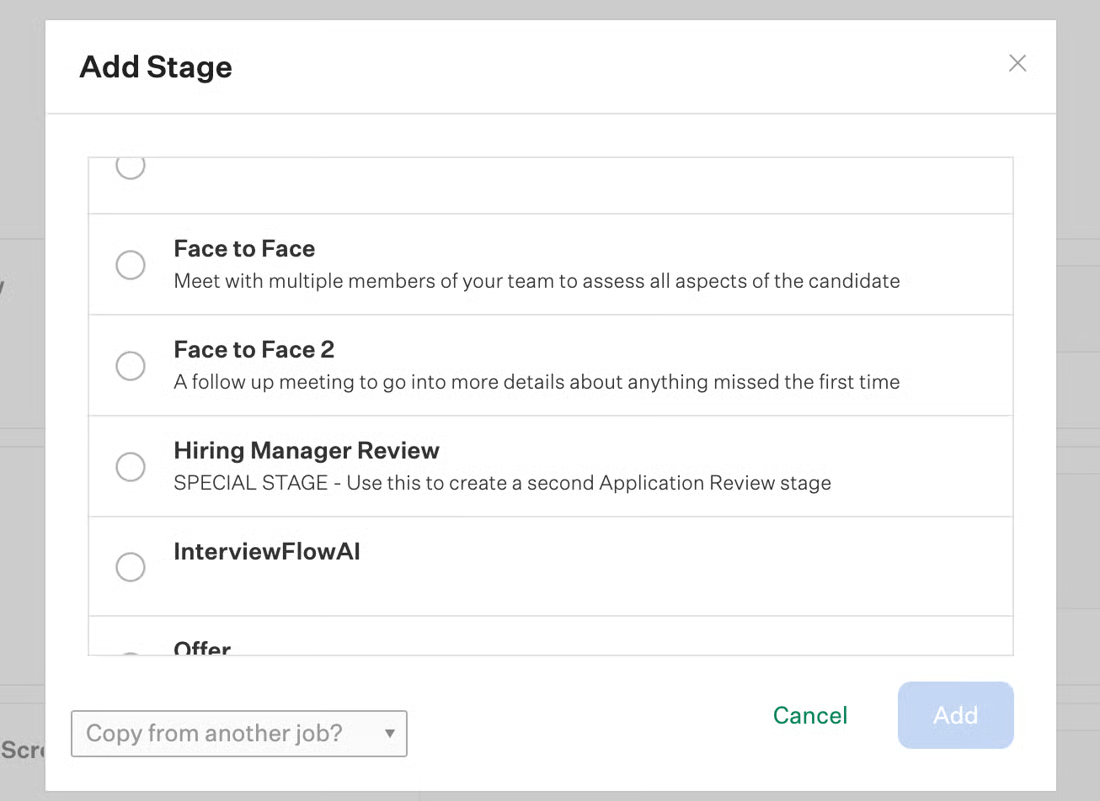
Start with one repeatable role rather than adding the stage to every open job. A recurring support, sales, or call centre role usually provides enough completions to test the rubric.
4. Select the assessment and reviewer
Open Edit Take Home Test inside the new stage. Choose the InterviewFlowAI assessment associated with that role, assign at least one Greenhouse reviewer, and save the stage.
Configure the questions, grading rules, and candidate email inside InterviewFlowAI. Six to ten focused questions will usually reveal more than a long list of generic prompts.
5. Send and review the AI interview
Move a test candidate into the stage and select Send Test. Confirm that the invitation arrives, the correct interview opens, the status changes in Greenhouse, and the completed Interview Kit contains the Go to test link.
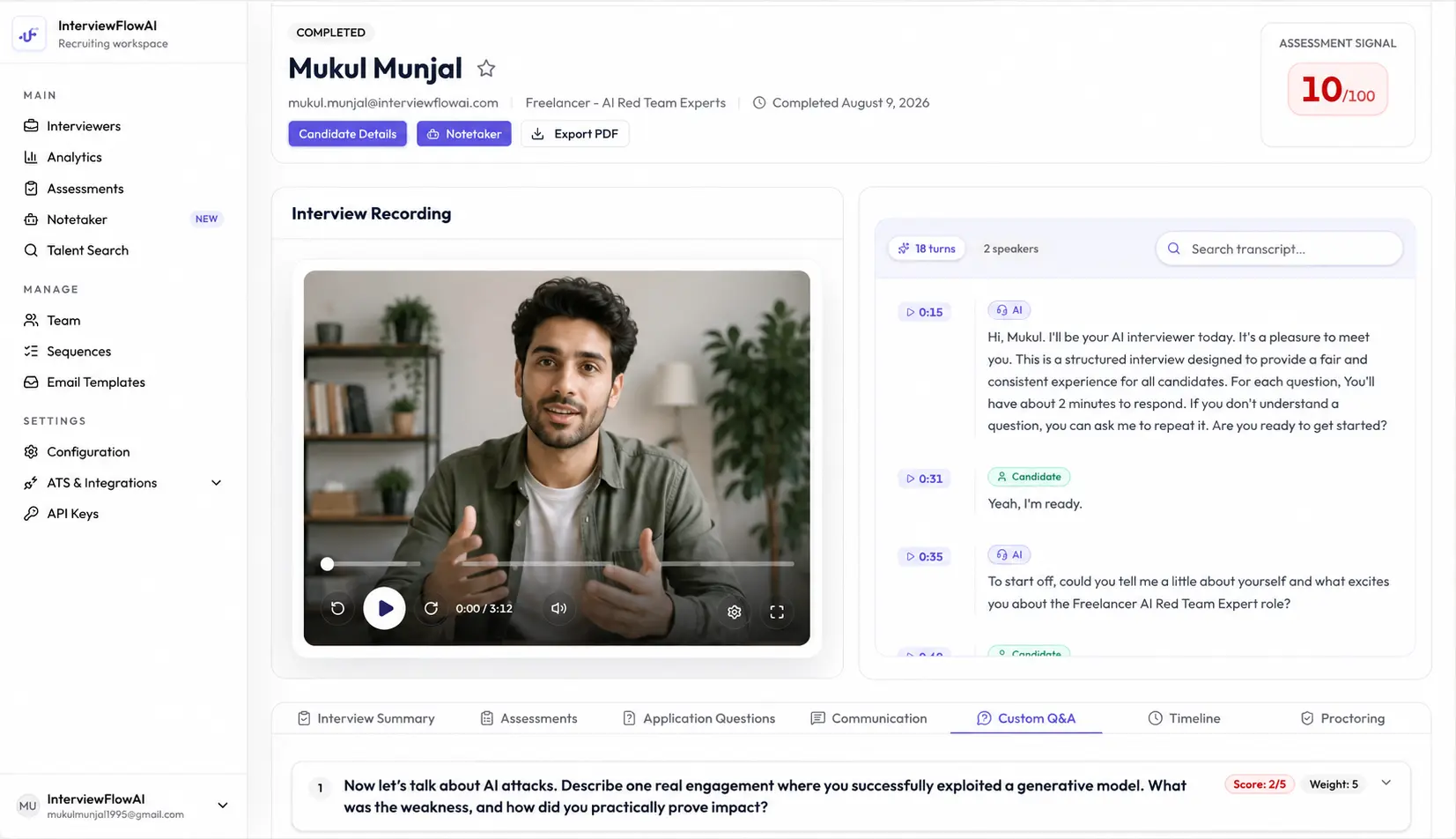
Run the flow yourself before inviting applicants. Test it on a phone and laptop, and review the candidate instructions carefully.
The InterviewFlowAI Greenhouse documentation, official Greenhouse partner article, and Greenhouse assessment API guide contain the current setup references.
Can InterviewFlowAI interviews start automatically from Greenhouse?
The public InterviewFlowAI and Greenhouse documentation currently describes a recruiter or coordinator selecting Send Test. It does not document an automatic invitation that fires as soon as a candidate enters the stage.
Adding InterviewFlowAI to an interview plan and automatically sending an interview are not the same thing. The stage places the assessment in the workflow. The documented Send Test action starts the candidate invitation.
This manual checkpoint lets a recruiter confirm the candidate and assessment during a pilot. If automatic stage-based sending is a hard requirement, verify the current capability with InterviewFlowAI first.
What results can recruiters review from Greenhouse?
Greenhouse shows the assessment status after the interview is sent. Once the candidate finishes, the Interview Kit includes a link to the full report in InterviewFlowAI.
Depending on how the assessment is configured, that report can include:
The interview recording and transcript
The candidate’s response to each question
AI-assisted analysis and summaries
Custom scoring or decision fields
Reviewer notes
Scorecards and transcripts let hiring managers see what the candidate said, how the answer relates to a competency, and what needs a follow-up.
The report should support a decision, not make one on the recruiter’s behalf. Teams should allow reviewers to question a score, examine the underlying response, and record why they advanced or declined a candidate.
Which Greenhouse hiring workflows benefit most from AI screening?
High-volume inbound hiring
When one role receives hundreds of applications, first-round calls become the bottleneck. A structured AI interview lets plausible candidates provide evidence without waiting for a calendar slot. Recruiters start with completed conversations instead of a list of people to call. See the high-volume hiring workflow.
Frontline and hourly roles
Candidates for hourly roles often apply outside office hours or complete the process on a phone. An asynchronous interview can check communication, availability, motivation, and role scenarios without a live screen for every applicant.
Global screening
InterviewFlowAI can collect the same core evidence across locations and working hours while Greenhouse keeps the team aligned on stage and status.
Verification beyond the resume
AI-assisted applications have made polished resumes easier to produce. That does not mean every polished application is dishonest. It does mean the resume has less power to distinguish candidates on its own.
A conversational screen can ask someone to explain a project, describe a decision, and respond to a follow-up. This gives the recruiter fresh evidence instead of another keyword match. Read our guide to AI-generated job applications.
Staffing and RPO workflows
Agencies can run a consistent first screen before submitting candidates. Recordings and reports help clients understand why someone was recommended without joining the original interview.
Can AI screening catch fake or AI-generated applications?
No tool should promise that it can prove a candidate is genuine from one score.
InterviewFlowAI’s Trust Score can surface signals such as tab switching, copy-and-paste activity, unusual response timing, or inconsistent answers. These signals tell a recruiter where to look more closely. They should not become an automatic rejection rule.
Review the interview alongside the application. Ask a targeted follow-up when a claim does not hold together, and use the employer’s approved process when identity is the concern. A flag is a reason to review, not a verdict.
How do you protect candidate experience when using AI interviews?
Candidates are not rejecting every use of AI. They are reacting to unclear, rigid, or impersonal processes.
Greenhouse’s 2026 Candidate AI Interview Report surveyed 2,950 active job seekers across five countries. It found that 63% had experienced an AI interview, while 38% had walked away from a hiring process because it included one. Seventy percent said they were not clearly told beforehand that AI would evaluate them. Those numbers make transparency part of conversion, not a compliance footnote.
Before sending an interview:
Tell candidates that the interview uses AI and explain what it does.
State the expected duration and the device or connection requirements.
Explain that a person reviews the result and owns the advancement decision.
Offer a clear route to request an accommodation or alternative process.
Collect only the data needed for the assessment and document retention rules.
Give candidates a contact for technical problems.
The EEOC’s AI and ADA resources explain why employers need an accommodation process when software could screen out a person with a disability. Legal requirements vary by location, so employers should have counsel review their specific workflow.
How should teams pilot Greenhouse AI screening?
Pick one role with steady volume and a clear definition of success. Record recruiter time, time to first screen, completion rate, pass rate, and hiring-manager acceptance before changing the process.
Build a short rubric around four to six job-related competencies. Write down what weak, acceptable, and strong evidence looks like before reviewing candidate results. Avoid vague criteria such as “culture fit” that different reviewers can interpret however they want.
For the first group, compare the AI report with the existing recruiter screen. Review disagreements and a sample of low-scoring interviews. Check whether recruiters can reach the evidence quickly or end up redoing the assessment.
A faster screen that creates more review work has not solved the problem. Keep the pilot narrow until the team trusts the workflow.
Which metrics show whether the integration is working?
Use a small scorecard that pairs efficiency with quality:
| Metric | What it tells you |
|---|---|
| Time to first screen | Whether candidates receive a quicker first interaction |
| Recruiter minutes per candidate | Whether the workflow removes work or moves it elsewhere |
| Invitation-to-completion rate | Whether candidates understand and complete the process |
| Completion-to-review time | Whether finished reports are acted on promptly |
| Hiring-manager acceptance | Whether the shortlist contains candidates worth advancing |
| Recruiter override rate | Whether the rubric and reviewer judgment regularly disagree |
| Candidate satisfaction | Whether the process feels clear, accessible, and respectful |
| Downstream pass rate | Whether early screening evidence remains useful later |
Track these metrics by role. A workflow that performs well for a high-volume support role may not fit senior sales or executive hiring.
Is InterviewFlowAI the right Greenhouse AI screening integration for your team?
InterviewFlowAI fits teams that repeat the same first-round questions, lose time to screening calls, hire across time zones, or need better evidence than a resume before a live interview.
It is a weaker fit for a small executive search, a role with too few applicants to measure a pilot, or a team that wants every piece of evidence stored inside Greenhouse.
InterviewFlowAI has completed more than 100,000 AI interviews across more than 100 businesses. Test one real role with the questions and rubric your recruiters already use to see whether it removes your bottleneck.
Frequently asked questions about Greenhouse AI screening
Does InterviewFlowAI replace Greenhouse?
No. Greenhouse remains the ATS and hiring system of record. InterviewFlowAI adds an AI interview and assessment layer to the job’s interview plan.
Does InterviewFlowAI automatically reject candidates?
InterviewFlowAI produces structured evidence and configured scoring for recruiter review. Your hiring team should retain responsibility for deciding who advances or is rejected.
What Greenhouse permissions are required?
Greenhouse states that setup requires Job Admin permissions or above. Your configuration may further limit who can edit interview plans.
Where do completed InterviewFlowAI reports appear?
Greenhouse displays the assessment status. Once the interview is complete, the candidate’s Interview Kit contains a Go to test link that opens the detailed report in InterviewFlowAI.
Does the integration support phone and video interviews?
InterviewFlowAI supports AI phone and video interview workflows. Confirm that the format and assessment you want are configured before adding the stage to a live Greenhouse job.
How much does the Greenhouse integration cost?
Integration access and pricing can depend on the InterviewFlowAI plan, screening volume, and implementation requirements. Check the current InterviewFlowAI pricing or request a quote for the Greenhouse workflow rather than relying on an older per-interview figure.
Should recruiters still review every result?
Yes. Recruiters should be able to examine the transcript, recording, question-level evidence, and scoring rationale before deciding what happens next. AI can collect and organize the evidence. The hiring decision still belongs to people.