A candidate applies. A recruiter reviews the application and copies details into another tool. They send a screening invite and wait for the interview. Then they update the ATS and alert the hiring manager. The candidate may spend only 15 minutes on the screen. The handoffs around it can take much longer. Recruitment process automation with Zapier and InterviewFlowAI removes those handoffs.
Zapier connects the tools already used by the hiring team. InterviewFlowAI conducts the structured AI phone or video interview. The ATS, CRM, form, or spreadsheet keeps the candidate record. Recruiters review the interview evidence and decide who moves forward.
What is Recruitment Process Automation, and Where Does Zapier Fit?
Recruitment automation often starts with a single task: sending an email, scheduling a call, or copying a candidate into a spreadsheet. Useful, yes. But the recruiter still has to notice when one stage ends and start the next.
Recruitment process automation connects the stages. An event in one system starts the correct action in another. Candidate information travels with the workflow, and recruiters step in when the process needs judgment rather than data entry.
In a Zapier recruitment automation workflow, each system has a clear job:
| System | What it does |
|---|---|
| ATS, CRM, form, or spreadsheet | Captures the candidate and keeps the source record |
| Zapier | Watches for an event, moves data, and starts the next action |
| InterviewFlowAI | Runs the AI interview and produces the recording, transcript, scorecard, and report |
| Recruiter or hiring manager | Reviews the evidence, handles exceptions, and decides what happens next |
Zapier does not replace the ATS, and it does not conduct the interview. It connects the systems so that candidate screening does not depend on someone moving every record by hand. For a wider view of the category, read the 2026 guide to AI recruiting automation.
Can Zapier Automate Candidate Screening?
Yes. Zapier can automate the workflow around candidate screening, while InterviewFlowAI carries out the structured interview and evaluation. A typical workflow looks like this:
A candidate applies or reaches the screening stage in an ATS.
Zapier detects that event.
Zapier sends the candidate's name, email, and job context to InterviewFlowAI.
InterviewFlowAI invites the candidate to complete the selected AI interview.
The candidate completes the interview on their own time.
InterviewFlowAI creates the report with scores and recommendations.
A second Zap updates the candidate record and alerts the reviewer.
A recruiter checks the transcript, recording, and scorecard before deciding who advances.
This is the difference between candidate screening automation and automatic hiring. The workflow can collect and organize evidence without turning a model score into the final decision.
InterviewFlowAI supports AI phone interviews and video interviews. Candidates do not have to wait for an open recruiter calendar, while the hiring team gets a consistent first-round conversation to review.
How Does InterviewFlowAI Work with Zapier?
The InterviewFlowAI Zapier integration can send candidates into InterviewFlowAI and start another Zap when a candidate or interview event occurs. The current integration has two actions and six triggers.
Actions that send data to InterviewFlowAI
| Action | What it does |
|---|---|
| Invite Candidate | Invites a candidate to the selected Interviewer for screening |
| Shortlist Candidate | Shortlists a candidate for the selected AI interview |
Triggers that send InterviewFlowAI events to other tools
| Trigger | When it fires |
|---|---|
| Candidate Created | A candidate is created or added to an Interviewer |
| Interview Started | The candidate starts the interview |
| Interview Completed | The candidate completes the interview |
| Interview Declined | The candidate is marked as declined |
| Interview Opted Out | The candidate opts out of the interview |
| Interview Report Available | The report with scores and recommendations is ready |
The distinction between "Interview Completed" and "Interview Report Available" matters. Completion tells the workflow that the candidate finished. Report availability tells it that the evaluation is ready to use. If the next step needs a scorecard or recommendation, use the report trigger.
Check the InterviewFlowAI integration page on Zapier before building. It shows the currently supported triggers, actions, and popular app pairings.
What Recruitment Workflows Can You Build With InterviewFlowAI and Zapier?
Start with the workflow that currently consumes the most recruiter time. A single reliable Zap is more useful than a large automation map that nobody trusts.
Move candidates from an ATS into an AI screen
Set the Zap to run when a candidate enters a defined screening stage. Zapier passes the candidate into InterviewFlowAI, and a second Zap returns the completed report to the ATS.
This works well when the ATS remains the system of record but does not have a native InterviewFlowAI integration. The recruiter stays inside the ATS and opens the supporting interview evidence from the candidate record.
Turn an application form into a screening workflow
Candidates collected through Google Forms, Zapier Forms, or another form app can enter an InterviewFlowAI screen without first being copied into a spreadsheet. Add a filter for clear eligibility conditions, then send the remaining applicants to the interview.
This setup can suit a startup, community hiring programme, or recruitment agency running a focused campaign without a large ATS.
Route high-volume applicants by role or location
Use a Zapier Filter or Path to send each candidate to the correct InterviewFlowAI job based on role, location, department, or another stable field. Each group receives the appropriate questions and scoring rubric.
The benefit is not simply speed. A warehouse applicant and a sales applicant should not receive a generic screen because both happened to arrive through the same form. Routing keeps the interview tied to the actual role.
Read more about designing a repeatable high-volume hiring workflow.
Keep recruiters informed without another dashboard check
Use the Interview Started, Completed, Declined, or Opted Out triggers to update the candidate record or send an internal alert. A recruiter can see where the process stopped without opening InterviewFlowAI every morning to compare lists.
Avoid sending a Slack or email alert for every small event. Notify the team when an exception needs attention or when the report is ready for review.
Prepare candidate evidence for agency clients
When a report is available, Zapier can notify the assigned consultant and update the candidate record with the structured output. The consultant reviews the recording, transcript, and scorecard before preparing the client submission.
This gives recruitment agencies a repeatable first-round process without turning the client submission into an unreviewed AI summary.
Build a simple screening operations report
Send selected workflow events to Google Sheets or Airtable. Track invitations, starts, completions, report-ready timestamps, and review outcomes. That gives the team a basic view of where candidates wait and where the automation fails.
How Do You Set Up Recruitment Process Automation with Zapier & InterviewFlowAI?
Build the inbound candidate flow first. Once that works, create the return flow for interview results.
Step 1: Prepare the InterviewFlowAI interview
Create the job or Interviewer the candidate will enter. Add the questions, role criteria, and scoring setup before connecting Zapier. Test the interview yourself so that you know what the candidate will receive.
If the question set still needs work, use the pre-screening interview question library to build a role-specific starting point.
Step 2: Generate an InterviewFlowAI API key
In InterviewFlowAI:
Go to API Keys.
Select Generate Key.
Give the key a clear name, such as Zapier recruitment workflow.
Copy the key and store it securely.
Do not paste the API key into a shared document, screenshot, or URL. It gives the connected Zapier account access to the actions supported by the integration.
Step 3: Create the inbound Zap
Choose the candidate source as the trigger app. Depending on the hiring stack, the event might be a new ATS stage, a new spreadsheet row, or a completed form.
Before the InterviewFlowAI action, add the checks the workflow needs. For example:
Search for an existing candidate record when the source app supports it.
Stop the Zap if the email address is missing.
Filter for the roles that use automated screening.
Route candidates to different InterviewFlowAI jobs based on the role field.
Then add a new action, search for InterviewFlowAI, and choose Invite Candidate or Shortlist Candidate.
Step 4: Connect the InterviewFlowAI account and map the fields
Sign in to InterviewFlowAI from Zapier and paste the API key when prompted. In the Configure tab, map the following fields:
Interviewer: the InterviewFlowAI interview the candidate should receive
Candidate Name: the full name from the source record
Candidate Email: the email address used for the invitation
Additional Fields: optional JSON for values such as source, referral status, or an upstream score
Metadata: optional JSON for operational values such as an external candidate ID, phone number, or email timing
A useful metadata payload could look like this:
{ "externalId": "candidate_123", "phoneNumber": "+1-555-123-4567", "sendEmailAfter": 1 }Pass the ATS or CRM candidate ID as externalId whenever possible. Names change, and email addresses can be duplicated or entered incorrectly. A stable ID gives the return Zap a better way to locate the original record.
Step 5: Test the candidate invitation
Use a controlled test record with an email address owned by the team. Run the Zap and confirm:
InterviewFlowAI creates the correct candidate.
The candidate receives the intended interview.
The name, email, and metadata arrive correctly.
The invitation and reminder timing match the hiring process.
Do not switch on a high-volume workflow after one successful happy-path test. Test a missing email, a duplicate candidate, and a record meant for a different role.
Step 6: Create the return Zap for the interview report
Create another Zap and select InterviewFlowAI as the trigger app. Choose Interview Report Available when the next action needs the evaluated report.
Connect the InterviewFlowAI account, select the relevant Interviewer, and test the trigger to pull sample data. Then add the destination action. That could update the ATS, add data to a spreadsheet, or notify the recruiter that the report is ready.
Step 7: Run a small pilot before publishing the workflow
Use one role and a small internal or approved test group. Confirm the candidate invitation, interview completion, report creation, destination update, and alert. Record who owns the Zap and what they should do if a run fails.
The exact fields and supported events can change. Keep the InterviewFlowAI Zapier setup guide open while configuring the workflow.
How Do You Send Interview Scores and Reports Back To Your ATS?
Treat the return workflow as a separate Zap. The inbound Zap creates or invites the candidate. The return Zap listens for the report and updates the system used by the recruiting team. Use this order:
Trigger when the InterviewFlowAI report is available.
Read the external candidate ID or another stable identifier from the payload.
Search for the existing record in the ATS.
Update dedicated interview fields or add a note with the report link.
Notify the assigned recruiter after the update succeeds.
Send unmatched records to an exception queue for manual review.
Do not create a new candidate record every time a report arrives. Search first and update the existing record. Otherwise, recruiters can end up with one profile for the application and another for the interview.
The destination fields should preserve the evidence behind the result. A ranked list can tell a reviewer where to start, but scorecards and transcripts show what the candidate said and how the evaluation was formed.
If the ATS does not expose the required action in Zapier, send the report to a structured review queue or use the ATS API or webhook options approved by the technical team.
How Do You Keep a Zapier Recruitment Workflow Reliable?
Recruiters are right to be suspicious of an automation that needs weekly babysitting. The workflow saves time only when failures are visible, and records arrive in the right place.
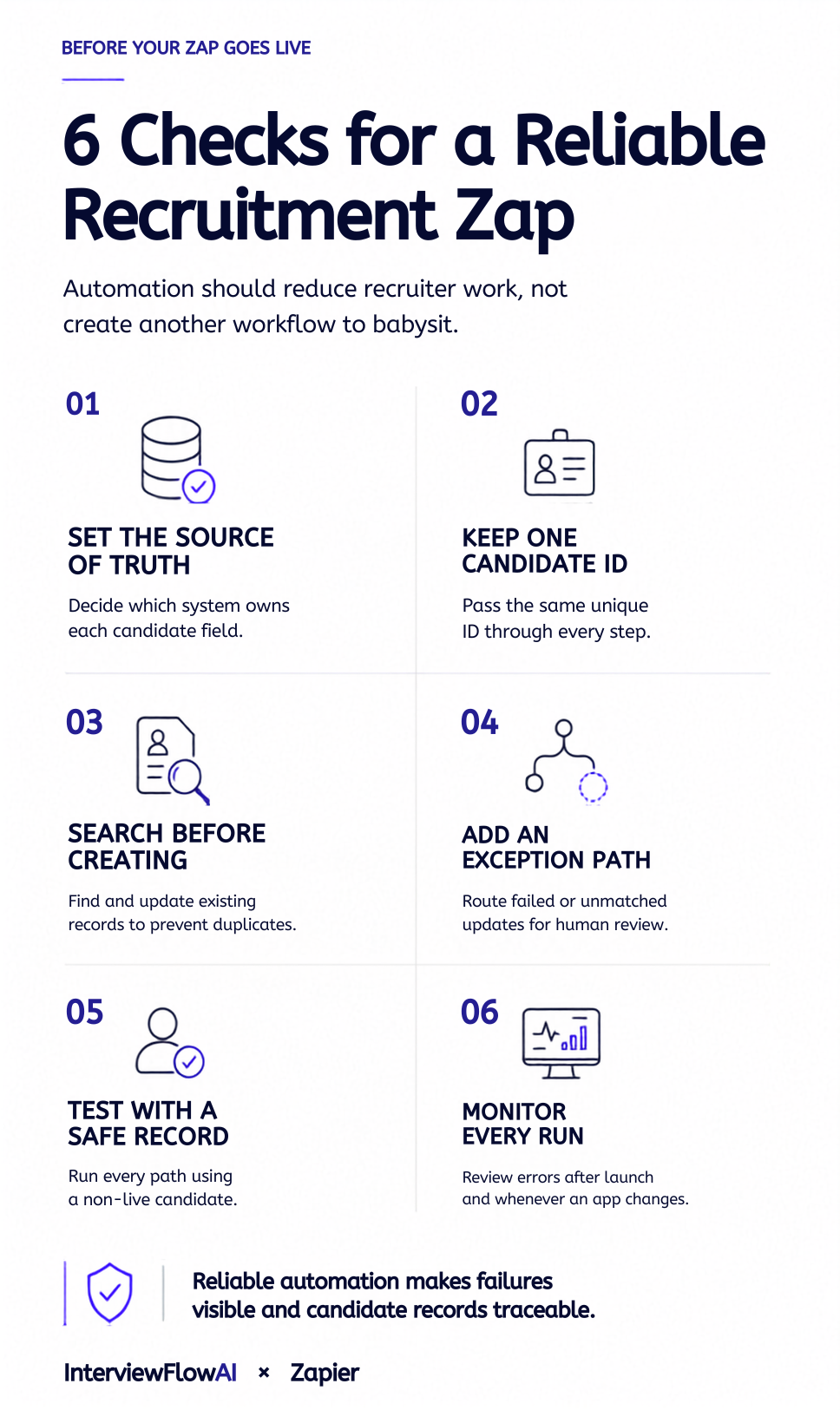
Use the following controls:
Assign one system as the owner of each field. The ATS might own stage and recruiter assignment, while InterviewFlowAI owns interview status and report data.
Pass a unique candidate ID through the workflow.
Search before creating records.
Use Filters to stop records that should not continue.
Use Paths when the workflow needs different outcomes, such as proceed, hold for review, or send to an exception queue.
Keep a record of failed or unmatched updates.
Test changes with a non-live candidate before republishing the Zap.
Review Zap run history after launch and after changing either connected app.
Rotate the API key if it may have been exposed.
Zapier's documentation explains how Filters and Paths control conditional workflows and how teams can review Zap run statuses.
Which Recruitment Decisions Should Stay Human?
Automate the coordination work: invitations, reminders, data transfer, status updates, and reviewer notifications. Use InterviewFlowAI to conduct the first-round conversation and organize the evidence.
A human should still decide whether a candidate advances, receives a rejection, or needs another form of assessment. Recruiters should also handle accommodation requests, conflicting evidence, and cases where the automation cannot match the correct record.
This is how Zapier describes its own AI recruiter pilot. A recruiter reviews the transcript, video clips, summary, and score before anyone advances. The AI screen does not make the hiring decision. Read what Zapier learned from its AI recruiter screens.
Employers should tell candidates when AI is involved, use job-related criteria, and provide a route for accommodations where required. The EEOC's resources on AI and the ADA cover disability-related considerations for employers in the United States. The NIST AI Risk Management Framework offers a voluntary framework for managing AI risk. Legal, notice, and retention requirements vary by location, so the team should have its configuration reviewed for the jurisdictions where it hires.
InterviewFlowAI has processed more than 100,000 interviews across 100+ businesses. Candidates who completed an interview and chose to rate it gave an average score of 4.8 out of 5, and completion typically ranges from 70% to 85%.
How Do You Measure Whether Recruitment Automation is Working?
Measure the workflow before and after the pilot. Otherwise, a busy automation can look successful while simply moving work into another queue. Here’s what to actually track:
| Metric | What it reveals |
|---|---|
| Application to invitation time | Whether the automation removes the wait before screening |
| Invitation to completion rate | Whether candidates start and finish the interview |
| Report-ready to reviewer-opened time | Whether completed evidence reaches a person quickly |
| Recruiter minutes per screened candidate | Whether the workflow reduces manual coordination |
| Successful ATS update rate | Whether the return Zap works reliably |
| Duplicate or unmatched record rate | Whether identity mapping needs attention |
| Decline and opt-out rate | Whether the candidate experience needs review |
| Percentage of reports receiving human review | Whether the agreed oversight step happens |
Do not begin with an industry benchmark. Record the current process for one or two roles, run the pilot, and compare the same stages. Teams that want to model the wider impact can use the time-to-hire calculator.
When should you use Zapier instead of a native ATS integration?
Zapier is useful when the hiring stack needs flexibility. A native integration is usually better when it already supports the complete workflow with fewer moving parts.
| Use Zapier when | Prefer a native integration when |
|---|---|
| The candidate source has a Zapier app but no native InterviewFlowAI connection | The ATS already has a supported InterviewFlowAI integration |
| The workflow needs forms, spreadsheets, messages, or several destination apps | Candidate and report syncing can stay inside the ATS |
| The team needs custom routing by role, source, or location | The hiring process follows standard ATS stages |
| The team wants to test a workflow before funding custom development | The workflow is high volume and business critical |
| The hiring operation needs an interim connector | The native integration covers the required data and error handling |
For example, Ashby users can use the native connection described in the InterviewFlowAI and Ashby workflow guide. Teams using another ATS, a form, or a spreadsheet can use Zapier to build a comparable handoff with the triggers and actions available to them.
Frequently asked questions
Do I need coding skills to connect InterviewFlowAI and Zapier?
No. The standard setup uses Zapier's visual workflow builder and the InterviewFlowAI app. You will need to understand which event should start the workflow, how candidate fields map between systems, and where the result should go. Custom APIs or webhooks may need technical help. If you face issues, please contact our experts.
Can I use InterviewFlowAI and Zapier without an ATS?
Yes. A form, spreadsheet, or database can capture the candidate and start the Zap. Assign one system as the source record, keep a stable candidate ID, and make sure a person owns exceptions and status changes.
Can Zapier invite candidates automatically?
Yes. The Invite Candidate action sends a candidate to the selected InterviewFlowAI Interviewer. Map the candidate name and email from the source app, then test the invitation with an internal record before using it with applicants.
What happens when a candidate declines or opts out?
Interview Declined and Interview Opted Out are separate InterviewFlowAI triggers. Use them to update the candidate record, stop reminders, and notify the recruiter when the hiring process requires follow-up.
Can interview reports be sent to Slack, Gmail, or Google Sheets?
Yes, if the destination app and required action are available in Zapier. Trigger the Zap when the InterviewFlowAI report is available, then map the fields needed by the destination. Avoid putting sensitive candidate details into broad channels.
How do I prevent a candidate from being invited twice?
Use a stable candidate ID, search the destination before creating a record, and store the invitation status in the source system. Add a Filter that allows the invitation only when the candidate has not already entered the InterviewFlowAI stage.
Is the InterviewFlowAI API key secure?
Treat it as a credential. Store it only in the Zapier account connection, restrict who can access the Zap, and rotate the key if it is exposed. Never place it in a query parameter, screenshot, or shared spreadsheet.
Can the workflow support both phone and video screening?
Yes. Configure the appropriate InterviewFlowAI interview for the role, then route the candidate to that Interviewer through Zapier. The candidate should know which format they will receive before starting.
Does Zapier or InterviewFlowAI make the final hiring decision?
No. Zapier moves data, and InterviewFlowAI organizes interview evidence. A recruiter or hiring manager should review the candidate's answers and remain accountable for progression and hiring decisions.
How much does recruitment process automation cost?
The total depends on InterviewFlowAI interview volume, the Zapier plan, and any ATS or destination-app costs. Check the current InterviewFlowAI pricing and Zapier task requirements for the planned workflow before launch.