An interview asks for a recruiter’s full attention. The workflow around it often asks for the opposite. Listen carefully. Ask the right follow-up. Watch for hesitation. Keep the conversation comfortable. Take accurate notes. Remember the details. Then turn a page of shorthand into something a hiring manager can actually review. That split is one reason we built InterviewFlowAI Notetaker, an AI note taker for recruiter-led interviews.
Add this AI Notetaker to a Google Meet, Zoom, or Microsoft Teams interview from your connected calendar, or paste a meeting link for an ad hoc call. After the recruiter gets the participants’ consent, Notetaker joins visibly, records and transcribes the conversation, and prepares a structured hiring report with timestamp-linked evidence. The recruiter still leads the interview. The hiring team still makes the decision. Notetaker handles the documentation that usually competes for attention in the room.
This guide explains what an AI interview note taker does, where it helps, what recruiters should review, how to handle consent, and how InterviewFlowAI keeps recruiter-led interviews connected to the rest of the candidate journey.
What is an AI note taker for interviews?
An AI note taker for interviews is software that records and transcribes a recruiter-led or hiring-manager-led conversation, then turns it into notes that the hiring team can review. A recruitment-specific notetaker can go further by organizing the conversation into a candidate report, linking findings to exact moments in the interview, and keeping the output with the candidate record.
That last part matters. A transcript is a record of what was said. It is not automatically a useful hiring handoff.
A recruiter still has to answer practical questions:
What did the candidate say that supports their experience?
Which claims need a closer look?
What was left unclear?
What should the next interviewer explore?
Where can a reviewer find the original answer?
A generic meeting assistant may produce a summary and a list of action items. An interview notetaker should prepare the conversation for a hiring decision without pretending to make that decision on the team’s behalf.
This makes an AI notetaker different from an AI interviewer. In a recruiter-led interview, a person asks the questions and responds to the candidate. The software stays in a supporting role: recording, transcribing, organizing, and making the conversation easier to review.
Why are interview notes still a bottleneck for recruiters?
Interview notes look like a small task because the notes themselves are usually short. The hidden work sits around them.
Recruiters describe trying to keep eye contact while typing, writing fragments by hand, cleaning those fragments after the call, and copying the result into an ATS field that was never designed to hold a useful account of a conversation. In one recruiting discussion, the original author of the post put the problem plainly: their ATS existed, but it was not good for taking notes. In another, a recruiter asked whether typing distracted the candidate or whether note-taking distracted the interviewer.
These are anecdotes, not universal findings. But the pattern is consistent with broader candidate-experience research.
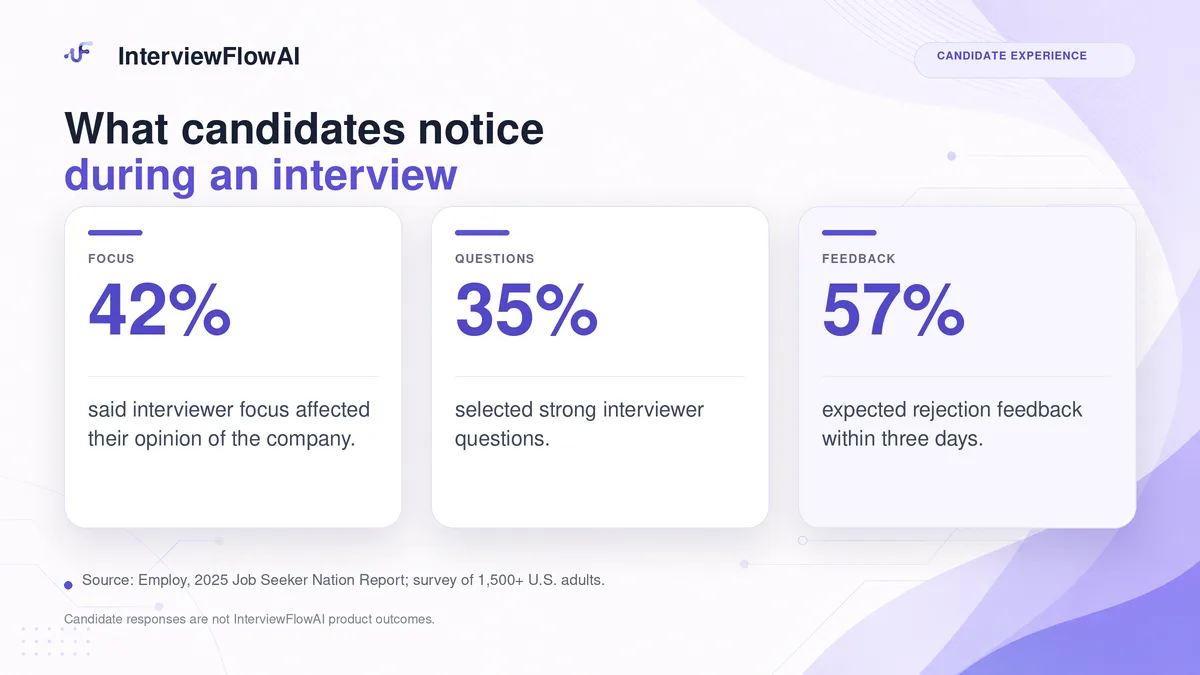
In Employ’s 2025 survey of more than 1,500 U.S. adults, 42% said an interviewer maintaining focus affected their opinion of a company, while 35% selected an interviewer asking strong questions. The same report found that 57% expected to hear back within three days if they were not selected. See the Employ Job Seeker Nation Report.
An AI notetaker does not guarantee better questions or faster feedback. It can, however, remove some of the manual work that makes both harder. The note-taking bottleneck usually appears in five places.
1. Attention is divided during the conversation
The recruiter is deciding what is important while the candidate is still talking. A useful detail can arrive while the recruiter is finishing the previous sentence in their notes. The result is often a trade-off between a better conversation and a more complete record.
2. Shorthand loses context
“Led migration. Team of 6. 28%.” may make sense immediately after the call. A day later, the recruiter may not remember whether 28% referred to revenue, cycle time, cost, or adoption. A hiring manager who was not present has even less context.
3. Post-call cleanup creates a second task
The interview ends, but the documentation does not. Notes need to be expanded, organized, moved into the hiring system, and written clearly enough for someone else to understand. On an interview-heavy day, that work stacks up quickly.
4. Candidate context becomes scattered
The resume is in the ATS. An AI screen is in another platform. Live-interview notes are in a document. The recording is in the meeting tool. A hiring manager’s feedback is in Slack. The problem is no longer missing information; it is finding the right information before the next decision.
5. Handoffs depend on memory
When notes are late or thin, the next interviewer starts without useful context. Panels repeat questions. Recruiters chase feedback. Agencies spend time reconstructing a candidate story for a client. A decision that should be based on evidence becomes a contest between incomplete recollections.
How does an AI interview note taker work?
The exact workflow varies by product. In InterviewFlowAI, the process is designed to fit the video interviews recruiters already run.
1. Select the meeting
Choose an upcoming interview from a connected calendar or paste a Google Meet, Zoom, or Microsoft Teams link. This also supports interviews arranged at short notice.
2. Inform the participants and confirm consent
Before recording begins, tell the candidate and other participants what the Notetaker will do. Confirm the appropriate consent for the locations involved and follow your organization’s policies.
3. Lead the interview as usual
Notetaker joins under its own name and remains visible in the meeting. The recruiter or hiring manager asks the questions, listens, and follows up. The software does not take over the conversation.
4. Let the conversation process
After the call, the recording moves through transcription and analysis. Processing time can vary, so the product does not promise that the report will be ready at a fixed minute after the interview.
5. Review the transcript and structured report
The completed conversation includes a searchable transcript and a structured hiring report. Reviewers can open timestamped findings and return to the relevant moment rather than replaying the entire interview.
6. Keep the conversation with the candidate
When the interview is created from a candidate record, the output returns to that candidate. An ad hoc conversation can be linked afterwards. The recruiter-led interview can then sit beside the resume, AI-led interview, and earlier candidate evidence.
That creates a useful chain:

Meeting → Consent → Visible Notetaker → Transcript and report → Candidate record → Human review
What should an AI interview notetaker produce beyond a transcript?
Transcription is the foundation, not the finished product.
A searchable transcript helps a reviewer find the candidate’s exact words. A structured report helps the team understand why those words matter to the next hiring step. The strongest systems keep the two connected.
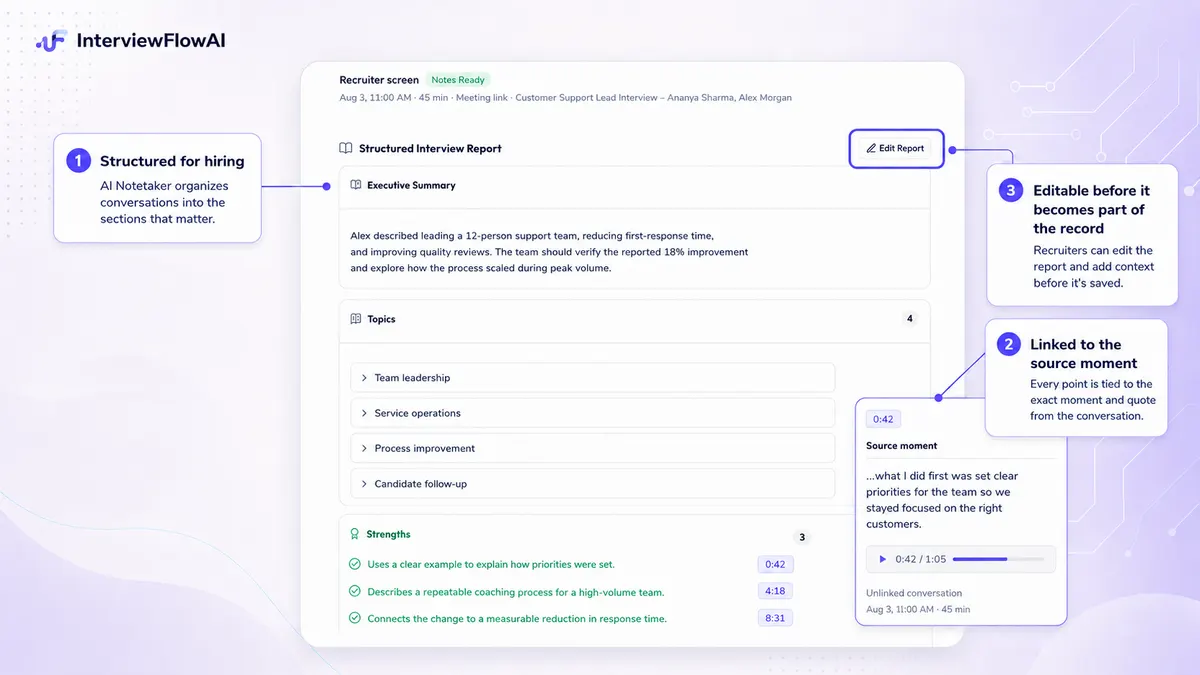
InterviewFlowAI Notetaker can prepare a fixed report with sections such as:
Executive summary
Topics discussed
Strengths
Weaknesses
Team fit
Red flags
Suggested next steps
Transcript and recording references
The available content depends on what was discussed and what the system processed successfully. A quiet or ambiguous answer should not be turned into false certainty simply because a report has a heading to fill. Three qualities make the output more useful than a generic summary.
The report points back to evidence
A statement such as “demonstrated ownership” is only useful if a reviewer can see why it appeared. Timestamp-linked evidence lets the hiring team return to the candidate’s example and judge it in context.
This is especially important for names, dates, figures, technical terms, and claims that could be transcribed incorrectly. The report should reduce the work of checking, not discourage checking.
The output stays editable
AI-generated notes are a first draft. Authorized users should be able to correct a name, remove an overstatement, add missing context, or rewrite a finding before it becomes part of the hiring record.
Research on manual interview notes helps explain why review matters. A study indexed by PubMed found that note-taking improved recall accuracy, but did not automatically improve judgment accuracy. Reviewing notes improved judgment in some conditions. The lesson is still relevant: better documentation can support a decision, but it does not substitute for a sound evaluation process. Read the study abstract.
The report connects different stages of the candidate journey
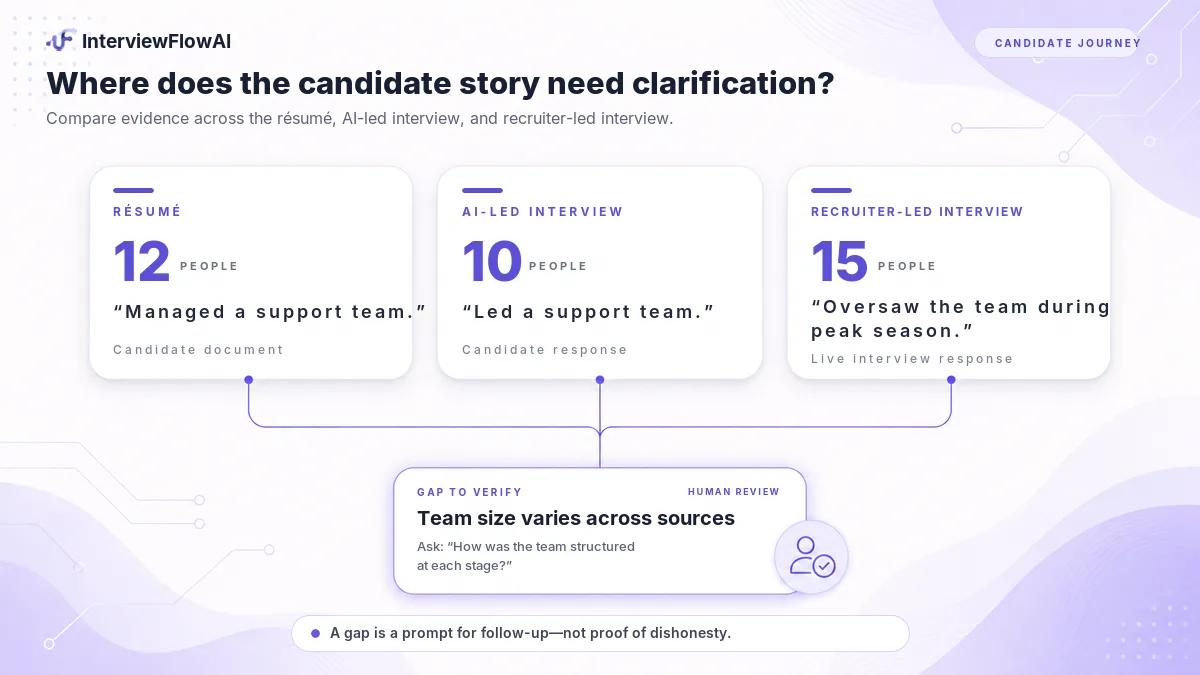
InterviewFlowAI can flag gaps between the candidate’s resume, an AI-led interview, and the recruiter-led interview. A flag is a prompt to review, not proof that a candidate was dishonest. A title may be described differently in conversation. A number may refer to a different period. A recruiter should return to the source, ask a follow-up, and record the conclusion.
That is more useful than treating each interview as a separate document. It helps the next reviewer see where the candidate’s story is consistent, where it has developed, and where clarification is still needed.
Can AI notes help recruiters stay focused on candidates?
They can remove one source of divided attention. They cannot make an inattentive interviewer attentive. The value of an AI Notetaker appears when the recruiter uses the space well:
Listen for what the candidate actually answered, not only for the next question on the script.
Ask a follow-up when an example is vague.
Notice when a candidate appears confused or uncomfortable.
Explain the role and process clearly.
Keep the conversation moving without rushing to finish a sentence in the notes.
This is why the best interview notetaker doesn’t just “remember everything.” No transcription system is perfect, and no report should be treated as complete simply because it is neatly formatted. The stronger promise is narrower: stay in the conversation, then review a structured record of it.
Employ’s candidate research provides useful context. Among respondents who had participated in a recorded interview, 77% said they were comfortable with the recording. The same report also found that candidates trusted HR professionals more than AI to guide them through the interview process. That combination points toward a practical role for the technology: support the human interaction instead of replacing it. See the findings and methodology.
How do AI interview notes improve hiring handoffs?
A hiring handoff fails when the next person receives a conclusion without the evidence behind it. “Strong candidate” does not tell a hiring manager what the candidate did, what remains unclear, or what to ask next. A transcript alone creates the opposite problem: all the evidence is present, but the reviewer has to read the entire conversation to find it. A structured, source-linked report sits between those extremes.
For an in-house recruiter, it can prepare the hiring manager for the next interview. For an agency recruiter, it can make a client submission more specific. For an RPO, it can keep documentation consistent across recruiters and client teams. For a panel, it can give members a shared record before the debrief.
The U.S. Office of Personnel Management recommends telling candidates that notes will be taken and advises interviewers to capture the substance of answers in professional, non-judgmental language. It also notes that structured interviews improve agreement between interviewers by standardizing how responses are elicited and evaluated. Read the OPM Structured Interview Guide.
An AI notetaker does not make an interview structured by itself. The questions, competencies, scoring rules, and reviewer discipline still matter. It can make the conversation easier to retrieve and hand off within that structure.
Can recruiters trust AI-generated interview summaries?
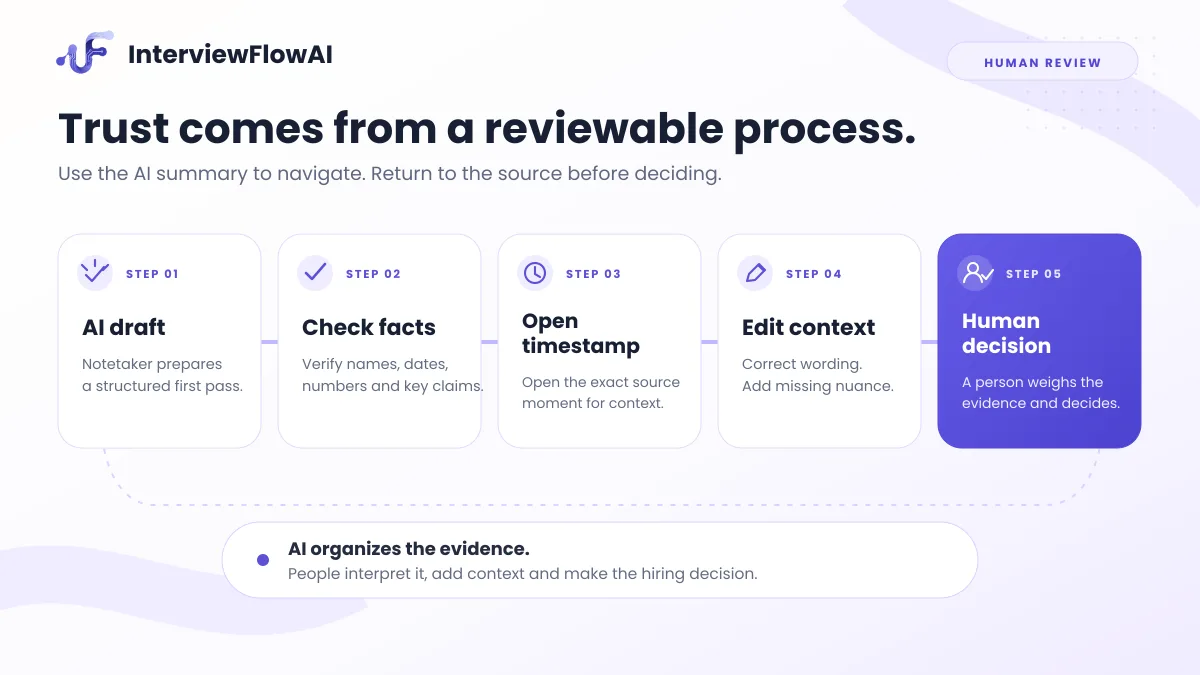
Recruiters should rely on AI notetakers. However, they should not accept them without review. Generative AI can omit context, combine separate ideas, misread a proper noun, or turn a cautious statement into a stronger claim. Clear audio improves the input, but it does not remove those risks.
NIST’s Generative AI Profile warns that people can defer too readily to automated outputs, especially as systems become more capable and polished. It connects that automation bias with risks such as fabricated or inaccurate content. Read NIST AI 600-1.
For interview notes, a practical review process should include:
Check names, dates, figures, company names, and technical terms.
Open the timestamp behind an important strength, risk, or gap.
Separate what the candidate said from the system’s interpretation.
Remove language that sounds more certain than the evidence.
Correct the report before sharing it or using it in a decision.
Keep the final hiring decision with an authorized person.
The question is not whether the summary sounds convincing. The question is whether a reviewer can verify it.
That is why timestamped evidence is central to InterviewFlowAI Notetaker. The report offers a route back to the conversation instead of asking the hiring team to trust a black-box conclusion.
Is it safe and legal to use an AI note taker in job interviews?
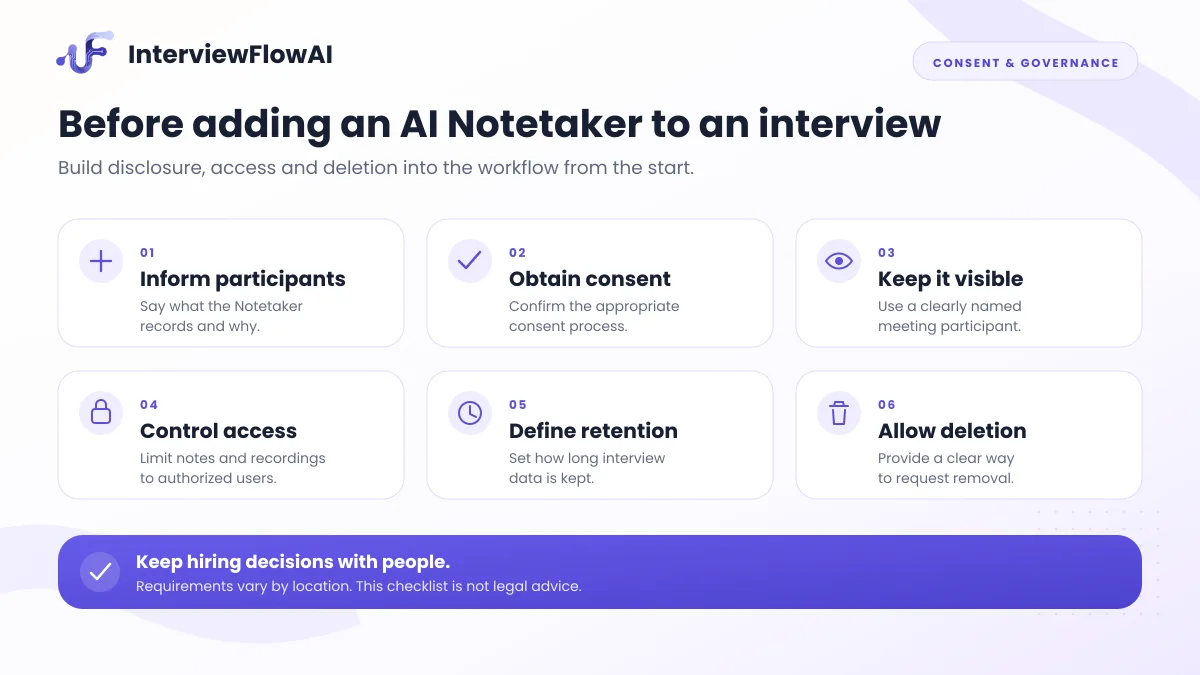
It can be used responsibly, but there is no single global rule for every interview. Recording, consent, employment, and data-protection requirements vary by location. A company interviewing across states or countries may need different processes for different participants. This section is a practical starting point, not legal advice.
At minimum, the organization should decide:
How and when candidates are informed.
What the meeting will record and why.
What consent process applies.
Whether and how candidates can decline.
Who can access the recording, transcript, and report.
How long the data is retained.
How deletion requests are handled.
Whether the data is used for any purpose beyond the disclosed hiring process.
Which vendor and subprocessors handle the data.
How mistakes in the report can be corrected.
Transparency matters because candidates notice when it is missing.
Greenhouse’s 2025 multi-market research found that 87% of U.S. job seekers considered employer transparency about AI important, while only 8% believed AI made hiring fairer. The survey included 4,136 job seekers, recruiters, and hiring managers across the United States, United Kingdom, Ireland, and Germany. Review the Greenhouse findings.
The UK Information Commissioner’s Office also treats recruitment information as personal data and highlights obligations across the process, from identifying candidates to deleting recruitment records. Its guidance is under review following recent legislative changes, which is another reason to check the current rules for every operating region. See the ICO recruitment and selection guidance.
InterviewFlowAI Notetaker joins under its own name as a visible participant. The organization is responsible for informing participants and confirming consent before recording. The visibility is deliberate: a candidate should not discover after the meeting that an unseen system captured the conversation.
A clear disclosure can be simple:
We use an AI notetaker so I can focus on our conversation. With your consent, it will record and transcribe the interview and prepare notes for our hiring team to review. It does not make the hiring decision. Please let me know if you have any questions before we begin.
Adapt the script with legal and privacy guidance for the locations involved. If candidates can opt out, explain the alternative and confirm that the choice will not disadvantage them.
What is the difference between an AI interviewer and an AI notetaker?
Both can support hiring, but they operate at different moments.
| AI interviewer | AI notetaker |
|---|---|
| AI leads the interaction | Recruiter or hiring manager leads |
| AI asks the questions and may follow up | Human asks questions and follows up |
| Useful for repeatable, selected screening stages | Useful for recruiter-led and hiring-manager-led stages |
| Produces evidence from an AI-led interview | Captures and organizes a human-led conversation |
| Candidate primarily interacts with the system | Candidate primarily interacts with a person |
| Human reviews the output and decides what happens next | Human reviews the output and decides what happens next |
An AI-led phone or video interview can collect structured first-round evidence at scale. When a recruiter or hiring manager takes over, Notetaker captures that human-led conversation. Both can remain connected to the same candidate profile, which makes the transition between automated and human stages easier to review.
The distinction also answers a common concern about replacement. Notetaker does not replace the recruiter in the interview. It supports the human recruiter who is already there.
When should recruiters use an AI note taker?
The best use cases are conversations where human interaction matters and the documentation has value after the call.
Recruiter screening calls
Capture motivation, relevant experience, availability, compensation expectations, and follow-up points without typing through the entire screen.
Hiring-manager interviews
Give the manager a structured record and make important answers easier to revisit before a debrief or decision.
Panel interviews
Create a shared source that panel members can review while still asking each interviewer to record an independent evaluation. A transcript should not cause the panel to collapse into one shared opinion too early.
High-volume interview days
Reduce the pile of post-call cleanup when a recruiter moves between multiple conversations. The value is not simply “more interviews.” It is preserving review quality when the schedule is dense.
Recruitment agencies
Prepare clearer client submissions, keep notes separated by candidate, and retain the evidence behind a recruiter’s recommendation.
RPO and distributed hiring teams
Create a more consistent handoff across recruiters, locations, time zones, and client stakeholders.
Interviews that start without a candidate record
Use a meeting link for the call, then connect the processed conversation to the correct candidate afterwards.
Final-round clarification
Return to earlier evidence when a final interviewer needs to resolve a gap between the resume, AI-led screen, and live conversation.
Notetaker is designed for supported video meeting links. It is not currently positioned for telephone-only or in-person interviews.
How is InterviewFlowAI Notetaker different from a general meeting assistant?
The difference is what happens after the transcript. General meeting tools are built for sales calls, internal meetings, lectures, research conversations, and many other contexts. Their summaries may be excellent, but the default output is not necessarily designed for a hiring workflow.
InterviewFlowAI Notetaker is organized around a candidate, an interview stage, and the next hiring decision.
| Capability | General meeting assistant | InterviewFlowAI Notetaker |
|---|---|---|
| Recording and transcription | Common | Yes |
| General meeting summary | Common | Yes |
| Structured hiring report | Varies | Built in |
| Timestamp-linked interview evidence | Varies | Yes |
| Candidate-profile connection | Usually separate | Yes |
| Resume, AI interview, and live-interview gap flags | Usually separate | Built for the connected workflow |
| AI-led and recruiter-led interviews in one platform | Usually separate | Yes |
| Human editing and review | Varies | Yes, with appropriate access |
This does not mean every hiring team should replace its current meeting assistant. The right question is whether the tool removes work from the actual recruitment process.
If a summary still has to be rewritten, copied into another system, matched to the right candidate, and checked against an earlier interview manually, the team has gained a transcript but kept most of the workflow.
InterviewFlowAI brings sourcing, AI-led interviews, recruiter-led interviews, reports, and candidate context into one platform. The Notetaker is one part of that wider process, not another disconnected tab.
How do you start using InterviewFlowAI Notetaker?
Open Notetaker in InterviewFlowAI.
Connect your calendar or paste a Google Meet, Zoom, or Microsoft Teams link.
Select or create the candidate meeting.
Inform the participants and confirm consent.
Admit the Notetaker when it joins the meeting.
Lead the interview as usual.
Review the transcript, report, recording, and timestamped evidence after processing.
Edit any generated finding that needs correction or context.
Link an ad hoc conversation to the correct candidate if it was not linked before the call.
For detailed setup instructions, use the InterviewFlowAI Human Interview Notetaker guide.
What should recruiters evaluate before choosing an AI note taker?
Do not start with the longest feature list. Start with the work the team wants to remove and the risks it must control.
Workflow fit
Does it work with the meeting platforms your team already uses?
Can it handle scheduled and ad hoc interviews?
Does the output connect to the candidate and interview stage?
Will recruiters still have to copy the notes elsewhere?
Output quality
Does it provide a searchable transcript?
Is the report structured for hiring or only for general meetings?
Can a reviewer open the evidence behind a finding?
Can authorized users edit errors and overstatements?
Candidate trust
Is the Notetaker visible?
Can you explain what is recorded, why, and who can access it?
Can your team apply an appropriate consent or opt-out process?
Is the candidate experience clear before the call begins?
Governance
What access controls exist?
What are the retention and deletion options?
Is the data used to train general-purpose models?
Can the organization document human review and final decision ownership?
Commercial fit
Is pricing based on seats, minutes, meetings, or usage credits?
Does the cost grow predictably with interview volume?
Does the product replace manual work, or add another system to manage?
Run a small pilot before a broad rollout. Measure report correction rate, time from interview to review-ready notes, feedback completion, user adoption, candidate questions or opt-outs, and whether the next interviewer actually uses the evidence provided.
Frequently asked questions about AI note takers for interviews
Can AI take notes during a job interview?
Yes. An AI interview notetaker can record and transcribe a supported video interview, then generate notes for human review. The organization should inform participants, follow the appropriate consent process, and check the output before using it in a hiring decision.
Does InterviewFlowAI Notetaker work with Google Meet, Zoom, and Microsoft Teams?
Yes. InterviewFlowAI Notetaker supports Google Meet, Zoom, and Microsoft Teams. It can be added through a connected calendar or with a supported meeting link.
Can I add Notetaker after an interview has already started?
Yes. Paste the supported meeting link into InterviewFlowAI and add Notetaker to the call. The participants should be informed and the appropriate consent confirmed before recording begins.
Does the candidate know that Notetaker is recording?
Notetaker joins under its own name and is visible to everyone in the meeting. Visibility does not replace disclosure. Your organization remains responsible for explaining what will be recorded and confirming the appropriate consent.
What does the InterviewFlowAI candidate report include?
Depending on the conversation and successful processing, the fixed report can include an executive summary, topics, strengths, weaknesses, team fit, red flags, next steps, and timestamped evidence. The transcript and recording remain available for review according to access and retention settings.
Can recruiters edit AI-generated interview notes?
Yes. Users with the appropriate access can revise generated topics and report items. Important names, dates, figures, and hiring conclusions should be reviewed before the report is shared or used.
How accurate are AI-generated interview notes?
Accuracy depends on audio quality, accents, speaker overlap, terminology, names, and other conditions. No summary should be assumed perfect. InterviewFlowAI provides timestamps so reviewers can return to the source when a finding matters.
Does an AI notetaker replace the recruiter?
No. In a recruiter-led interview, the recruiter or hiring manager asks the questions, responds to the candidate, and makes the hiring judgment. Notetaker captures and organizes the conversation for review.
Can Notetaker compare the live interview with earlier candidate information?
InterviewFlowAI can flag gaps between the resume, an AI-led interview, and the recruiter-led interview. A flag should lead to human review or a follow-up question. It should not be treated as proof of deception.
How long does processing take?
Processing continues after the meeting through recording, transcription, and analysis stages. The time can vary, so InterviewFlowAI does not promise a fixed turnaround for every conversation.
Can my team delete a recording, transcript, or report?
Authorized users can permanently delete eligible conversations and associated transcript, report, and recording references. Deletion cannot be undone. Your organization should set retention and deletion rules that fit its legal obligations and internal policies.
Is there a free AI note taker for interviews?
InterviewFlowAI Notetaker is free for existing users through 24 August 2026. After that launch period, it costs $0.99 per interview. New users can access it through the InterviewFlowAI trial.
Keep the conversation human. Keep the evidence reviewable.
AI use in recruiting is no longer unusual. SHRM found that 51% of surveyed organizations used AI to support recruiting, and 89% of HR respondents using it in recruiting reported time savings or greater efficiency. See SHRM’s 2025 Talent Trends research.
The harder question is where AI belongs. In a recruiter-led interview, it belongs behind the conversation: handling the record, not replacing the relationship; surfacing evidence, not making the final call; helping the next reviewer find context, not asking them to trust a polished summary blindly.
That is the role InterviewFlowAI Notetaker is built to play.
Add it to your next Google Meet, Zoom, or Microsoft Teams interview. Stay with the candidate while the conversation is happening. Then review the transcript, structured report, timestamps, and candidate context when the call is over.