An AI candidate screening tool collects and evaluates early-stage evidence—resumes, screening questions, skills tests, and interviews—and then organizes or prioritizes candidates against the criteria you’ve set for the role. But here’s the boundary I keep coming back to when I talk to recruiting teams about this: AI can gather and structure evidence. It should not make the final call on who gets hired.
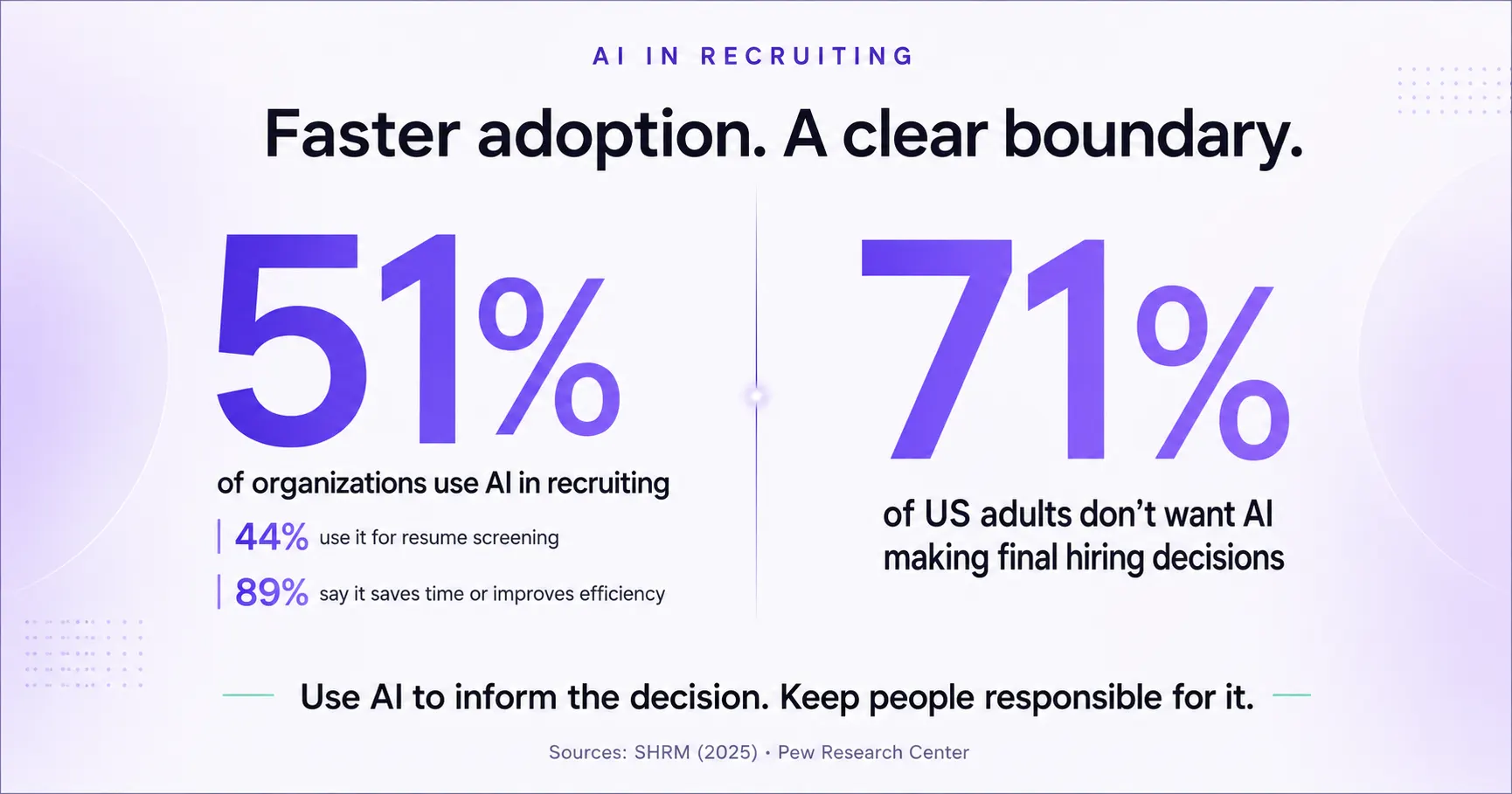
Adoption is outpacing trust right now. SHRM surveyed 2,040 US HR professionals in 2025 and found that 51% of organizations were already using AI somewhere in recruiting. Among that group, 44% used it for resume screening, and 89% said it saved time or made the team more efficient. At the same time, Pew Research found that 71% of US adults don’t want employers to make final hiring decisions using AI.
This guide is about addressing that tension amidst the process of using AI tools for candidate screening in 2026 and providing actionable solutions for recruiters. Recruiters will also get insights on where the AI in recruitment line actually sits: what to automate, what evidence to collect, and where a person needs to stay in the loop.
What is AI candidate screening?
In 2026, AI candidate screening is a wide umbrella term. Under that umbrella, a tool might handle one job or several:
- Parsing resumes and applications
- Checking minimum qualifications
- Matching experience or skills to a role
- Asking structured screening questions
- Running phone or video interviews
- Summarizing responses and transcripts
- Scoring evidence against a role-specific rubric
- Prioritizing candidates for recruiter review
A resume matcher, a chatbot, a one-way video platform, and a conversational AI interviewer can all fairly be called AI screening software, yet they still solve different problems because they collect different types of evidence.
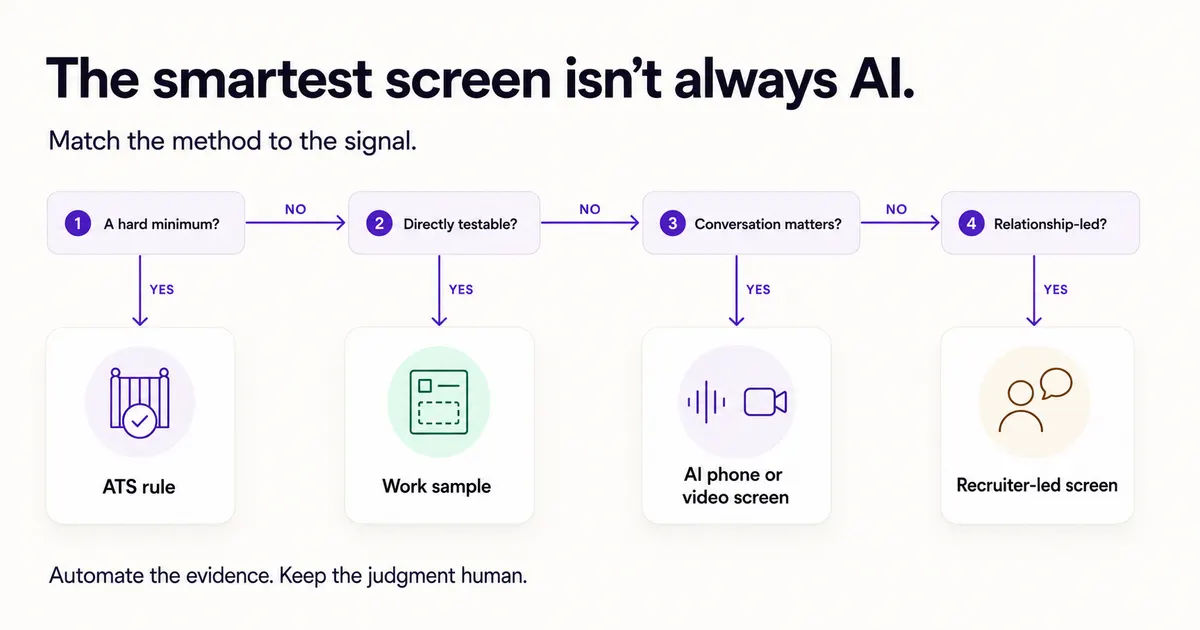
So start with the bottleneck, not the label on the tool. If you’re drowning in applications, resume matching or knockout questions help you triage. If resumes aren’t telling you about communication, motivation, availability, or role knowledge, a structured phone or video screen fills that gap. If the role comes down to one demonstrable skill, a work sample usually beats both.
Is AI candidate screening the same as ATS filtering?
No, and treating them as interchangeable is how teams end up buying the wrong tool. Here’s how the main screening methods actually compare:
| Method | Evidence used | Main strength | Main limitation | Best fit |
|---|---|---|---|---|
| Manual resume review | Resume and application | Human context and judgment | Slow, variable, and difficult at volume | Small or highly specialized pools |
| ATS rules and knockout questions | Application fields and fixed rules | Fast, predictable filtering | Brittle when rules are poorly designed | Clear legal or logistical minimums |
| AI resume matching | Resume plus job description or rubric | Faster comparison and prioritization | Can overvalue keywords, titles, or familiar brands | Initial review with a reject-sample audit |
| Chatbot or text screen | Candidate’s typed responses | Available 24/7 and easy to scale | Limited depth and possible drop-off | Logistics and short qualification checks |
| One-way video interview | Recorded candidate answers | Recruiter reviews on demand | Less conversational and may feel impersonal | Consistent asynchronous questions |
| Conversational AI phone or video interview | Two-way spoken responses and follow-ups | Collects richer, structured evidence at scale | Requires careful question design, notice, and monitoring | First-round screening for repeatable roles |
| Skills test or work sample | Candidate’s task performance | Direct evidence of job-related ability | Can burden candidates if too long or poorly timed | Roles with observable, testable skills |
A structured candidate screening process usually stitches a few of these together. An ATS confirms work authorization. An AI phone interview digs into role-specific experience. A recruiter reads the transcript and scorecard before deciding who advances. None of these replaces the others end to end, and I’d be skeptical of any vendor who says otherwise. If you’re specifically weighing one-way video against a two-way conversational format, we’ve compared one-way video interviews against conversational AI in more depth.
How does AI candidate screening work?
Every product works a little differently under the hood, but a defensible screening workflow follows roughly six stages.
1. Define the evidence before reviewing candidates
Start with the job, not with historical hiring data or a generic “fit” score. Separate the role requirements into:
- True minimums, such as required certification or work location
- Scoreable competencies, such as problem solving or customer communication
- Logistics, such as availability or shift preference
- Evidence that belongs later in the process
For each scoreable competency, write down what weak, acceptable, and strong evidence looks like. The US Office of Personnel Management describes a structured interview as one that uses standardized questions and scoring so candidates are evaluated consistently, and it lists structured interviews among the more valid assessment tools available to employers.
2. Collect existing candidate information
The system may parse a resume, application, portfolio, or ATS record. That makes candidates easier to compare on paper, but parsing isn’t evaluation. A title like “account executive” can mean very different work at two different companies. A good screening process looks for job-relevant evidence instead of treating titles, keywords, school names, or previous employers as proof of ability.
3. Gather missing evidence
If the application can’t answer an important question, the screening stage should collect it. Depending on the role, that might mean:
- A short text or chatbot screen
- A work sample
- A one-way video response
- A two-way AI phone interview
- A conversational AI video interview
Match the format to the competency. Don’t use a video interview to judge something you could assess more directly and with less effort from the candidate.
4. Convert responses into structured evidence
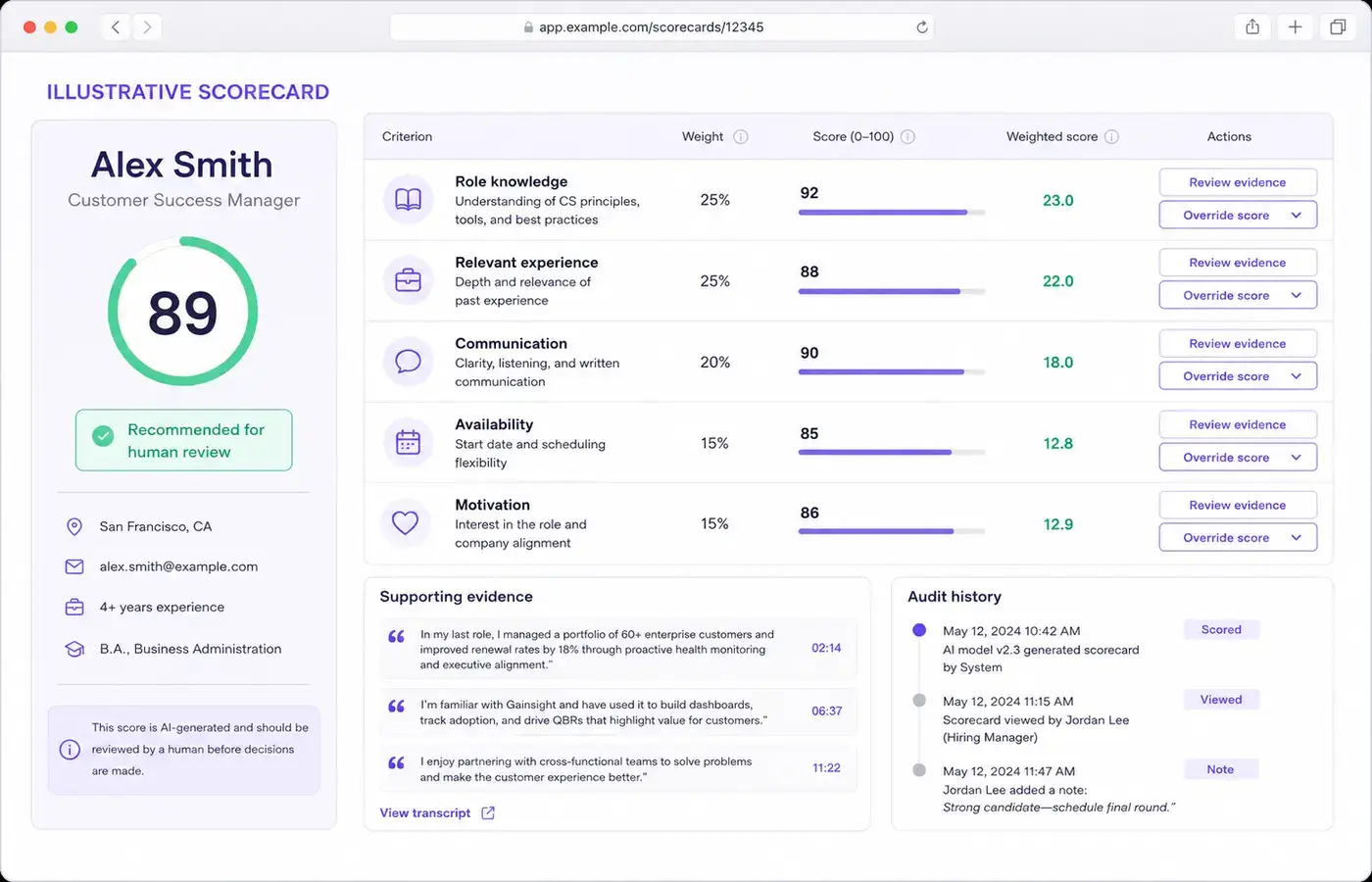
The system may produce a transcript, summary, competency notes, or a scorecard. Each score should point back to something the candidate actually said or did. A customer-support score shouldn’t read as just “8/10.” It should show that the candidate described a specific escalation, explained how they handled the customer, and named what they’d change next time.
5. Apply a job-specific rubric
Weight the criteria according to the role. A sample rubric might look like:
- Work-sample or role-knowledge evidence: 35%
- Relevant experience: 25%
- Communication: 20%
- Logistics and availability: 10%
- Motivation for the role: 10%
Those are illustrative weights, not a template to copy. Set your own weights before you see any candidate results, write down why you chose them, and check over time that the criteria actually predict good hires. Leave out protected traits and anything that acts as a proxy for them.
6. Give a person the evidence and decision
The output should be a reviewable shortlist, not an automatic final verdict. A recruiter should be able to:
- See why each criterion received its score
- Open the underlying response, transcript, or recording
- Adjust a mistaken score or weight
- Record the reason for an override
- Review a sample of rejected candidates
- Decide who advances

What are the benefits of automated candidate screening?
Faster access to first-round evidence
Automated candidate screening runs outside recruiter working hours and can work through multiple candidates without waiting for a shared calendar slot. That shows up most in high-volume hiring, where the first useful shortlist can otherwise take days.
SHRM’s 2025 research found that 89% of HR professionals at organizations using AI in recruiting said it saved time or increased efficiency, 36% reported lower recruiting or hiring costs, and 24% said it improved their ability to spot top candidates.
Those are reported outcomes, not a guarantee for your team. You still need to measure whether your own process actually gets faster and better, not assume it will because a survey says so.
More consistent questions
A structured workflow gives every candidate for the same role a comparable core set of questions. Follow-ups can still dig into a candidate’s specific answer, but the competencies being assessed and how they’re scored stay the same across the pool.
Consistency alone doesn’t make a process fair. It does make the process much easier to inspect and improve than a string of improvised, one-off screens that no one wrote down.
Better recruiter focus
Recruiters spend less time repeating logistics questions and typing up notes, and more time on the parts that actually need a person: reviewing ambiguous cases, building relationships with candidates, advising hiring managers, and improving the rubric itself.
A clearer record of the screening decision
Transcripts, recordings, score components, and override notes show what evidence actually informed a recommendation. That beats a black-box match score, and it’s a lot easier to review later than a recruiter’s scattered notes from three weeks ago.
What are the risks of AI candidate screening, and how do you prevent them?
The system optimizes for the wrong target
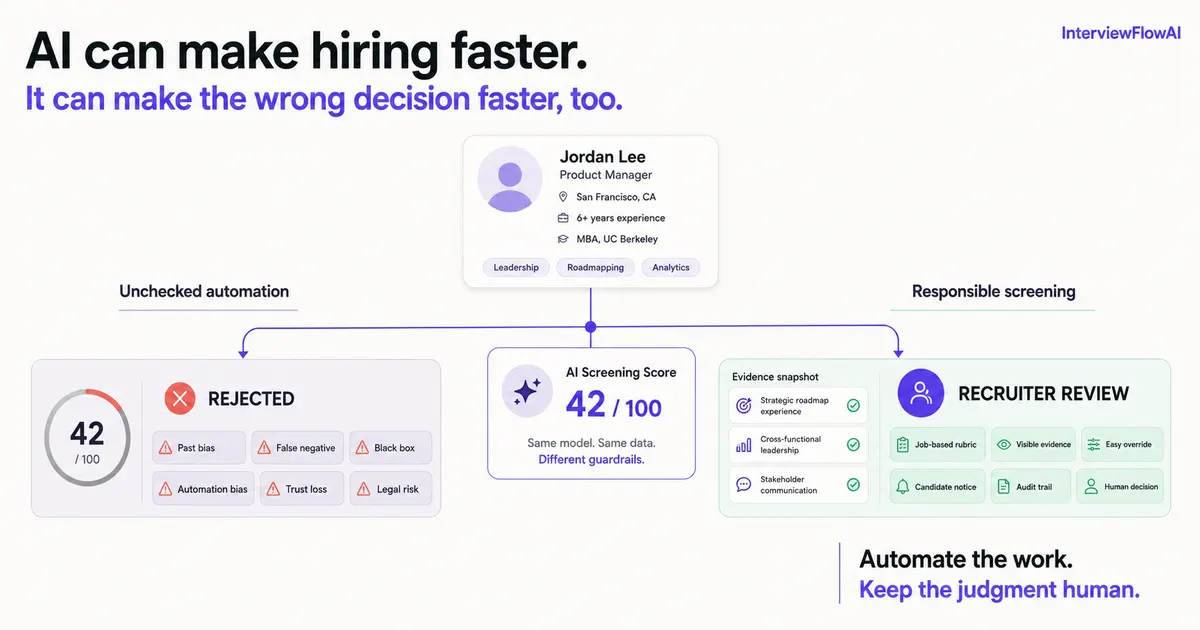
Train or tune a model around past hires, and it can quietly reproduce old preferences. It may learn that familiar titles, schools, employment patterns, or company names correlate with past decisions, even when none of that is necessary for the job.
Prevention: Build the rubric from a real job analysis and observable competencies. Require evidence behind every score. Validate criteria against actual job outcomes instead of assuming your historical hiring decisions were the right ones.
Good candidates become false negatives
Recruiters bring this up constantly: keyword-heavy systems can discard candidates whose experience is relevant but described in unfamiliar language. It gets worse when a low match score turns into a silent rejection with no one checking it.
Prevention: Never auto-reject on a semantic match score alone. Pull a sample of rejected candidates every week during a pilot and actually read them. Track how often a recruiter reverses the system’s call, and why.
Recruiters end up re-checking everything anyway
Automation creates new work when a score has no rationale attached, the evidence is buried three clicks deep, or results have to be copied between systems by hand.
Prevention: Test whether a recruiter can get from a score to the source evidence in one or two clicks. Track workflow time during your pilot, not just model accuracy on paper.
Automation bias replaces judgment
A detailed-looking score can feel more objective than it is. Recruiters can end up trusting the number even when the underlying input was thin, or the rubric was weak to begin with.
Prevention: Surface uncertainty, require human review at real decision points, make overrides easy, and pay attention to disagreement patterns. A high override rate might mean the rubric is off. A near-zero override rate might mean people have stopped checking.
Candidates lose trust
Pew found that 66% of US adults wouldn’t want to apply to an employer that used AI to help make hiring decisions. A relationship-led search, like executive recruiting, can take real damage from a screen that feels impersonal or robotic. This is part of why we built InterviewFlowAI around two-way conversation instead of a one-way recorded prompt: candidates can ask a follow-up question back, which changes how the interaction actually feels.
Prevention: Tell candidates plainly what the tool does, what data it uses, and who makes the final decision. Offer an accommodation or an alternative path. Use automation to remove waiting and repetitive work, not in places where a human conversation is the point.
Accessibility, privacy, and legal requirements get missed
Hiring technology doesn’t get a pass from employment and disability law. The US Equal Employment Opportunity Commission has said federal civil-rights law applies whenever an automated system makes or informs a selection decision.
Rules also shift by location. New York City’s Local Law 144 requires certain automated employment decision tools to have a recent bias audit, publish that audit, and give candidates notice. Illinois requires employers using AI to analyze video interviews to notify applicants, explain in general terms how the AI works, and get consent, and it also limits sharing and gives applicants a right to deletion.
Prevention: Bring in employment counsel before launch. Map every jurisdiction you’re hiring in, document what the assessment is actually for, offer accommodations, collect only the data you need, and set retention and deletion rules. Get legal review specific to your employer, your roles, and your tool, not a general disclaimer.
What should you look for in candidate screening software?
We get versions of this question constantly, usually phrased as “what actually automates the screening and interview workflow” or “how do these platforms compare.” A polished demo won’t answer it. Ask the vendor to run through these seven questions on one of your real roles with an anonymized candidate set.
1. Can we define the actual hiring criteria?
You want role-specific competencies, not a generic match score that can’t be traced back to the job. Ask whether you can create your own competencies, separate minimums from scoreable evidence, set weights before anyone gets evaluated, and let hiring managers sign off on the rubric.
2. Does every score show its reason?
Pick a sample candidate and ask the vendor to open the evidence behind that score. You’re looking for response excerpts, transcript or recording access, notes at the criterion level, and some indicator when evidence is missing or thin. “The model says so” isn’t an explanation.
3. Can a recruiter override a result or adjust weights?
People stay accountable for the decision, so the system needs to support that. Check whether recruiters can change a score, write down why, compare the original and revised result side by side, and adjust weights without losing the history of what changed.
4. Does it fit the ATS and recruiter workflow?
An impressive assessment still fails if recruiters end up copying results by hand or working out of a separate inbox. Test candidate invitations and status updates, ATS record matching, scorecard delivery, duplicate handling, permissions, error recovery, and export and deletion. Don’t accept “integration available” as an answer until you’ve seen the actual workflow and the specific ATS it connects to. As an example of what that looks like in practice, see how InterviewFlowAI’s Ashby integration handles candidate engagement and screening directly inside an ATS.
5. Is there an audit trail?
The system should log the rubric version used, the questions asked, the evidence collected, the scores produced, any human overrides, and the final outcome. That record is what lets your team review quality later or investigate a complaint.
6. What is the candidate experience actually like?
Go through the screen yourself, on a phone and on a laptop. Look at the notice and instructions, how long it takes to complete, accessibility support, whether there’s an accommodation or alternative path, how it behaves on mobile or a weak connection, whether a candidate can recover from an interrupted interview, and what it tells them about data use and retention.
Experience the candidate journey
Want to check what AI interviews actually feel like for candidates? Try it for yourself.
7. What validation, monitoring, and security evidence exists?
NIST’s AI Risk Management Framework lists validity, reliability, transparency, explainability, privacy, and managed bias as traits of trustworthy AI. Ask the vendor what the assessment claims to measure, what evidence backs that claim, whether it’s been evaluated for jobs and populations like yours, how performance gets monitored after launch, how model or rubric changes are documented, and what security and retention controls apply.
How much does automated candidate screening cost?
Pricing across this category varies a lot, and most of it depends on how the vendor structures usage, not the sticker price. Three models show up repeatedly:
- A flat monthly seat fee regardless of volume
- A per-interview or per-credit rate
- A hybrid where a base plan covers a set number of interviews and overage bills per credit
Work out which model fits your hiring pattern before you compare numbers. A flat seat fee punishes you in a slow month. A pure per-interview rate can get expensive fast at high volume. A credit-based plan with rollover sits somewhere in between.
The number actually worth calculating isn’t the headline rate; it’s total cost per candidate screened: platform cost, plus setup and integration time, plus recruiter review time, plus support, divided by candidates actually screened. A low per-screen price stops being cheap if your team has to re-check every result or manually copy data into the ATS. That’s why AI software tools like InterviewFlowAI come with scalable pricing plans that match the hiring needs.
For the specific numbers, including what InterviewFlowAI and other platforms charge, see our pricing comparison or check current plans directly.
How do you roll out AI candidate screening step by step?
Step 1: Establish the baseline
Measure your current process before you introduce any software:
- Time from application to first screen
- Recruiter review minutes per candidate
- Screen completion rate
- Screen-to-hiring-manager pass rate
- Hiring-manager acceptance of the shortlist
- Candidate satisfaction
- Time to shortlist
Without a baseline, “faster” is just a claim from a sales deck.
Step 2: Pick one repeatable role
Choose a role with enough volume that you can actually measure results, and a reasonably stable definition of success. Skip an executive search, a tiny candidate pool, or a job where the requirements are still being argued about internally.
Step 3: Build a short, observable scorecard
Use four to six competencies, each with a behavioral definition and scoring anchors. The free candidate scorecard generator can help structure a first draft, but a recruiter and hiring manager should review the result before it goes live.
Step 4: Set the human decision boundary
Decide, in advance:
- Which conditions can stop a candidate automatically, if any
- Which results always require human review
- Who’s allowed to override a recommendation
- How override reasons get recorded
- What sample of rejected candidates gets audited
Don’t let final hiring decisions rest on the system alone.
Step 5: Run a parallel pilot
For an initial group of candidates, run the new process alongside the current one instead of letting the automated output quietly determine outcomes on its own.
Create up to 10 free interviewers on InterviewFlowAI, your business’s smart candidate screening partner.
Look at where humans and the tool agree, where they disagree, whether the evidence actually supports the score, whether qualified candidates are getting missed, whether any group is seeing a materially different outcome, and whether the new workflow is really saving recruiter time.
Step 6: Monitor quality, not just speed
Use a dashboard that pairs efficiency with decision quality:
| Metric | What it reveals | Warning sign |
|---|---|---|
| Time to first screen | Candidate waiting time | Faster screens but slower human review |
| Recruiter minutes per candidate | Operational efficiency | Time moves to re-checking or data entry |
| Completion rate | Candidate usability | Drop-off by device, region, or group |
| Hiring-manager acceptance | Shortlist relevance | More candidates, same or lower acceptance |
| Recruiter override rate | Rubric or model disagreement | Persistent high overrides or no scrutiny |
| Reject-sample recovery rate | Possible false negatives | Qualified candidates found in rejected sample |
| Adverse impact analysis | Outcome differences | Unexplained disparities requiring review |
| Candidate satisfaction | Trust and experience | Confusion, lack of notice, or poor access |
| Quality-of-hire indicators | Downstream relevance | Short-term speed with worse job outcomes |
Run your current numbers through the time-to-hire calculator to set a baseline, then track changes by role and by stage as you go.
Is AI candidate screening worth it for high-volume hiring?
For most teams, this is where AI screening earns its keep. It’s worth using when application volume outpaces what recruiters can review, the same role gets filled over and over, candidates are applying across time zones or after business hours, and the team actually has the bandwidth to review results and catch errors.
24/7 candidate screening is the practical difference-maker here. A candidate who applies at 11 pm on a Saturday can complete a structured phone or video screen before your team logs back on Monday, instead of sitting in a queue for four days. For roles you fill dozens of times a year, that adds up fast.
For staffing and RPO teams specifically, bulk candidate screening AI can shrink the gap between sourcing and a client-ready shortlist, but only if results flow cleanly into whatever system your recruiters and clients actually use. We hear this constantly from agencies: the bottleneck isn’t finding candidates, it’s the hours between “we have 200 applicants” and “here are the five worth a client call.” That’s the specific workflow bottleneck automated screening is built to close.
Screen high-volume roles with less waiting
Need an expert’s help with your high-volume candidate screening? Book a call with InterviewFlowAI experts.
When should you keep candidate screening human?
Keep a recruiter in front of the candidate when the search targets a small group of senior or passive candidates, the relationship itself is part of what you’re selling the candidate on, the role’s requirements are still unsettled, the tool can’t explain or document its recommendation, there’s no path to an accommodation or alternative, the assessment hasn’t been validated for how you’re using it, or your team genuinely doesn’t have the capacity to monitor outcomes.
Sometimes the right call is partial automation. Automate scheduling, reminders, transcription, and note organization, and keep the actual conversation human.
Where does InterviewFlowAI fit into candidate screening?
Resume screening can prioritize the information you already have. It can’t tell you how a candidate reasons through a role-specific problem or responds when you push back with a follow-up. InterviewFlowAI is built for that next part of the funnel: two-way AI phone and video interviews. It asks role-specific questions and follow-ups, then produces transcripts, recordings, scorecards, and a ranked shortlist for recruiter review.
Automated ranking shows the score components behind each candidate and supports role-specific criteria and weights, so recruiters review the evidence and decide who advances, not the other way around.
It’s most useful when the first-round interview itself is the bottleneck. Candidates can complete a screen at 2 am if that’s when they’re free, and recruiters get a structured record to work from instead of a resume and a blank page.

Frequently asked questions about AI candidate screening
What is AI candidate screening?
It’s software that collects, structures, evaluates, or prioritizes early-stage candidate evidence, from resumes and application answers to skills tests and phone or video interviews. A responsible process keeps a person accountable for who advances and who gets hired.
How does AI screen candidates?
The system compares candidate evidence against criteria you’ve defined for the role. Depending on the product, that might mean parsing a resume, asking screening questions, transcribing an interview, summarizing responses, building a scorecard, or prioritizing candidates for recruiter review.
Is AI screening the same as ATS filtering?
No. ATS filtering usually runs on fixed fields, knockout questions, or keyword rules. AI screening can interpret unstructured information, ask follow-up questions, or score evidence against a rubric. Some tools do both, like InterviewFlowAI.
Can AI candidate screening be biased?
Yes. Bias can enter through training data, the criteria you set, proxy variables, question design, scoring, accessibility, or simply how people end up using the output. Job-related criteria, validation, explainable scores, human review, reject-sample audits, and outcome monitoring all reduce that risk, but no tool is automatically unbiased just because it’s software.
Is AI candidate screening legal?
It depends on your jurisdiction, the tool, the data involved, and how you’re using the output. US federal employment and disability law still applies, and some cities and states add specific audit, notice, consent, or deletion requirements on top. Get legal advice for your specific process before you launch.
Does AI screening replace recruiters?
It shouldn’t. AI can cut down on repetitive evidence collection, documentation, and prioritization work. Recruiters are still the ones designing the process, reviewing ambiguous cases, reading context, managing candidate relationships, watching outcomes, and making the calls they’re accountable for.
What is the best AI candidate screening software?
The best fit is whatever solves your actual bottleneck and can show you how it reaches its output, not the one with the flashiest demo. Evaluate job-specific criteria, score rationales, human overrides, ATS workflow, audit history, candidate experience, validation, security, and ongoing monitoring. Check out the top AI candidate screening softwares in 2026 here.
How much does automated candidate screening cost?
It depends on the pricing model: per seat, per candidate, per interview, or usage-based, and whether it’s billed monthly or annually. Work out which model fits your hiring pattern first, then compare total operating cost, not just the headline rate. InterviewFlow AI just costs $0.99/interview/month. And they also offer plans that easily fit different recruitment volume goals.
Key information sources
| Claim used | Source | Scope and caveat |
|---|---|---|
| 51% of organizations use AI to support recruiting | SHRM, 2025 Talent Trends: AI in HR | Survey of 2,040 US HR professionals, February 3 to 12, 2025 |
| Among AI recruiting users, 44% use it to screen resumes | SHRM, 2025 Talent Trends: AI in HR | Use-case share among organizations reporting AI use in recruiting |
| 89% report time savings or increased efficiency, 36% lower costs, 24% better identification of top candidates | SHRM, 2025 Talent Trends: AI in HR | Reported perceptions among HR professionals at organizations using AI in recruiting, not guaranteed causal results |
| 71% oppose AI making final hiring decisions | Pew Research Center, Americans’ views on AI in hiring | Survey of 11,004 US adults, December 12 to 18, 2022 |
| 66% would not want to apply to an employer using AI to help make hiring decisions | Pew Research Center, AI in hiring | Public attitude, not an observed application-abandonment rate |
| Structured interviews use consistent questions and scoring | US Office of Personnel Management, What is a structured interview? | Federal assessment guidance; adapt to role and jurisdiction |
| Trustworthy AI includes validity, transparency, explainability, privacy, and fairness with harmful bias managed | NIST AI Risk Management Framework | Voluntary risk-management framework, not employment-specific legal advice |
| Federal civil-rights law applies to automated selection systems | EEOC 2023 Annual Performance Report | US federal enforcement context; consult counsel for the specific use |
| NYC requires specified bias-audit, publication, and notice steps for covered AEDTs | NYC Department of Consumer and Worker Protection | Applies to covered tools and uses under NYC Local Law 144 |
| Illinois requires notice, explanation, and consent before covered AI video analysis, plus sharing and deletion restrictions | Illinois Artificial Intelligence Video Interview Act | State-specific requirements; verify current applicability with counsel |