Workable brings applicant tracking, sourcing, candidate scoring, and hiring workflows into one system. In 2026 the Workable Agent extends that further by running the top of the funnel: sourcing from a pool of more than 400 million profiles, scoring CVs and profiles against job criteria, and chatting with candidates to capture basic facts before a recruiter is involved. For most teams, Workable covers the stages on either side of the first conversation very well.
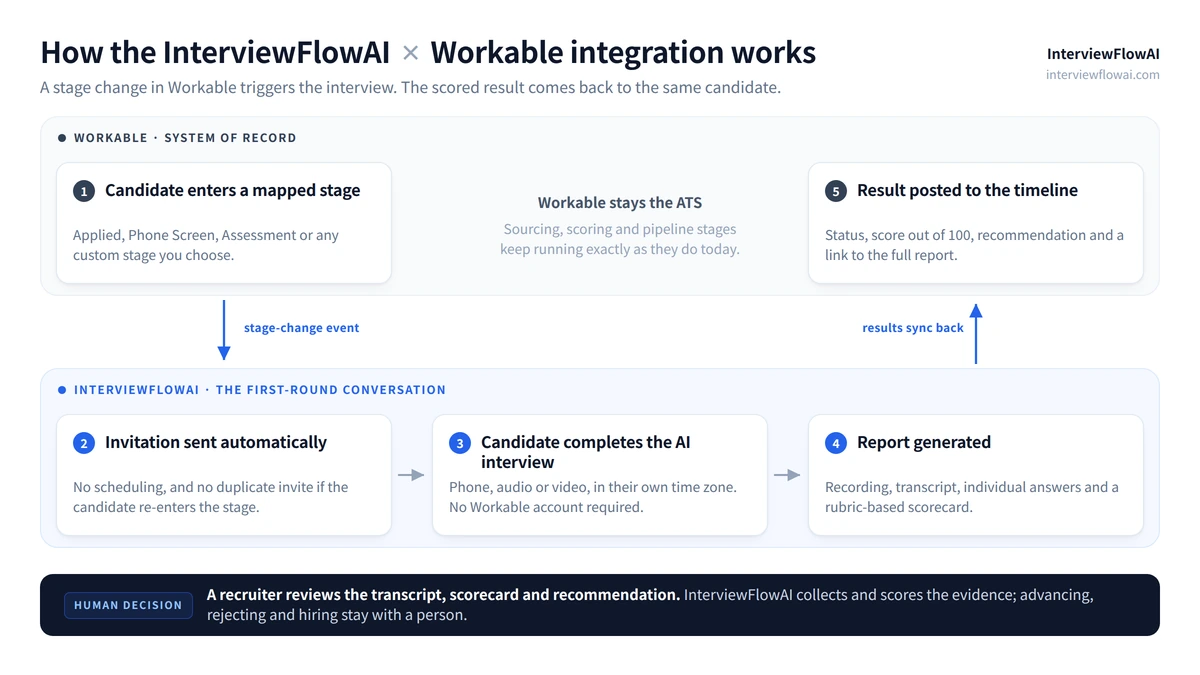
The remaining issue still sits between those stages. Workable can tell you which applicants look like a fit on paper and which ones cleared your must-haves. It cannot tell you how a candidate explains the project on their CV, whether a listed tool was used daily or touched once, or how someone reasons through a problem when asked a follow-up. That is a conversation, and it is usually the first thing to break when applicant volume climbs. InterviewFlowAI fills exactly that gap. When a candidate reaches a stage you choose in Workable, it conducts an AI phone, audio, or video interview and returns the results to the candidate timeline for recruiter review. Workable stays the system of record.
Workable AI features and how InterviewFlowAI complements them
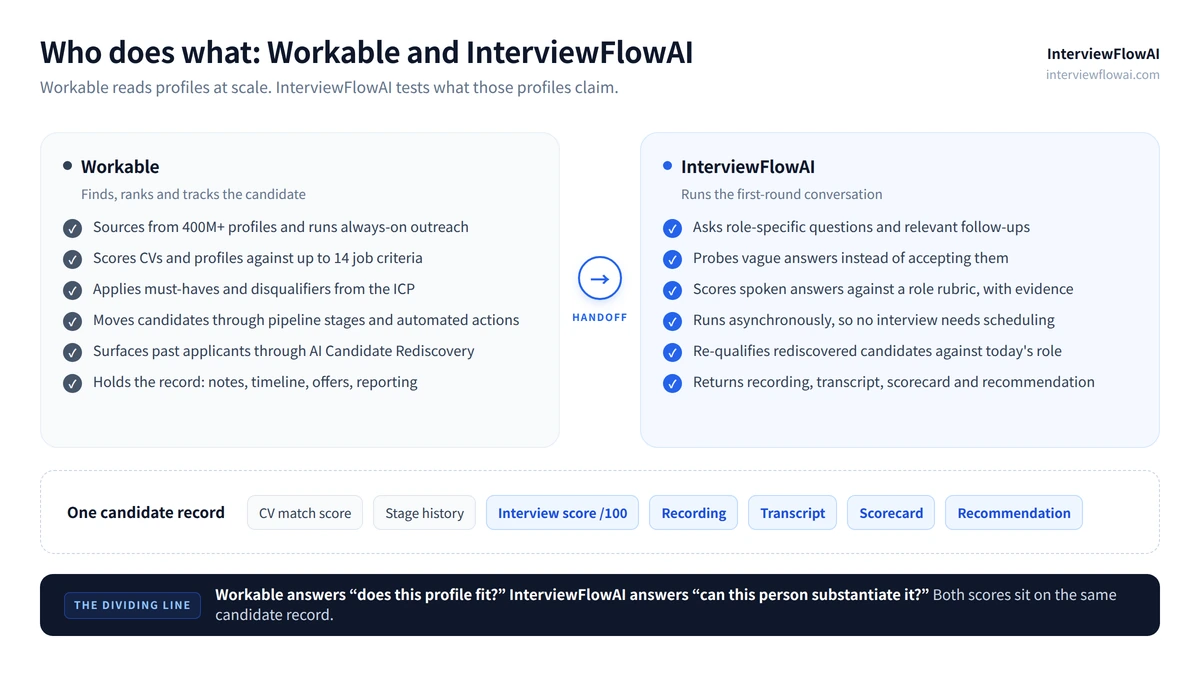
Workable's AI is strongest at reading documents and profiles at scale. InterviewFlowAI is built for the part that documents cannot answer. The two lines below sit next to each other on the same candidate.
| Workable's current capability | InterviewFlowAI's complementing capability | Recruiter benefit from the combined workflow |
|---|---|---|
| Workable Agent runs top-of-funnel sourcing, screening, and qualification | Conversational AI interviews ask role-specific questions and relevant follow-ups | Recruiters compare “looks qualified” with evidence of how the candidate explains their work |
| AI resume screening scores CVs and profiles against up to 14 job-specific criteria | A structured rubric applied to spoken answers rather than documents | Two independent reads on the same candidate, one from the CV and one from the conversation |
| The Ideal Candidate Profile sets must-haves and disqualifiers | AI interviews assess candidates whose fit cannot be decided by fixed rules | Clear mismatches are filtered early, while plausible candidates receive a real first round |
| Candidate engagement chat captures basic facts before human involvement | A full first-round interview with recording, transcript, and scorecard | The pre-screen becomes an actual interview rather than a data-collection form |
| The AI Interview Question Generator drafts role-specific questions by competency | InterviewFlowAI asks the question set asynchronously at volume and scores every answer | The questions you designed get asked consistently, to every candidate, not only the shortlist |
| The AI Recruiter Assistant summarizes profiles and drafts outreach | Recordings, transcripts, and structured scorecards attached to the candidate record | Hiring managers receive fuller records with reviewable evidence |
| AI Candidate Rediscovery surfaces past applicants for new roles | The current role's interview and rubric applied after re-engagement | Teams verify present-day fit before advancing a candidate from the database |
| Pipeline stages and automated actions move candidates through the workflow | Stage-triggered interviews launch automatically and post results back | Repeatable screening runs inside Workable, with no separate candidate list to maintain |
Workable's own guide to its AI features is explicit that these capabilities are embedded in the ATS rather than offered as standalone tools. That is the right design, and it is the reason the integration is built around Workable stages instead of a parallel candidate list.
How Workable and InterviewFlowAI work together
High-volume inbound roles
Support, sales development, operations, and retail postings routinely draw hundreds of applications. The Workable Agent narrows that to a scored, ranked set. Mapping your Phone Screen stage to an InterviewFlowAI Interviewer means every candidate who reaches it gets the same conversation on the same rubric, without a recruiter booking a single call. The recruiter's first action becomes reviewing transcripts and scores rather than clearing a calendar.
Verifying claimed skills
A resume match score reads what a candidate wrote. A conversation tests it. Asking someone to walk through the migration they listed, then following up on why they chose that approach, separates depth from vocabulary in a few minutes. The transcript makes that separation legible to the hiring manager later.
Distributed and after-hours pipelines
Candidates in other time zones stall in the gap between “shortlisted” and “recruiter available.” An asynchronous interview removes the gap. Candidates complete it when it suits them, and results are waiting when the recruiting team logs in.
Consistency and integrity review
With one interview format per role, every candidate answers the same questions under the same conditions. That gives a defensible basis for comparison, and it surfaces inconsistencies between the written application and the spoken answers while the candidate is still early in the pipeline.
Workable features that gain more value with InterviewFlowAI
Pipeline stages
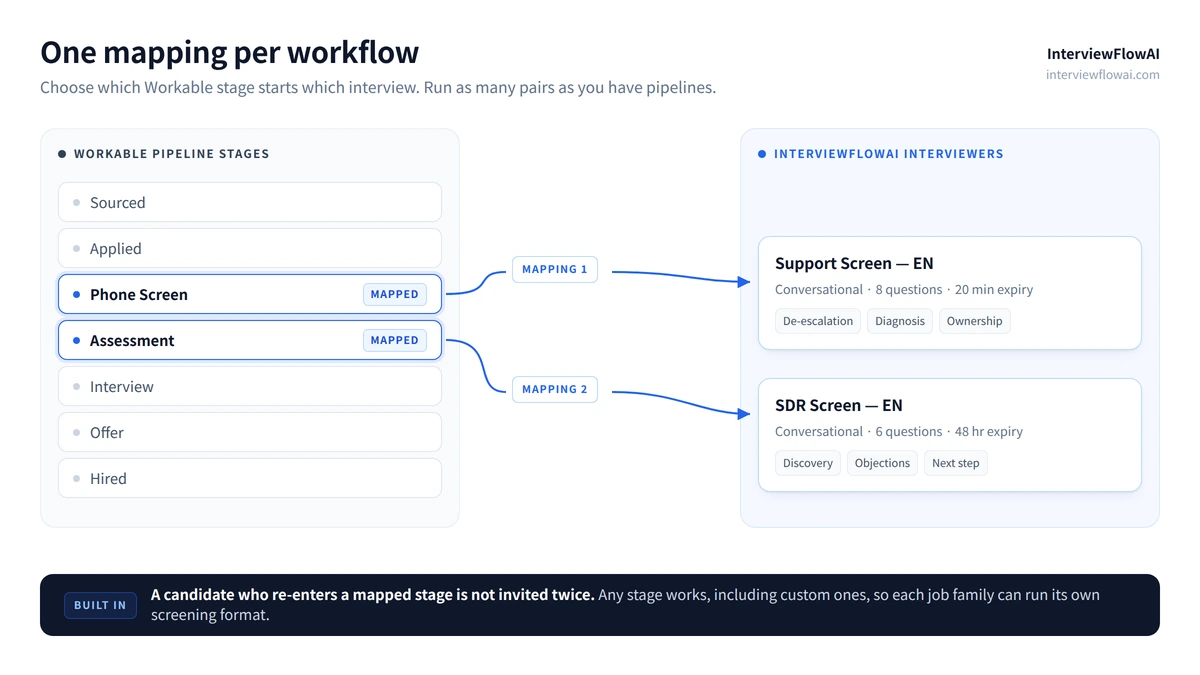
Stages are the integration's control surface. You choose which one triggers an interview, whether that is Applied, Phone Screen, Assessment, or a custom stage you have built, and the automation fires on stage change. Teams running different funnels for different job families create multiple mappings, each pairing its own stage with its own Interviewer. Duplicate prevention is built in, so a candidate who re-enters a mapped stage is not invited twice.
AI resume screening and candidate scoring
Workable's match score answers whether the profile fits. The interview score answers whether the person can substantiate the profile. Reading them side by side is where the combination earns its keep. A high match score paired with a weak interview score is the exact case that used to cost a recruiter a wasted half hour, and it now surfaces before the call is booked.
Workable Agent
The Agent is designed to hand over interview-ready candidates. InterviewFlowAI extends what “interview-ready” means to include a completed first-round conversation, so the handover to a hiring manager carries a recording, a transcript, and a scored recommendation rather than a ranked list.
Candidate timeline
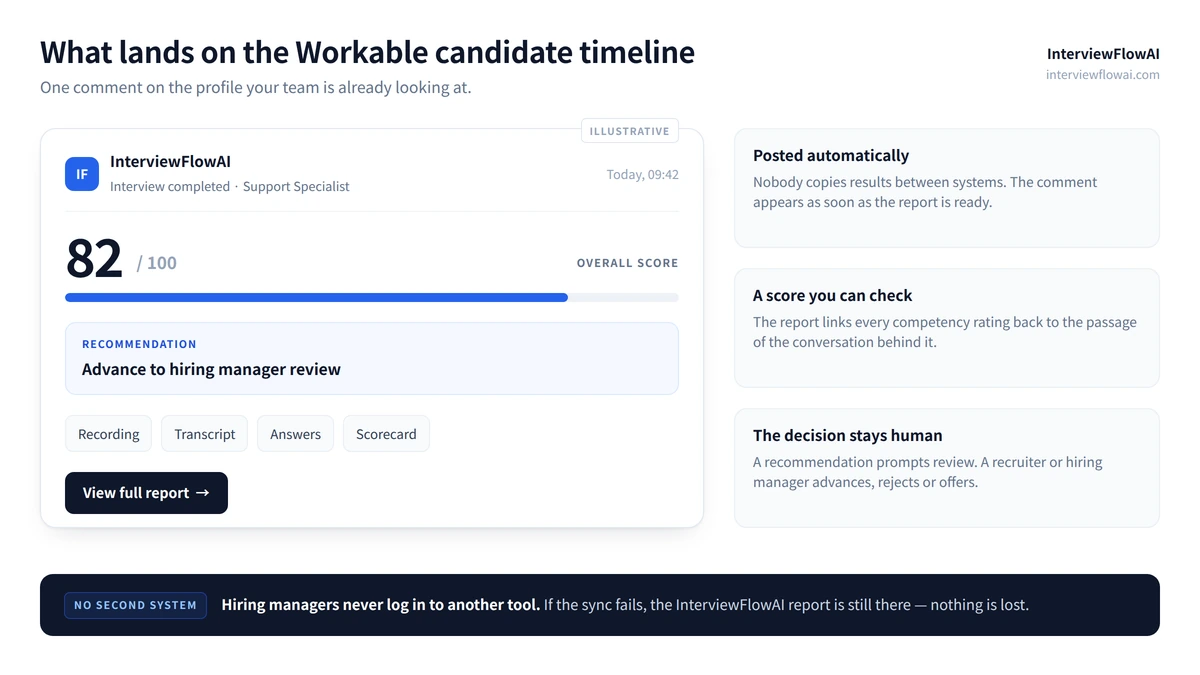
Results are written back as a timeline comment containing the completion status, an overall score out of 100, a recommendation, and a link to the full report. Everything a reviewer needs sits on the profile they were already looking at, in the tool they already have open. InterviewFlowAI's scorecards and transcripts connect each competency rating to the passage of the conversation that produced it, so a reviewer can check the evidence rather than trust a number.
Automated actions
Workable's automated actions already move candidates and trigger notifications on stage change. Adding a stage-triggered interview to that chain means screening is no longer the one manual link in an otherwise automated pipeline.
AI Candidate Rediscovery
Rediscovery is strongest when the surfaced candidate is re-qualified rather than re-read. Advancing a rediscovered applicant into a mapped stage runs the current role's interview against them, so the decision rests on today's requirements instead of a resume assessment from a previous search.
A note on terminology. Both products use the word “Interviewer,” and they mean different things. In Workable, an Interviewer is a member of your team assigned to the job. In InterviewFlowAI, an Interviewer is the configured AI interview itself: its questions, criteria, language, and expiry. A mapping connects the two, with a Workable Interviewer and stage on one side and an InterviewFlowAI Interviewer on the other.
How to configure InterviewFlowAI in Workable
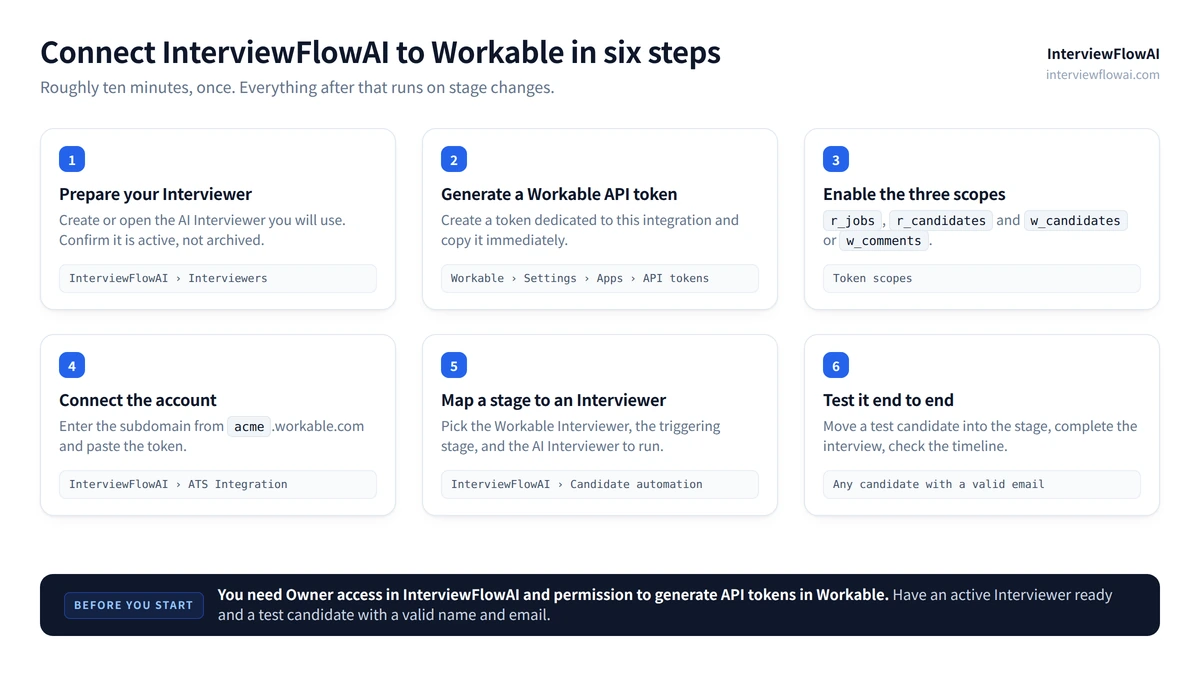
Before you start you will need Owner access in InterviewFlowAI, permission to generate API tokens in Workable, an active and non-archived InterviewFlowAI Interviewer, and a test candidate with a valid name and email address.
1. Prepare your InterviewFlowAI Interviewer
Log in to the InterviewFlowAI dashboard and create or open the Interviewer you intend to use with Workable. Confirm it is active and not archived, then review its questions, scoring criteria, language, expiration window, and invitation email before you connect anything.
2. Generate a Workable API token
In Workable, open the upper-right menu and go to Settings, then Integrations, then Apps, then API access tokens. Click Generate new token and name it something identifiable, such as InterviewFlowAI. Enable these scopes:
| Scope | What it is for |
|---|---|
r_jobs | Read Workable Interviewers, stages, and active members |
r_candidates | Receive candidate stage-change events |
w_candidates or w_comments | Add completed interview results to the candidate timeline |
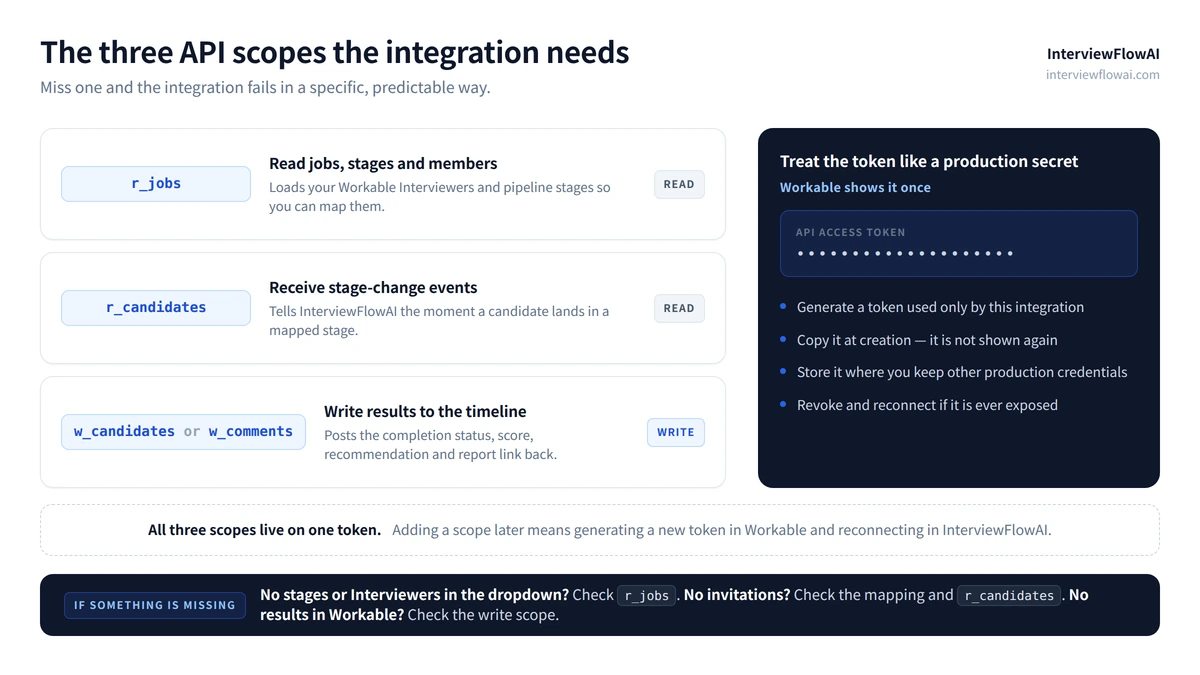
Copy the token as soon as it is generated, because Workable will not display it again. Treat it like any other production credential. Generate a token dedicated to this integration, store it securely, and rotate it if it is ever exposed.
3. Find your Workable subdomain
Open your Workable company profile settings and copy the account subdomain. For an account at acme.workable.com, the subdomain is acme.
4. Connect Workable to InterviewFlowAI
In InterviewFlowAI, open ATS Integration, find Workable, and click Open setup. Enter the account subdomain, paste the API access token, and click Connect.
5. Map a Workable stage to an InterviewFlowAI Interviewer
In Candidate automation, click Add mapping. Select the Workable Interviewer, choose the stage that should trigger the interview, select the InterviewFlowAI Interviewer to run, and click Save automation. Repeat for each workflow you want automated.
6. Test it end to end
Move a test candidate with a valid name and email into the mapped stage, confirm the invitation arrives, complete the interview, and check that the result appears on the candidate's Workable timeline. Verifying once before you switch on a live requisition saves a great deal of diagnosis later.
Troubleshooting
Connection fails. Check the subdomain spelling and confirm the token is still valid and carries all required scopes.
Interviewers or stages do not appear. Refresh the page and re-check the
r_jobsscope on the token.Invitations do not arrive. Confirm the mapping is saved, the Interviewer is active, and the candidate's email is valid, then check spam.
Results do not appear in Workable. Confirm the report has finished generating and that the write scope is present, then refresh the candidate profile. A failed sync never deletes the InterviewFlowAI report.
Full setup documentation, with screenshots, lives in the InterviewFlowAI x Workable Support Wiki.
Which teams get the most value from the InterviewFlowAI x Workable integration?
High-applicant-volume roles where the bottleneck is first-round call capacity, not candidate supply;
Distributed and multi-timezone hiring, where scheduling delay is the main source of candidate drop-off;
Lean recruiting teams supporting several hiring managers at once with no coordinator in the middle;
Skills-first hiring, where a claim on a CV needs to be substantiated before anyone books time;
Agencies and RPOs running consistent screening across multiple client pipelines inside one Workable account; and
Seasonal and burst hiring, where volume triples for six weeks and headcount does not.
Candidate experience, pricing, and responsible use
Candidates complete the interview through a link. There is no Workable account to create, no software to install, and no scheduling negotiation. They can take it at a reasonable hour in their own time zone, which is often the difference between a completed screen and a silent withdrawal.
A few principles are worth stating plainly:
Results are decision support, not decisions. The score and recommendation inform a recruiter. Every advance and reject stays with a person.
One format per role. Applying the same interview to every candidate in the mapped stage is what makes comparisons fair and reviewable.
Evidence over inference. Recordings and transcripts mean an adverse decision can be examined rather than assumed, which matters under the EU AI Act and rules such as NYC Local Law 144, and matters regardless of jurisdiction if you want hiring managers to trust the output.
Disclosure and a human route. Tell candidates clearly that the first round is an AI interview, and keep a visible path to a person for anyone who needs an accommodation.
Current plans and limits are on the pricing page. If you are evaluating a different ATS, the companion guide covers the Ashby integration in the same detail.
Frequently asked questions
Does InterviewFlowAI replace Workable?
No. Workable remains the ATS and the system of record. InterviewFlowAI adds the first-round conversation and writes the completed result back to the candidate timeline.
Can InterviewFlowAI interviews start automatically from Workable?
Yes. Once a Workable stage is mapped to an InterviewFlowAI Interviewer, candidates entering that stage are invited automatically. Duplicate prevention stops a second invitation if a candidate re-enters the same stage.
What results appear in Workable?
The candidate timeline receives the completion status, an overall score out of 100, a recommendation, and a link to the full report. The report contains the recording, transcript, individual answers, and scoring detail.
Which Workable API scopes does the integration need?
Three. r_jobs reads Workable Interviewers, stages, and active members. r_candidates receives candidate stage-change events. w_candidates or w_comments posts completed interview results to the candidate timeline.
Do candidates need a Workable account?
No. Candidates complete the interview from the invitation link. They need a valid name and email address on the Workable candidate record, nothing more.
Can we run different interviews for different roles?
Yes. Create as many mappings as you need. Each one pairs a Workable Interviewer and stage with a specific InterviewFlowAI Interviewer, so engineering, sales, and support pipelines can each run their own format.
What happens if the result fails to sync back to Workable?
The InterviewFlowAI report is never deleted by a failed sync. Check that the report finished generating and that the write scope is still present on the token, then refresh the candidate profile.
Does the integration make hiring decisions automatically?
No. It collects evidence and returns a recommendation. Advancing, rejecting, and offering remain recruiter and hiring manager decisions.
Get started
Ready to configure the workflow? Follow the InterviewFlowAI x Workable Support Wiki, get started free, or book a product demo.